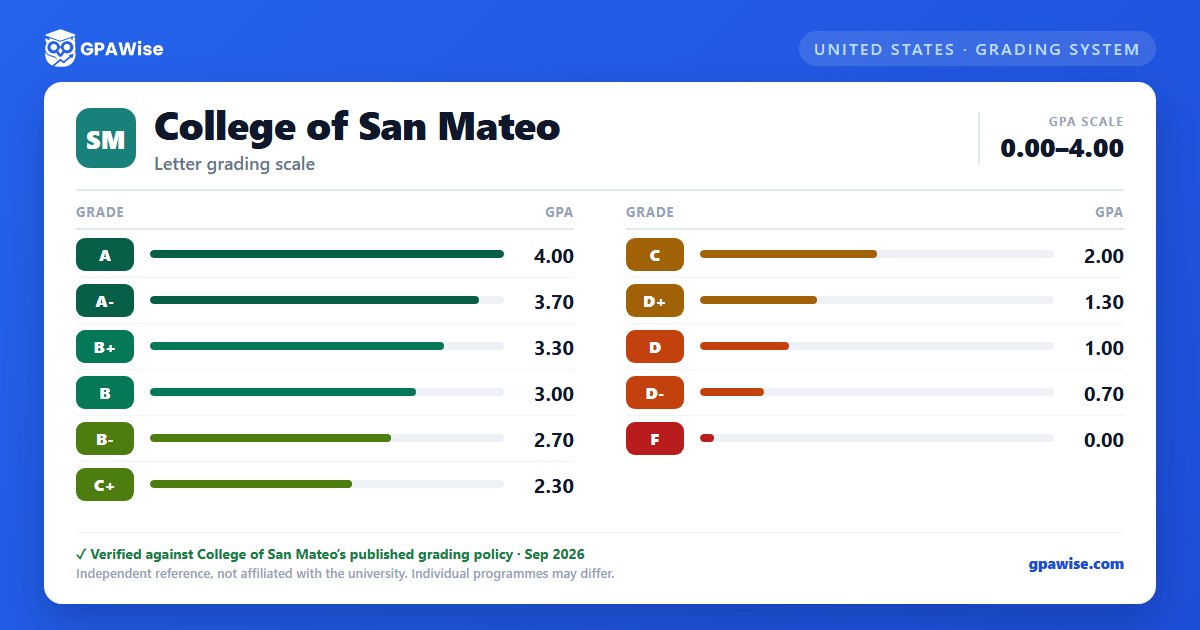
Your Grade Point Average (GPA) is determined by dividing the total number of grade points earned by the total number of units attempted. Grades earned in non-degree applicable courses are not counted in calculating GPA.
Several symbols carry no grade points and are not used in the GPA computation, including Incomplete (I), Excused Withdrawal (EW), Military Withdrawal (MW), Report Delayed (RD), Withdrawal (W), In Progress (IP), and Credit/No Credit or Pass/No Pass grades (CR, NC, P, NP).
Under the Pass/No Pass option, a maximum of 12 units toward an Associate degree, or 6 units toward a certificate, may be applied from courses in which a student elects Pass/No Pass instead of a letter grade.
For university transfer, all major preparation courses should be completed with a letter grade. Four-year colleges and universities vary widely in how many units of Pass/No Pass coursework they accept, so students should consult the catalog of the college they plan to transfer to for its specific regulations.
Can I save my semesters and track my CGPA at College of San Mateo?
Yes. After you calculate a semester's GPA, click "Save as semester" to add it to the built-in CGPA tracker, which then computes your cumulative GPA across every saved semester using the standard weighted formula (Σ SGPA × credits ÷ Σ credits). You can save semesters by course (full breakdown) or quick-add a past semester with just the SGPA and credit hours. Locking, renaming, and deleting saved semesters are all supported, and the tracker shows a running CGPA plus a trend arrow versus your previous semester.
How do I convert SGPA to CGPA at College of San Mateo?
Your CGPA is the credit-weighted average of every semester's SGPA. The formula is: CGPA = (SGPA₁ × credits₁ + SGPA₂ × credits₂ + … + SGPAₙ × creditsₙ) ÷ (credits₁ + credits₂ + … + creditsₙ). On this page, add each semester to the CGPA tracker (either by course or as a quick SGPA + credit-hours entry) and the calculator runs the conversion for you on every save, edit, and delete — no manual arithmetic required.
Can I add past semester GPAs without entering every course?
Yes. On the My CGPA Tracker tab, click "Add semester" and choose the quick-add option. You enter just the SGPA and the credit hours for that semester — no course-by-course breakdown required. It works as a GPA calculator with previous semesters support, or as a GPA calculator without course details when you only remember the SGPA from your transcript. Quick-added and course-by-course semesters can be mixed freely; both contribute to your CGPA using the same credit-weighted formula.
Is my CGPA tracker data sent to your servers?
No. Your saved semesters are stored locally in your browser only — nothing is transmitted to GPAWise. A "Clear all tracker data" button is always available on the tracker tab to wipe the data on demand.
Is this College of San Mateo GPA calculator free?
Yes — GPAWise is completely free to use. There's no signup, no paywall, and your inputs stay in your browser.