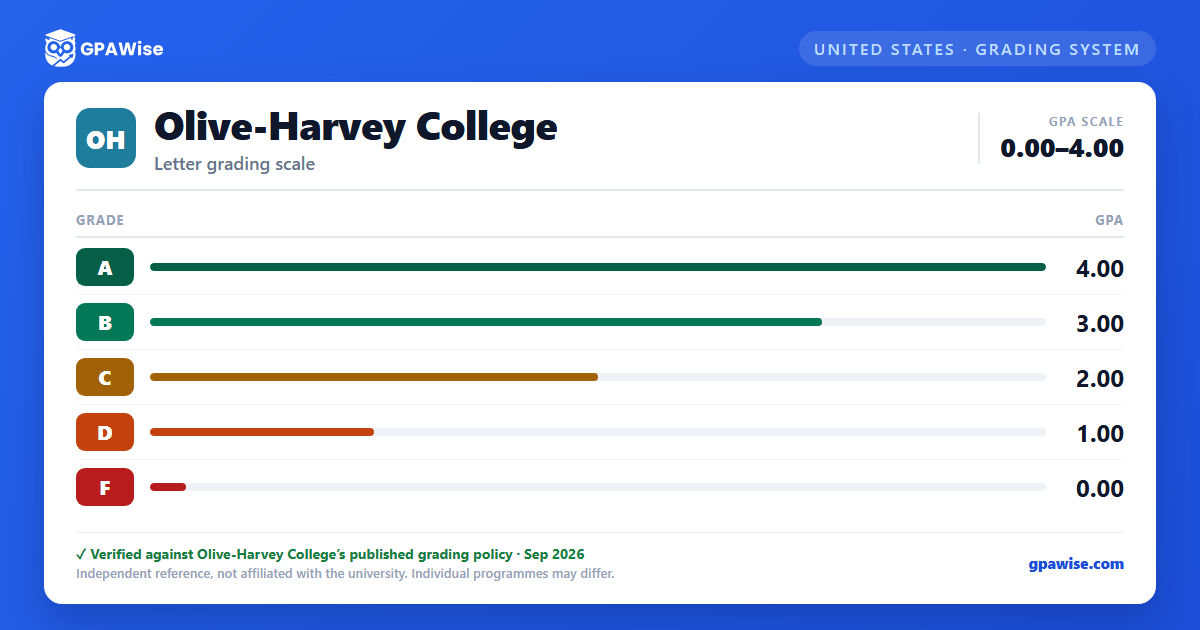

How GPA Is Calculated
City Colleges of Chicago (CCC) calculates two GPA figures. Graduation GPA (GRAD-GPA) is based on all credit hours and grades earned in the Credit Career, excluding pre-college (remedial) coursework, transfer credit, credit by assessment or standardized examination. Cumulative GPA (CUM-GPA) is calculated the same way but includes remedial coursework. Satisfactory (S) and Unsatisfactory (U) grades are never included in either GPA.
- Repeating a course to improve a grade: only the last credit hours and grade earned are used in the GPA calculation, even if the last grade is not the highest one earned for that course.
- Students who earn a "D" or "F" may repeat a course; students who earn a "C" or better may repeat it only once without Academic Vice President approval.
- Transfer credit cannot be used to exclude CCC grades from a student's GPA calculation.
Source: Academic and Student Policy Manual, Nov 2025, Sections 3.08/3.10/3.11/3.17(b) — verified Sep 2026
Academic Standing
A student must maintain a Cumulative Grade Point Average (CUM-GPA) of 2.0 or higher to remain in good Academic Standing.
Source: Academic and Student Policy Manual, Nov 2025, Section 3.12 — verified Sep 2026
Graduation GPA Requirement
To graduate from any credit degree program, a student must earn a grade of "C" or better in all courses used to satisfy core curriculum and/or general education requirements, and hold a minimum Graduation GPA (GRAD-GPA) of 2.0 or higher. Elective courses with a final grade of "D" or "S" may still count towards graduation. Students who graduated prior to August 1, 2013 needed either a minimum GRAD-GPA or CUM-GPA of 2.0 or higher.
Source: Academic and Student Policy Manual, Nov 2025, Section 5.02 — verified Sep 2026
Scholastic Honors
Full-time students (12+ credit hours in a term) are awarded scholastic honors based on their term grade point average:
- Honor's List: 3.0 – 3.49
- Dean's List: 3.5 – 3.99
- Presidential Scholars List: 4.0
Associate Degree graduates are awarded scholastic honors based on their Graduation GPA (for students who graduated before August 1, 2013, the higher of Graduation GPA or Cumulative GPA is used):
- Honors: 3.0 – 3.49
- High Honors: 3.5 or higher
Source: Academic and Student Policy Manual, Nov 2025, Section 3.18(a) — verified Sep 2026
Transfer Credit and GPA
Courses from other institutions accredited by one of the six regional accreditors are evaluated for transfer only where a final grade of "C" (including "C-") or higher was earned. Accepted transfer credit appears on the academic record and may count towards graduation, subject to certain limits, but it is excluded from both the Graduation GPA (GRAD-GPA) and Cumulative GPA (CUM-GPA) calculations — transfer credit is never used to exclude a CCC grade from a student's GPA.
Source: Academic and Student Policy Manual, Nov 2025, Sections 2.07/3.10/3.17(b) — verified Sep 2026
Frequently asked questions
What grading scheme does Olive-Harvey College use?
Where does this Olive-Harvey College grade scale come from?
What are Olive-Harvey College's GPA rules?
Source: Academic and Student Policy Manual, Nov 2025, Sections 3.08/3.10/3.11/3.17(b) — verified Sep 2026
What are Olive-Harvey College's academic standing rules?
Source: Academic and Student Policy Manual, Nov 2025, Section 3.12 — verified Sep 2026
What does Olive-Harvey College require to graduate?
Source: Academic and Student Policy Manual, Nov 2025, Section 5.02 — verified Sep 2026
How are honors and awards decided at Olive-Harvey College?
Source: Academic and Student Policy Manual, Nov 2025, Section 3.18(a) — verified Sep 2026
How does Olive-Harvey College treat transfer credit?
Source: Academic and Student Policy Manual, Nov 2025, Sections 2.07/3.10/3.17(b) — verified Sep 2026
