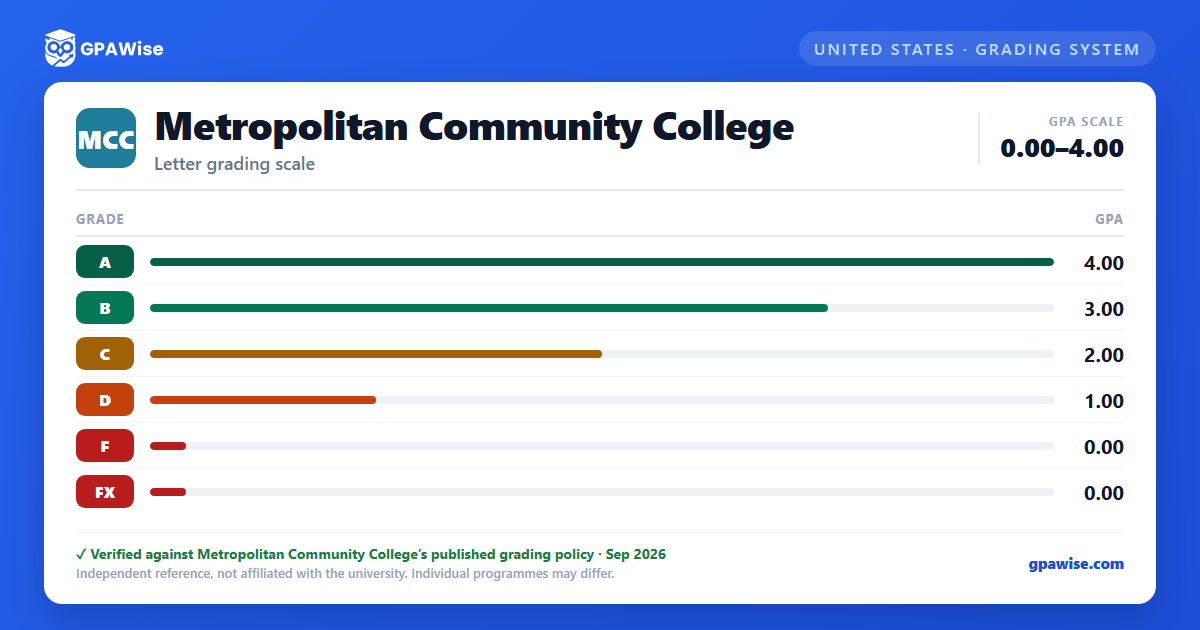

How GPA Is Calculated
GPA is determined by dividing the total number of grade points earned by the total number of credits attempted in courses that count toward GPA: grade value × credit hours completed = grade points, summed and divided by total hours completed.
Grades of R (Re-enroll), P (Pass), W (Withdrawal), V (Audit), and Z (Unreported) do not apply toward GPA, but they do count toward attempted hours.
Source: mycatalog.mccneb.edu, Academic Policies and Procedures, Grading System, 2026-2027 Catalog — verified Sep 2026
Repeating a Course and Academic Amnesty
Students may repeat a course to earn a better grade; both grades remain on the permanent record, but the latest grade is used to compute GPA.
Students may petition for academic amnesty once, eliminating up to two quarters of D and F grades from their GPA calculation and hours attempted (courses that hold amnesty-eligible grades). A and B and C grades are not eligible and remain in the GPA. Students must have completed a minimum of 24.0 credit hours at 1000- or 2000-level MCC classes with a minimum GPA of 2.50 after the most recent quarter being petitioned for amnesty. Original grades stay on the transcript, marked with a pound sign (#), but are excluded from the GPA calculation. Academic amnesty has no bearing on financial aid eligibility.
Source: mycatalog.mccneb.edu, Academic Policies and Procedures, Grading System, 2026-2027 Catalog — verified Sep 2026
Academic Standards and Alert System
Minimum cumulative GPA required for good academic standing rises with credit hours attempted: 1.50 for 1.0–29.5 attempted graded credit hours, 1.75 for 30.0–79.5 hours, and 2.00 for 80.0 or more hours.
Students below the threshold are placed on Academic Probation (registration holds, required online probation workshop). Students on probation who fail to reach a 2.00 GPA in their next quarter are placed on Academic Suspension (denied enrollment for one quarter). Returning students enter Academic Observation status; falling below a 2.00 GPA there leads to Academic Dismissal, which may be permanent. Suspension and dismissal decisions may be appealed in writing to the Associate Vice President of Student Affairs.
Source: mycatalog.mccneb.edu, Academic Policies and Procedures, Academic Progress, 2026-2027 Catalog — verified Sep 2026
Minimum GPA to Graduate
To graduate with an Associate in Applied Science, Associate in Arts, Associate in Science, or Associate in Science in Nursing degree, or a Certificate of Achievement, students must earn a cumulative GPA of at least 2.00 in all studies applicable toward the program and be in good academic standing. Career Certificates instead require a grade of C or better in all courses required for the certificate.
Source: mycatalog.mccneb.edu, Academic Policies and Procedures, Graduation Guidelines, 2026-2027 Catalog — verified Sep 2026
Dean's List and Graduation Honors
To qualify for the Dean's List each quarter, students must complete a minimum of 12.0 credit hours in graded 1000-level or above classes overall, complete at least 6.0 such credit hours in the qualifying quarter, and achieve at least a 3.50 GPA for that quarter.
To graduate with honors, students must earn a cumulative GPA of 3.50 or above in all MCC courses attempted and completed.
Source: mycatalog.mccneb.edu, Academic Policies and Procedures, Dean's List / Graduation Guidelines, 2026-2027 Catalog — verified Sep 2026
Transfer Agreements
MCC offers articulation agreements (Associate to Bachelor's pathways, where an entire associate degree transfers toward a bachelor's degree) and transfer guides (a suggested course list within an MCC degree that transfers to a four-year institution). Reverse Transfer allows students who complete a minimum of 22.5 quarter hours at MCC and then transfer to a four-year college or university to transfer credit back to MCC to earn an associate degree.
Source: mycatalog.mccneb.edu, Academic Policies and Procedures, Transfer Agreements, 2026-2027 Catalog — verified Sep 2026
Frequently asked questions
What grading scheme does Metropolitan Community College (MCC) use?
Where does this MCC grade scale come from?
What are MCC's GPA rules?
Source: mycatalog.mccneb.edu, Academic Policies and Procedures, Grading System, 2026-2027 Catalog — verified Sep 2026
What are MCC's academic standing rules?
Source: mycatalog.mccneb.edu, Academic Policies and Procedures, Academic Progress, 2026-2027 Catalog — verified Sep 2026
What does MCC require to graduate?
Source: mycatalog.mccneb.edu, Academic Policies and Procedures, Graduation Guidelines, 2026-2027 Catalog — verified Sep 2026
How are honors and awards decided at MCC?
Source: mycatalog.mccneb.edu, Academic Policies and Procedures, Dean's List / Graduation Guidelines, 2026-2027 Catalog — verified Sep 2026
How does MCC treat transfer credit?
Source: mycatalog.mccneb.edu, Academic Policies and Procedures, Transfer Agreements, 2026-2027 Catalog — verified Sep 2026
