
Special Grades and Options
An “Incomplete” (“I”) is given only in exceptional cases where a student has completed the majority of coursework satisfactorily but, due to documented illness or other documented emergency, could not finish requirements. The work must be completed by the end of the next semester of enrollment, or the “I” converts to an “F.”
Juniors and Seniors may take up to six semester hours outside their general education or major requirements under the Pass/Fail Option, recorded as “PS” (Passed) or “F” (Failed). The option must be elected at registration and is irrevocable afterward.
Any student may audit a course (recorded as “AU”); audited courses do not count toward credit-hour load or graduation unless later repeated for credit.
Source: Catalog § “I” Grade Policy; § Pass/Fail Option; § Auditing — verified Sep 2026
How the GPA Is Calculated
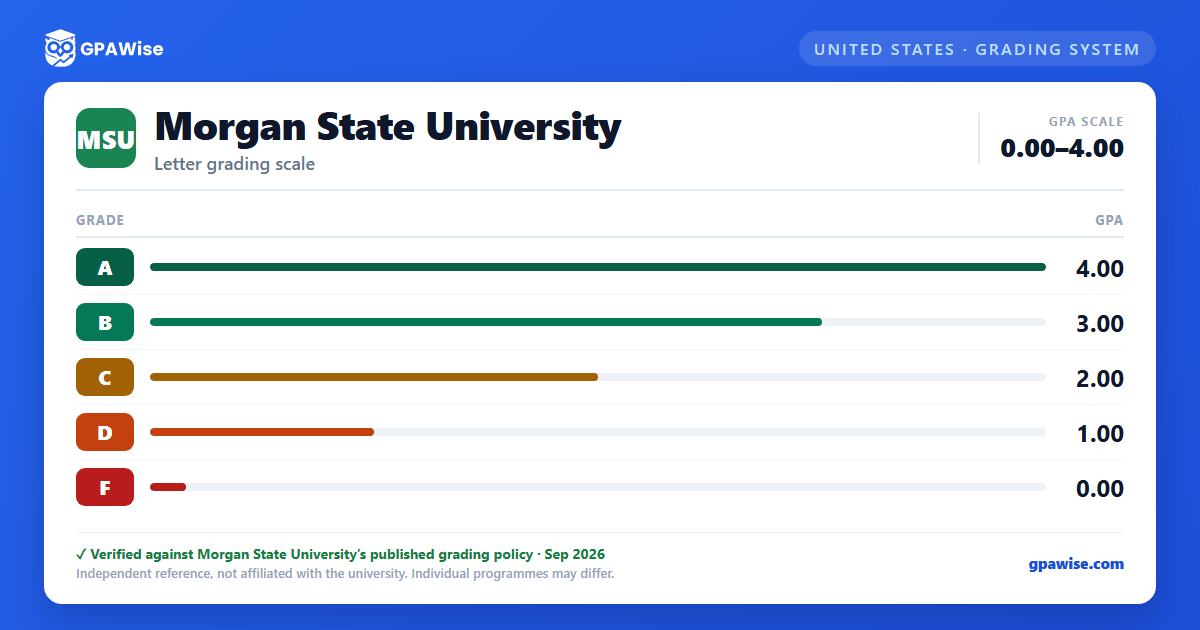
The grade point average is computed by multiplying the numerical value of each letter grade earned by the credit hours assigned to that course, summing the products across all courses pursued, and dividing by the total quality hours attempted.
When a course is repeated, every attempt is recorded on the transcript, but only the most recently earned grade for that course is used in the cumulative GPA calculation — even if it is lower than a previously earned grade.
Source: Catalog § Quality Points and GPA; § Repeating Courses For Credit — verified Sep 2026
Academic Probation and Dismissal
A student with a cumulative GPA of at least 2.00 is considered in good standing. Below 2.00, the thresholds for probation and dismissal vary by total attempted credits:
| Total Attempted Credits | Academic Probation if GPA is | Academic Dismissal if GPA is |
|---|---|---|
| 0–24 | 0.00–1.99 | — |
| 25–47 | 1.90–1.99 | 0.00–1.89 |
| 48–72 | 1.95–1.99 | 0.00–1.94 |
| 73 or more | — | 0.00–1.99 |
First-time freshmen are not dismissed regardless of GPA or credits earned during their first two semesters. Academic dismissal must be preceded by at least one semester of academic probation. Transfer credits count toward the attempted-credit totals above but are not included in the GPA computation.
Source: Catalog § Satisfactory Academic Performance — verified Sep 2026
Degree Credit and Quality Point Requirements
The Bachelor of Arts and Bachelor of Science degrees each require satisfactory completion of a minimum of 120 semester hours in the required distribution of courses. The number of quality points earned must be at least twice the number of credits pursued at the University.
Source: Catalog § Baccalaureate Degrees Offered — verified Sep 2026
Dean's List Criteria
Completion of 15 or more computable semester hours, with no missing grade, no grade of “I,” and no grade less than “C,” while attaining a semester average of 3.4 or above; or completion of 12 to 14 computable semester hours under the same grade conditions while attaining a semester average of 3.60 or above. Students enrolled in corrective courses (e.g., DVRD/ALCR 101, MATH 106) do not qualify.
Source: Catalog § Dean's List Criteria — verified Sep 2026
Transfer Credit and GPA
Transfer credit hours are not computed in the cumulative grade point average. All credit hours transferred to Morgan are, however, included in the Attempted Credits totals used to determine academic standing (probation/dismissal) categories.
Source: Catalog § Quality Points and GPA; § Satisfactory Academic Performance — verified Sep 2026
Frequently asked questions
What grading scheme does Morgan State University (MSU) use?
Where does this MSU grade scale come from?
What are MSU's GPA rules?
Source: Catalog § Quality Points and GPA; § Repeating Courses For Credit — verified Sep 2026
What are MSU's academic standing rules?
Source: Catalog § Satisfactory Academic Performance — verified Sep 2026
What does MSU require to graduate?
Source: Catalog § Baccalaureate Degrees Offered — verified Sep 2026
How are honors and awards decided at MSU?
Source: Catalog § Dean's List Criteria — verified Sep 2026
How does MSU treat transfer credit?
Source: Catalog § Quality Points and GPA; § Satisfactory Academic Performance — verified Sep 2026
