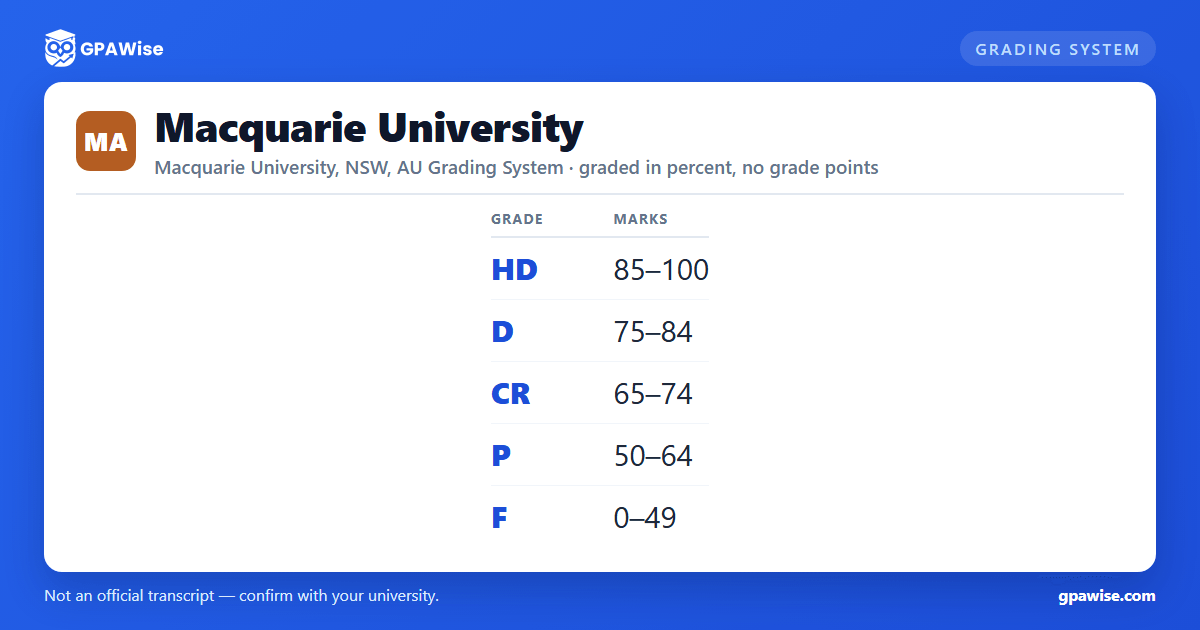

How grading works at Macquarie University
Macquarie grades every coursework unit on a fixed, five-band scale tied to a single university-wide mark range (0-100): High Distinction (HD), Distinction (D), Credit (CR), Pass (P) and Fail (F). Macquarie's own Assessment Procedure (clause 127) prints only these mark bands per grade -- there is no grade-point column attached to any of them.
Some units are graded pass/fail only, with no numeric mark: S (Satisfactory) and a no-mark F variant are used where a unit's outcome is measured as pass or fail alone. SC marks a result "not recorded" due to special circumstances. Withdrawal is recorded as FW (withdrawn after Census Date, with academic and/or financial penalties) or W (withdrawn on or before the Last Date to Withdraw Without Fail, no academic penalty).
Where a student fails through non-submission, non-attendance, or failing a hurdle requirement, Macquarie records one of two specific fail outcomes instead of a plain F: FA (Fail Absent) for non-submission of an assessment task or non-attendance at a required assessment, and FH (Fail Hurdle) for a student who scored over 50 overall but failed all available attempts of at least one mandatory hurdle assessment. Both are reported within the same 0-49 Fail range as a plain F -- they record why a student failed, not a different mark band.
Source: Assessment Procedure, clauses 125-128 'Final Grades' and 'Grade Descriptors' — verified Aug 2026
Macquarie uses the Weighted Average Mark (WAM), not a GPA, for every student enrolled since 2020
Students studying at Macquarie from 1 January 2020 onward receive a Weighted Average Mark (WAM), not a Grade Point Average. The WAM is the average out of 100 of all marks a student has achieved across every unit of their course, and it is recorded on the transcript a student receives upon graduation.
Macquarie previously used a Grade Point Average for students who completed their studies before 1 January 2020, on two different scales depending on when they commenced: a 7-point scale (HD=7, D=6, Cr=5, P=4, F=0) for students who commenced from 1 January 2017 and completed before 2020, and a 4-point scale (HD/D combined=4, Cr=3, P=2, F=0) for students who commenced before 1 January 2017. Macquarie's own current policy describes both scales entirely in the past tense -- "A Grade Point Average (GPA) was in use prior to 1 January 2020" -- and neither scale applies to any currently- or future-enrolling student. Historical GPA was calculated only from units completed at Macquarie itself, excluding credit points granted through recognition of prior learning (RPL) or non-award study.
Source: Assessment Procedure clause 76; Appendix B: WAM and GPA Calculations, clauses 1-8 — verified Aug 2026
Frequently asked questions
Can I save my semesters and track my average at Macquarie University?
Can I add past semesters without entering every course?
Is my tracker data sent to your servers?
Is this Macquarie University GPA calculator free?
Does Macquarie University use a GPA?
Not for any currently- or future-enrolling student. Since 1 January 2020, Macquarie has used the Weighted Average Mark (WAM) -- a 0-100 average of all your unit marks -- instead of a Grade Point Average. A GPA was used only for students who completed their studies before 2020, on a 7-point or 4-point scale depending on when they started; both are now closed, historical scales.
Source: Assessment Procedure clause 76; current-students Grading System page — verified Aug 2026
What are Macquarie's grade bands?
High Distinction (HD) 85-100, Distinction (D) 75-84, Credit (CR) 65-74, Pass (P) 50-64, and Fail (F) 0-49. These five bands cover the full 0-100 mark range with no gaps, and apply to all coursework units offered by or on behalf of the University.
Source: Assessment Procedure, clause 127 'Grade Descriptors' — verified Aug 2026
When did Macquarie switch from GPA to WAM?
1 January 2020. Every student studying at Macquarie from that date receives a Weighted Average Mark (WAM) instead of a Grade Point Average. Students who completed their studies before 1 January 2020 have a GPA recorded instead, calculated on a 7-point scale (for students who commenced from 2017) or a 4-point scale (for students who commenced before 2017) -- both closed to current students.
Source: Assessment Procedure clause 76; Appendix B clauses 5-7 — verified Aug 2026
What's the difference between FA, FH and a plain Fail (F) at Macquarie?
All three are reported within the same 0-49 Fail range -- they are reasons for failing, not separate mark bands. FA (Fail Absent) is used when a student didn't submit an assessment task or didn't attend a required assessment. FH (Fail Hurdle) is used when a student scored over 50 overall but failed every available attempt of at least one mandatory hurdle assessment. A plain F covers every other case where a student's mark falls in the 0-49 range.
Source: Assessment Procedure, clause 128 — verified Aug 2026
