
Your degree timeline
Now in progress — · 0cr

Using OCAD University's Grading Scheme

OCAD University, ON, CA Grading System

Verified against the university’s official grading policy ocadu.ca — the grade table below is the one the institution publishes. Verified Aug 2026. How we verify

OCAD University Grading Scale

See grade values & mark ranges
Grade Marks Range
A+ 90.00 - 100.00
A 85.00 - 89.00
A- 80.00 - 84.00
B+ 77.00 - 79.00
B 74.00 - 76.00
B- 70.00 - 73.00
C+ 67.00 - 69.00
C 64.00 - 66.00
C- 60.00 - 63.00
D+ 57.00 - 59.00
D 54.00 - 56.00
D- 50.00 - 53.00
F 0.00 - 49.00

Report an error in this scheme

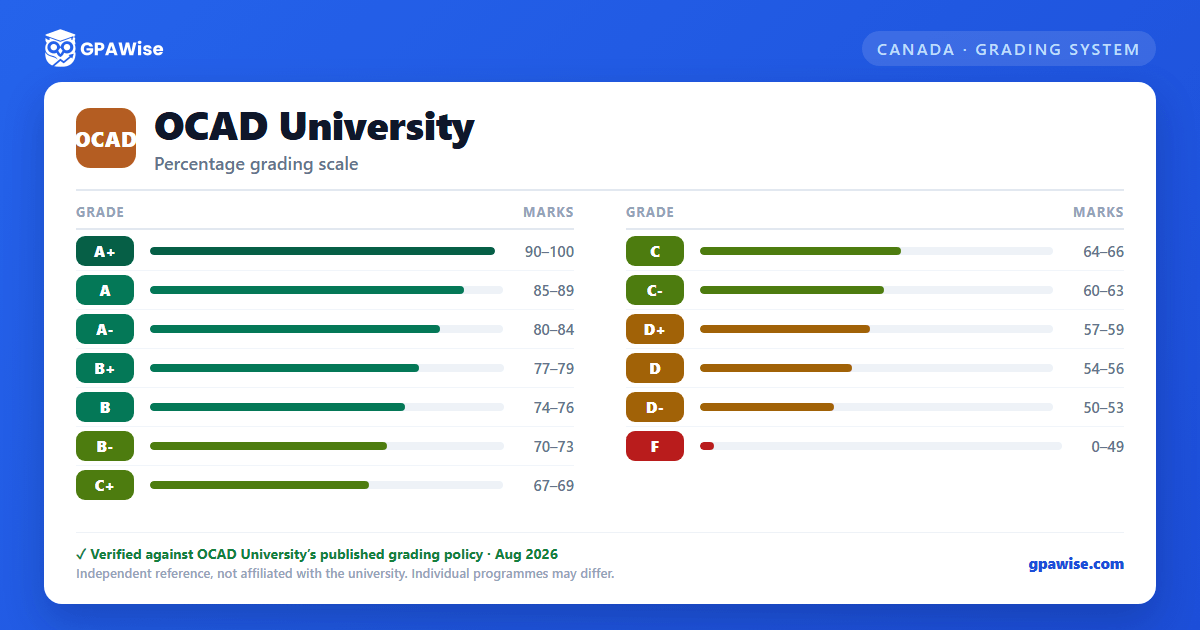
OCAD University grading scheme — grade, GPA value and marks range
The grade scale as an image — handy for saving or sharing.
Your GPA updates as you type — no submit button needed.

GPA Results

Semester Average
—
The university publishes no grade points — averages are reported in percent
0% 100%
0 credits

Performance Summary

Performance summary will appear once you add courses.

Course Details

Course Credits Grade Marks Weighted
Add a course with credits and a grade to see your GPA
Total Credits: 0 Total Weighted: 0.00
Aiming for a specific cumulative GPA? Try the OCAD University Target GPA Calculator Work out the average GPA you'll need next semester to reach your goal.

About the OCAD University Grade Average Calculator

OCAD University grades in percent and maps those marks to 13 letter grades. It publishes no grade-point value for any grade, so there is no official OCAD University GPA — standing is expressed as a percentage average. This calculator follows the university's official scheme and reports the same credit-weighted percentage the university does.

To calculate your average at OCAD University, enter each course's name, credit hours, and the marks you scored. The calculator weights every course by its credit hours and divides total weighted marks by total credits — no signup required, and your inputs stay in your browser. It deliberately shows no 4.0-scale figure: any such number would come from a third-party conversion table rather than from the university.

How OCAD University's grading system works

What does an A+ mean at OCAD University?

An A+ is the highest grade awarded at the university, typically requiring 90% or higher. The university attaches no grade-point value to it — the percentage band is the whole of what the grade means.

What about a US 4.0 GPA equivalent?

The university publishes no grade points, so there is no official OCAD University figure to convert from — and this page will not invent one. Third-party tables that assign a 4.0-scale value to OCAD University letters are conversions built by other organisations for their own purposes, not the university's grading system. If you need an equivalence for an application, admissions offices ask for an official transcript evaluation rather than a self-converted figure, and your percentage average is the number the university itself certifies.

Semester average vs overall average

Your semester average covers one term; your overall average covers every term you've completed, weighted by credit hours. Both are percentages — The university publishes no grade points, so neither is a GPA.

Track your average across semesters

Save each semester once you've calculated it, and the tracker keeps a running overall average using the standard credit-weighted formula: Σ(average × credits) ÷ Σ(credits). Heavier semesters pull the overall figure harder than lighter ones.

You can save a semester by course — enter every course and click "Save as semester" — or as a quick entry with just the semester average and its credit hours, useful for past terms you don't want to re-type. Both modes feed the same formula. Semesters can be locked, renamed, or deleted at any time.

Your tracker data stays on this device — nothing is sent to our servers, and no signup is required. A persistent "Clear all tracker data" option lets you wipe it whenever you want.

Frequently asked questions

What grading scheme does OCAD University use?
The university uses its official grading scheme: percentage marks mapped to 13 letter grades, with no grade-point value for any of them. The grades are A+ (90–100%), A (85–89%), A- (80–84%), B+ (77–79%), B (74–76%), B- (70–73%), C+ (67–69%), C (64–66%), C- (60–63%), D+ (57–59%), D (54–56%), D- (50–53%), F (0–49%).
Where does this OCAD University grade scale come from?
From the university's official grading policy, published at ocadu.ca. The grade table on this page is the one the policy sets out, verified Aug 2026.
Does OCAD University use a GPA?
No. The university does not publish a grade-point value for any letter grade, so there is no official OCAD University GPA. Standing is expressed as a percentage average, and this calculator deliberately shows no 4.0-scale figure.
How is my overall average worked out at OCAD University?
Your overall average is the credit-weighted average of your semester averages: (average₁ × credits₁ + … + averageₙ × creditsₙ) ÷ (credits₁ + … + creditsₙ). Save each semester to the tracker on this page, by course or as a quick average + credits entry, and it works out your overall average on every save, edit and delete.
Is this OCAD University GPA calculator free, and is my data private?
Yes. GPAWise is free, with no signup, and your courses and saved semesters stay in your browser: nothing is sent to our servers. "Clear all tracker data" on the tracker wipes them at any time.

GPAWise is an independent tool and is not affiliated with, endorsed by, or sponsored by OCAD University. University names and trademarks are the property of their respective owners. Grading data is reproduced for reference — always verify with your institution.

Other feedback or bug reports

Calculator not working right? UI confusing? Missing a feature? Tell us here.

Found an error in the university's grading scheme (wrong GPA value, mark range, missing grade)? Use Suggest a correction instead — admins can review and apply those directly.