
How grading works at the University of Sydney
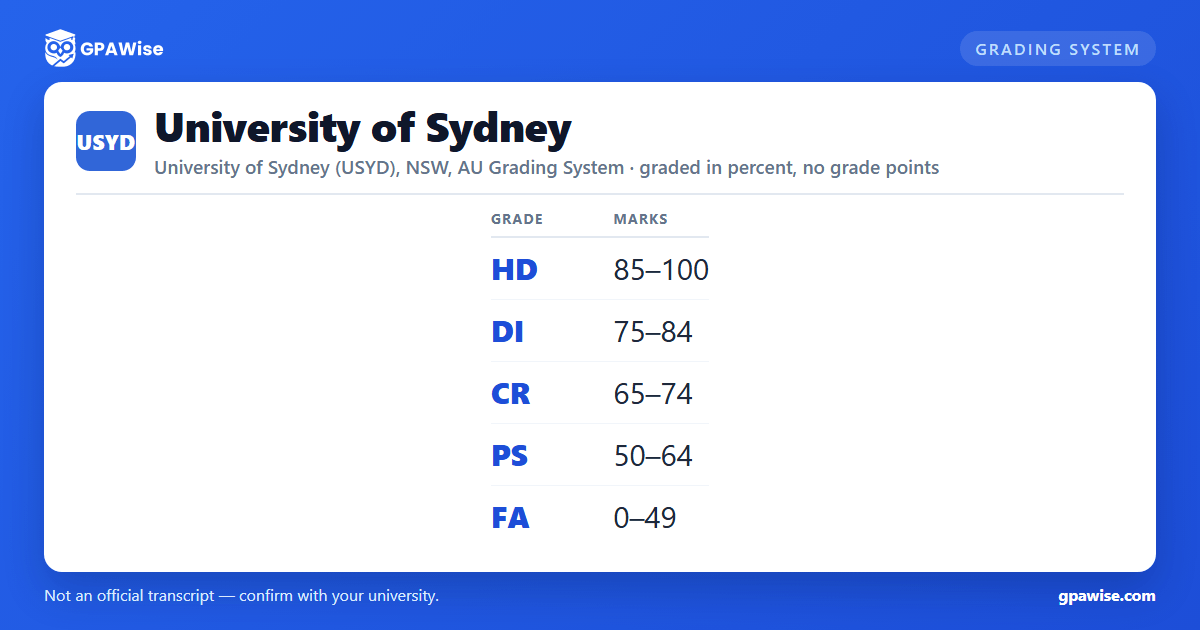
Sydney grades coursework on a five-band scale of High Distinction (HD), Distinction (DI), Credit (CR), Pass (PS) and Fail (FA), tied to a single university-wide mark range: HD 85-100, DI 75-84, CR 65-74, PS 50-64, FA 0-49. The Coursework Policy 2021 (Schedule 1) prints only these mark bands per grade -- there is no separate grade-point column attached to any of them.
Sydney also uses Absent Fail (AF) for a student who fails to submit or attend compulsory assessment tasks, five 'Aegrotat' grade variants (CA/DA/HA/PA/SA) that a Dean alone may award to a student too ill to complete a unit but assessed pro rata at that standard, and Satisfied Requirements (SR) / Failed Requirements (FR) for units of study graded pass/fail only, without a numeric mark.
Source: Coursework Policy 2021, Schedule 1 'Common Result Grades and Administrative Outcomes' — verified Aug 2026
Sydney does not use a GPA -- it uses the WAM
The University of Sydney does not calculate or publish a Grade Point Average. Instead it uses the Weighted Average Mark (WAM), calculated directly from your course marks (0-100), not from grade points: WAM = sum(mark x credit points x level weight) / sum(credit points x level weight). Since May 2020 the level weight for every unit of study is uniformly 1.
Marks are included in or excluded from the WAM on a per-grade basis set out in Schedule 1 -- graded results (HD/DI/CR/PS/FA/AF and their Aegrotat equivalents) are included, while ungraded pass/fail results (SR/FR) and administrative outcomes (Cancelled, Discontinued, Incomplete, Withdrawn, etc.) are not. In late 2023 the Academic Board decided the WAM would no longer be shown on final transcripts for most students; where a teaching period is designated as subject to an extraordinary adverse impact, the University also calculates a Converted WAM (CWAM) that excludes marks from that period, published on graduating transcripts alongside the WAM.
Source: Coursework Policy 2021, Schedule 3 'Weighted Average Marks'; Weighted Average Mark (WAM) student page — verified Aug 2026
Academic progression at Sydney
Sydney monitors academic progression by course completion rate (the proportion of attempted credit points a student has passed), not directly by WAM. A student is identified as at risk of not meeting progression requirements at the end of a teaching period if their periodic completion rate is 50% or less of credit points attempted, if they fail a compulsory or 'barrier' unit for the first time, or if they haven't reached 50% of the credit points needed for their award by the midpoint of their course's maximum completion time.
A student is identified as not meeting progression requirements if their course completion rate is under 50% after attempting 48 or more credit points (AQF level 7 or above) or 24 or more credit points (AQF level 6 or below), if they fail a compulsory or barrier unit they've already failed before, or if they can't finish within their course's maximum time limit on a full-time load. Students in either category are notified in writing and may be required to consult an academic adviser; repeated or serious cases can lead to a requirement to show good cause, and ultimately to exclusion from the award course.
Source: Coursework Policy 2021, Part 15 clauses 90-93 (Academic progression) — verified Aug 2026
What you need to complete a course at Sydney
Sydney's Coursework Policy sets no single, university-wide minimum WAM to graduate -- consistent with the University not using a GPA/CGPA system. The total number of credit points required to complete an award course (including a combined or double degree) is instead set by the Senate resolutions and each award course's own resolutions, and a student must pass a unit of study to gain its credit points.
Source: Coursework Policy 2021, Part 12 clause 60 (Units of study) — verified Aug 2026
Honours classes and the University Medal at Sydney
Sydney awards Honours degrees in one of four classes -- First Class, Second Class Division 1, Second Class Division 2, and Third Class -- based on a separately-calculated honours mark, not the course WAM. For appended honours and most integrated honours (a mark calculated across 48 to 96 credit points): First Class 80-100, Second Class Division 1 75-79, Second Class Division 2 70-74, Third Class 65-69, with no honours awarded below 65. For integrated honours calculated across 96 or more credit points, the bands widen: First Class 75-100, Second Class Division 1 70-74, Second Class Division 2 65-69, and Third Class 50-64 (award course resolutions may set higher thresholds, or allow Third Class down to a mark of 50).
A University Medal may additionally be awarded to a First Class Honours graduate with an outstanding academic record across their whole degree, at the University's discretion.
Source: Coursework Policy 2021, Part 19 clauses 121-122; Part 20 clauses 124-125 — verified Aug 2026
Recognition of prior learning at Sydney
Sydney recognises prior learning by granting credit -- as specific credit (recognised as directly equivalent to a particular Sydney unit of study), non-specific 'block' credit (a set number of credit points at a level or in a subject area, not tied to one unit), or a reduced volume of learning for the whole course -- or by waiving a compulsory or prerequisite unit. Credit can be granted for study completed in another course at Sydney, at another Australian or recognised overseas institution, in an accredited private-provider course, in a VET course, or in a non-award program including a microcredential. Where possible, credit is assessed and offered alongside an applicant's offer of admission.
Source: Coursework Policy 2021, Part 11 clauses 50-52 (Recognition of prior learning) — verified Aug 2026
Frequently asked questions
Can I save my semesters and track my average at USYD?
Can I add past semesters without entering every course?
Is my tracker data sent to your servers?
Is this University of Sydney (USYD) GPA calculator free?
Does the University of Sydney use a GPA?
No. Sydney's Coursework Policy and student guidance are explicit that the University does not calculate or publish a Grade Point Average. Instead it uses the Weighted Average Mark (WAM), calculated directly from your 0-100 course marks weighted by credit points.
Source: Coursework Policy 2021, Schedule 3; Weighted Average Mark (WAM) student page — verified Aug 2026
What are Sydney's grade bands?
High Distinction (HD) 85-100, Distinction (DI) 75-84, Credit (CR) 65-74, Pass (PS) 50-64, and Fail (FA) 0-49. These five bands cover the full 0-100 mark range with no gaps.
Source: Coursework Policy 2021, Schedule 1 'Common Result Grades' — verified Aug 2026
Is Sydney's WAM shown on my transcript?
Since a late-2023 Academic Board decision, the WAM is no longer shown on final transcripts for most students. It remains an internal figure used for decisions like Honours eligibility and academic standing.
Source: Weighted Average Mark (WAM) student page — verified Aug 2026
How is academic progression assessed at Sydney?
Mainly by course completion rate -- the share of attempted credit points you've passed -- rather than by WAM directly. Falling at or below a 50% completion rate, or failing a compulsory 'barrier' unit, can identify you as at risk of not meeting progression requirements.
Source: Coursework Policy 2021, Part 15 clauses 90-93 — verified Aug 2026
What honours classes does Sydney award?
First Class, Second Class Division 1, Second Class Division 2, and Third Class, based on a separately-calculated honours mark rather than your course WAM. The exact mark thresholds for each class depend on which of Sydney's honours-assessment mechanisms your course uses.
Source: Coursework Policy 2021, Part 19 clauses 121-122 — verified Aug 2026
