
How grading works at Edith Cowan University
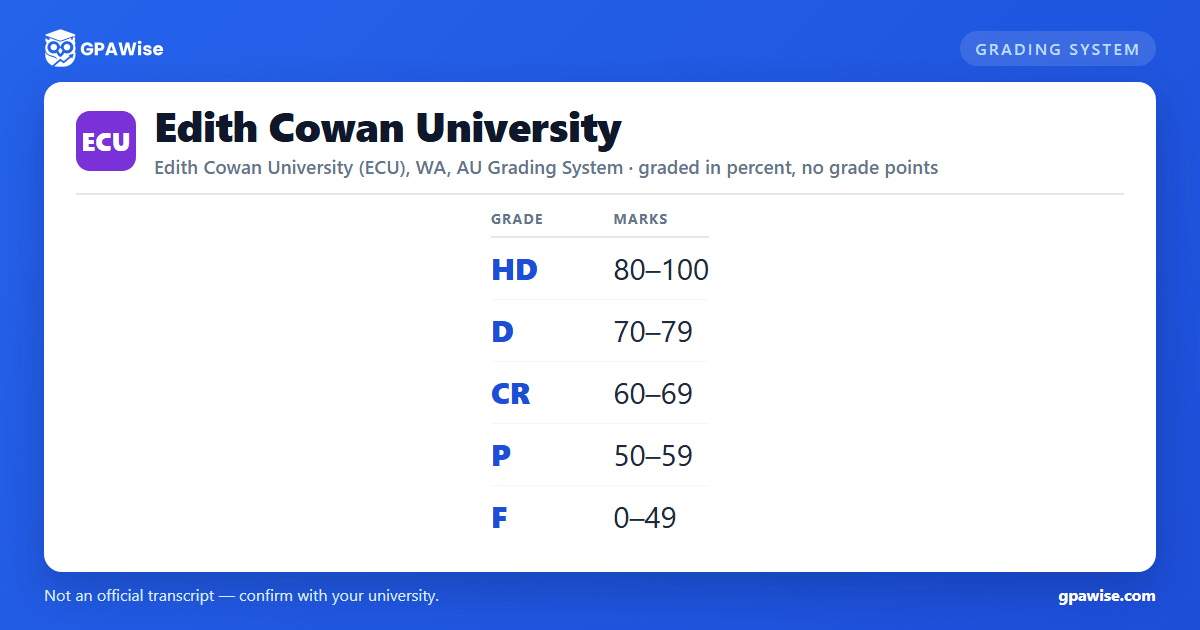
ECU grades standard coursework Units on a fixed, university-wide percentage table called Grading Schema 1 (Standard): High Distinction (HD, 80-100), Distinction (D, 70-79), Credit (CR, 60-69), Pass (P, 50-59), and Fail (F, 0-49). No grade-point value (e.g. an A+/A/B-style points column) is published for any of these results anywhere in ECU's assessment policy.
ECU also publishes a Pass (Conceded) grade, PC, which the University may award in a prescribed set of circumstances -- it is an administrative override rather than an additional mark band.
A separate schema, Grading Schema 2, applies to Undifferentiated Pass/Fail Units, including practical units and work-integrated learning placements -- these are recorded simply as Undifferentiated Pass (UP) or Undifferentiated Fail (UF), with no percentage band at all.
Source: Assessment, Examination and Moderation Procedures, Grading Schema 1 & 2 (May 2023) — verified Aug 2026
How ECU calculates the Weighted Average Mark (WAM)
ECU does not calculate a GPA. Instead it uses a Weighted Average Mark (WAM), defined in ECU's own Admission, Enrolment and Academic Progress Rules as "the average mark a Student achieves ... weighted by each Unit's Credit Point value."
ECU publishes two related figures: a Course WAM (the weighted average across all Units undertaken in a Student's course) and a Progression Period WAM (the weighted average for the Units completed in a single Progression Period, used to determine a Student's Academic Progression Status). Both are computed directly from the raw percentage mark for each Unit -- ECU has no separate grade-point conversion table.
Source: Admission, Enrolment and Academic Progress Rules, Definitions (effective 29 June 2021) — verified Aug 2026
Academic Progression Status at ECU: Green, Amber, Red and Purple
At the end of each Progression Period, ECU assigns every Student one of four Academic Progression Statuses:
- Green -- the Student attained more than 50% of their enrolled Credit Points and, where applicable, achieved a Progression Period WAM of at least 50.
- Amber -- held a Green Status but attained 50% or less of enrolled Credit Points, or achieved a Progression Period WAM below 50. A Student with an Amber Status may be encouraged to complete ECU's "Succeed Tool" to identify support services.
- Red -- failed a Designated Unit, failed a non-Designated Unit for a second or later time, or (holding Amber) again attained 50% or less of Credit Points or a WAM below 50. A Red Status can trigger a mandatory meeting and a "Success Plan."
- Purple -- the Student is Excluded. Triggered by, among other things, holding a Red Status and again attaining 50% or less of Credit Points or a WAM below 50, or failing a Designated Unit with no further repeat permitted.
Separately, a Student generally may not repeat a Unit they have already successfully completed, except where required by course/accreditation rules or by the University.
Source: Admission, Enrolment and Academic Progress Rules S4.6-4.7; Academic Progression Procedures (Oct 2023) — verified Aug 2026
Advanced standing and credit transfer at ECU
The Dean (or their nominee) may grant a Student Advanced Standing in a course, arising from previous studies (credit) and/or Recognition of Prior Learning (RPL). To be granted advanced standing for a Unit, a Student must satisfy the Dean that they have already achieved a level of achievement equivalent to completing that Unit at ECU.
A Student who is granted advanced standing credit toward a Higher Education award must still successfully complete at ECU at least the number of credit points equal to the difference between the advanced standing credit granted and the total credit points required for the award, plus any other requirement of ECU's Advanced Standing Policy. Except for related ECU subsidiary courses, a Student cannot receive credit twice for units or a body of study for which credit has already been received.
Source: Admission, Enrolment and Academic Progress Rules, Rule 21 "Advanced Standing" (effective 29 June 2021) — verified Aug 2026
Requirements to graduate from an ECU award course
To be eligible for any award, a Student must attain the relevant number of Credit Points (or complete the relevant VET Units) and otherwise meet the mandatory requirements of their course, plus any other applicable University requirement. The chair of a Student's Progression Panel may, on an Associate Dean's recommendation, approve a Student graduating up to 10 Credit Points short of the number normally required, provided the Student has otherwise met the course requirements.
Every Student who completes an award course receives a Statement of Academic Record and a Testamur; a Student who completes only part of an award course receives a Statement of Academic Record only. Completion of a Major, Double Major or Specialisation is recorded on both documents; completion of a Minor is recorded on the Statement of Academic Record only.
Source: Admission, Enrolment and Academic Progress Rules, Rule 7 "Awards" (effective 29 June 2021) — verified Aug 2026
Frequently asked questions
Can I save my semesters and track my average at ECU?
Can I add past semesters without entering every course?
Is my tracker data sent to your servers?
Is this Edith Cowan University (ECU) GPA calculator free?
Does Edith Cowan University use a GPA?
No. ECU does not publish a grade-point value for any of its grades. Instead it uses a Weighted Average Mark (WAM) -- a credit-point-weighted average of your percentage marks -- for academic progression and other internal purposes.
Source: Admission, Enrolment and Academic Progress Rules, Definitions — verified Aug 2026
What mark do you need for a High Distinction, Distinction, Credit or Pass at ECU?
High Distinction (HD): 80-100. Distinction (D): 70-79. Credit (CR): 60-69. Pass (P): 50-59. Fail (F): 0-49. These bands apply to standard coursework Units under Grading Schema 1.
Source: Assessment, Examination and Moderation Procedures, Grading Schema 1 (May 2023) — verified Aug 2026
What is a Pass (Conceded) grade at ECU?
A Pass (Conceded), PC, is a conceded pass mark the University may grant a Student in a prescribed set of circumstances, close to but below the standard 50-mark Pass threshold. It is an administrative override rather than a separate mark band on the standard HD-F scale.
Source: Assessment, Examination and Moderation Procedures, Grading Schema 1 (May 2023) — verified Aug 2026
