
How grading works at the University of Melbourne
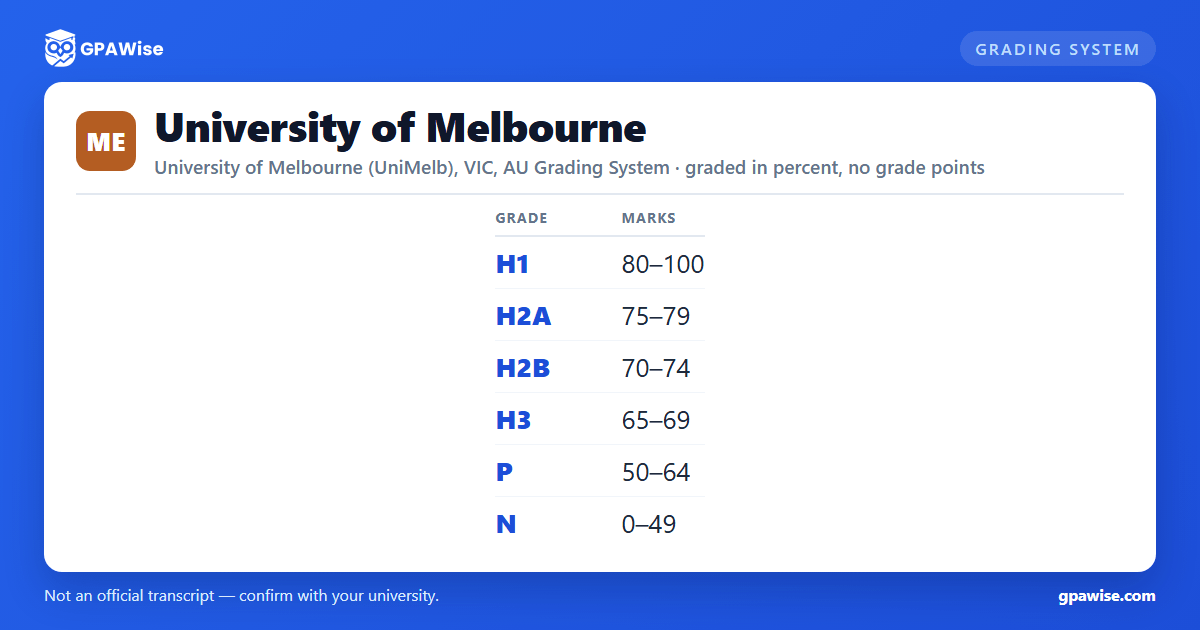
UniMelb grades most subjects on a mark out of 100, which maps to one of six results on its Table 1 scale: H1 (First Class Honours) 80–100%, H2A (Second Class Honours Division A) 75–79%, H2B (Second Class Honours Division B) 70–74%, H3 (Third Class Honours) 65–69%, P (Pass) 50–64%, and N (Fail) 0–49%. This one table, approved by the Academic Board, applies university-wide to every coursework subject — not only Honours-year subjects.
A few other codes appear on transcripts without a mark of their own: CMP (Completed) and FL (Fail) are used only for subjects marked strictly pass/fail; NH (Not Completed/Fail) is used when a hurdle requirement isn't met in a subject the student would otherwise have passed (a fixed 49% appears on the transcript); WD (Withdrawn) and NA (Not Assessed) carry no mark at all.
Source: Assessment and Results Policy (MPF1326), Table 1 'Final Result Types', section 4.169 — verified Aug 2026
The University of Melbourne doesn't use a GPA -- it uses the WAM
The University of Melbourne does not calculate or publish a Grade Point Average. Instead it uses the Weighted Average Mark (WAM), calculated directly from your 0–100 subject marks weighted by credit points: WAM = SUM(mark × credit points) / SUM(credit points). The University's own guidance describes the WAM as its equivalent of the GPA used elsewhere: "Much like the GPA used by many other universities, the Weighted Average Mark (WAM) provides an indication of your overall academic performance."
Every subject with a recorded percentage mark counts toward your WAM, including failed subjects. Subjects marked only pass/fail or completion-only (no percentage mark) are excluded, as are subjects with 0 credit points (such as time-based research subjects) and any subject with no mark recorded at all.
Your WAM appears on your Academic Transcript, your Australian Higher Education Graduation Statement (AHEGS), your Statement of Results, and in my.unimelb once your course results begin being certified (available only for courses commenced after 1 January 2010).
Source: Assessment and Results Policy (MPF1326) sections 5.17-5.21; WAM page, students.unimelb.edu.au/course-admin/wam — verified Aug 2026
Academic progress and standing at the University of Melbourne
You're considered "at risk" of unsatisfactory progress if, in any one progress review period, you fail 50% or more of your enrolled credit points, fail a compulsory or core subject for the first time, fail an elective subject for a second time while already in good standing, or withdraw from all your subjects. Bachelor Honours students are separately monitored throughout the teaching period and flagged if their performance puts them at risk of not achieving an honours grade.
Progress becomes formally unsatisfactory in situations such as reaching your course's maximum completion time without finishing, failing to meet a condition set in an earlier review, or (depending on your course and "at risk" history) failing 50%+ of attempted credit points, failing an elective a third time, or failing a compulsory/core subject while already at risk.
Unsatisfactory progress can trigger a "show cause" notice and a hearing before a Course Academic Progress Committee (CAPC), which may impose conditions on your enrolment, place you on probationary status, revoke a scholarship, approve leave of absence, suspend your enrolment, or — only where you were previously warned in writing, offered support, and given the chance to show cause — terminate your enrolment in the course.
Source: Academic Progress Review Policy (Coursework) (MPF1291), sections 4.3-4.5, 5.35-5.37 — verified Aug 2026
What the University of Melbourne requires to complete your course
An award is only conferred once the relevant dean certifies you've completed all academic requirements of the course you're enrolled in. The University of Melbourne doesn't set a single, university-wide minimum WAM to graduate — completion is defined by each course's own approved requirements, published in the Handbook.
What the policy does set university-wide is a maximum time to complete your course (including any leave of absence): for a coursework course offered full-time only, that's n + 2 years, where n is the expected full-time duration; for a course offered full-time or part-time, it's 2n + 2 years. A dean may extend this by up to one year in exceptional circumstances. A Bachelor Honours Degree specifically requires completing all components of the honours program and being certified by examiners as achieving first, second, or third-class honours.
Source: Courses, Subjects, Awards and Programs Policy (MPF1327), sections 4.27, 4.180-4.182, 4.190 — verified Aug 2026
Honours classification and "with distinction" at the University of Melbourne
Bachelor Honours Degree — a one-year, 100-credit-point program taken after a completed 300-credit-point Bachelor Degree, building on your major and including a research component of at least 25 credit points. It can only be awarded once you've completed every component of the honours program and the examiners certify you've achieved first-class, second-class, or third-class honours — drawing on the same H1/H2A/H2B/H3 result codes used for your individual subjects, but assessed as an overall classification across the honours program rather than subject by subject.
Masters Degree "with distinction" — the Academic Board may approve this where you've achieved an average of First Class Honours (H1) across the studies making up your Masters Degree course, plus any other requirements set for that specific course.
Source: Courses, Subjects, Awards and Programs Policy (MPF1327), sections 4.22-4.27, 4.73-4.74 — verified Aug 2026
Credit and advanced standing at the University of Melbourne
Advanced standing (the University's term for credit transfer/RPL) waives the need to take a subject, with or without credit points, based on prior university-level study, high-level secondary work, non-award study at the University, documented professional experience, or approved articulation pathways (including polytechnic study and the Group of Eight Credit Transfer Agreement).
Limits: credit for study completed elsewhere is capped at 50% of a course's total credit points (unless the Academic Board approves otherwise), and a Bachelor Honours program can carry at most 25 credit points of advanced standing. Credit is never granted for failed or incomplete subjects, conceded/compensatory passes, subjects taken while deferred or on leave, or subjects whose content has become out of date. Applications must generally be made on entry or in your first year of study, and won't be considered once you've completed more than half your course's credit points.
Source: Credit, Advanced Standing and Accelerated Entry Policy (MPF1293), sections 4.3, 4.14-4.17, 5.2 — verified Aug 2026
Frequently asked questions
Can I save my semesters and track my average at UniMelb?
Can I add past semesters without entering every course?
Is my tracker data sent to your servers?
Is this University of Melbourne (UniMelb) GPA calculator free?
Does D mean a near-fail at the University of Melbourne, like in the US system?
The University of Melbourne doesn't use a plain "D" grade at all. Its scale runs H1 (First Class Honours, 80–100%), H2A (Second Class Honours Division A, 75–79%), H2B (Second Class Honours Division B, 70–74%), H3 (Third Class Honours, 65–69%), P (Pass, 50–64%), and N (Fail, 0–49%). These are the standard Australian Honours-derived grade codes — there's no risk of confusing them with the US A-F letter scale, since none of the letters overlap.
Source: Assessment and Results Policy (MPF1326), Table 1, section 4.169 — verified Aug 2026
Does the University of Melbourne use a GPA?
No. The University of Melbourne calculates and reports a Weighted Average Mark (WAM) instead — a credit-point-weighted average of your 0–100 subject marks, not a grade-point average. The University describes the WAM as "much like the GPA used by many other universities," and directs other institutions or organisations that need to understand your academic performance to refer to its WAM methodology.
Source: Assessment and Results Policy (MPF1326) sections 5.17-5.19; WAM page, students.unimelb.edu.au/course-admin/wam — verified Aug 2026
What are the University of Melbourne's grade bands?
H1 (First Class Honours) 80–100%, H2A (Second Class Honours Division A) 75–79%, H2B (Second Class Honours Division B) 70–74%, H3 (Third Class Honours) 65–69%, P (Pass) 50–64%, and N (Fail) 0–49%. These six bands cover the full 0–100% mark range with no gaps, and apply to every coursework subject university-wide.
Source: Assessment and Results Policy (MPF1326), Table 1, section 4.169 — verified Aug 2026
What's the minimum passing mark at the University of Melbourne?
You need a mark of at least 50% to pass an ordinarily-marked subject — the Pass (P) band runs 50–64%. A mark of 49% or below falls into Fail (N), which is worth 0 toward your WAM but is still counted in the WAM calculation (unlike pass/fail-only subjects, which are excluded entirely).
Source: Assessment and Results Policy (MPF1326), Table 1 and section 5.20 — verified Aug 2026
Are H1/H2A/H2B/H3 the same as my Honours degree classification at the University of Melbourne?
Related, but not identical. H1/H2A/H2B/H3 are the results you receive for individual subjects (Table 1 of the Assessment and Results Policy). Your overall Bachelor Honours Degree classification ("first, second or third-class honours") is a separate, whole-of-program judgement the examiners certify once you've completed every component of your honours year — it draws on the same H1/H2A/H2B/H3 terms, but reflects your overall honours-program performance rather than any single subject's grade.
Source: Courses, Subjects, Awards and Programs Policy (MPF1327), section 4.27 — verified Aug 2026
