
How Incompletes, Withdrawals, and Repeats Affect GPA
An Incomplete ("I") may be assigned when a student has completed at least 75% of the coursework and maintained passing performance but cannot finish the remaining work due to documented extenuating circumstances. The instructor and student must agree in writing on the outstanding work and a deadline, which cannot exceed the end of the following term or semester; missing the deadline converts the Incomplete automatically to the grade earned. Incomplete grades are not factored into GPA calculation.
Withdrawal codes carry different GPA effects: "WP" (withdrawal between the end of add/drop and midterm) does not affect GPA; "WF" (assigned after midterm when coursework isn't completed) affects GPA; "WU" (after midterm, remedial courses) does not affect GPA.
An "F" counts toward GPA and cannot be erased, but the course may be repeated to improve it — the latest grade earned for that course prevails.
Source: FNU 2026-2027 University Catalog, Academic Grading System and Transcript Code Key — verified Aug 2026
Program-Specific Minimum Passing Grade
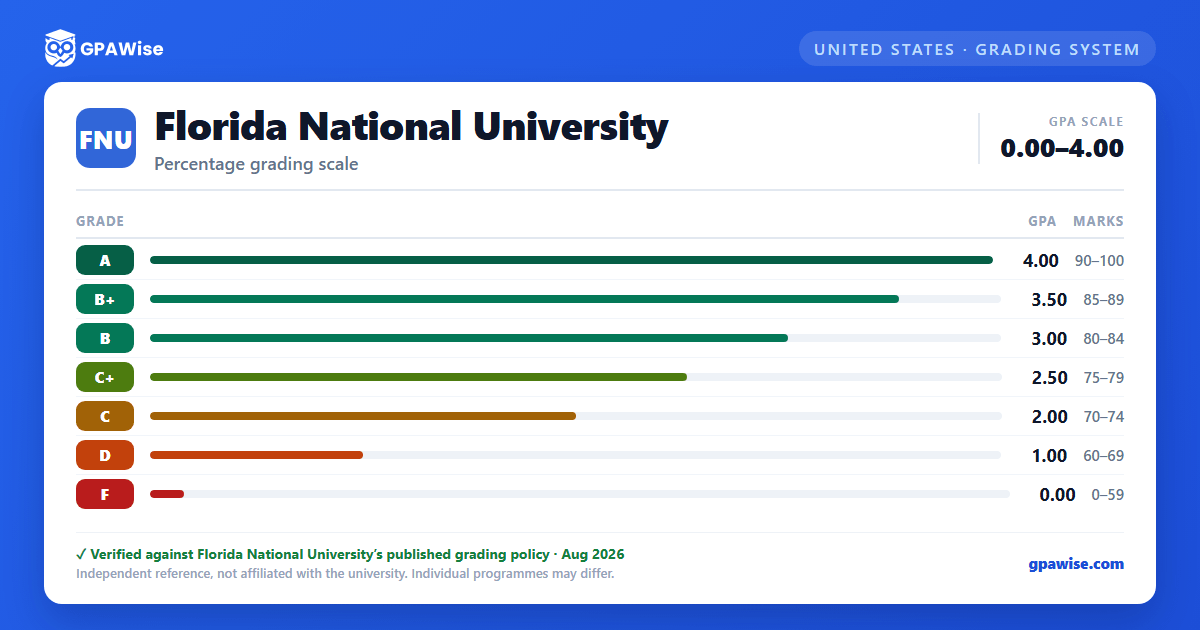
In the Associate of Science in Nursing program and the Associate of Science in Physical Therapist Assistant program, the lowest acceptable grade is 80% (a B) — anything below 80% is considered a failing grade in these two programs, a stricter floor than the university-wide grading scale.
Source: FNU 2026-2027 University Catalog, Academic Grading System and Transcript Code Key — verified Aug 2026
Transferred Credit (TC)
Credit granted for an equivalent course — internal or external transferability — is recorded with a "TC" notation. TC carries no quality points and does not factor into GPA.
Source: FNU 2026-2027 University Catalog, Academic Grading System and Transcript Code Key — verified Aug 2026
Frequently asked questions
What grading scheme does Florida National University (FNU) use?
Where does this FNU grade scale come from?
What are FNU's GPA rules?
Source: FNU 2026-2027 University Catalog, Academic Grading System and Transcript Code Key — verified Aug 2026
What are FNU's academic standing rules?
Source: FNU 2026-2027 University Catalog, Academic Grading System and Transcript Code Key — verified Aug 2026
How does FNU treat transfer credit?
Source: FNU 2026-2027 University Catalog, Academic Grading System and Transcript Code Key — verified Aug 2026
