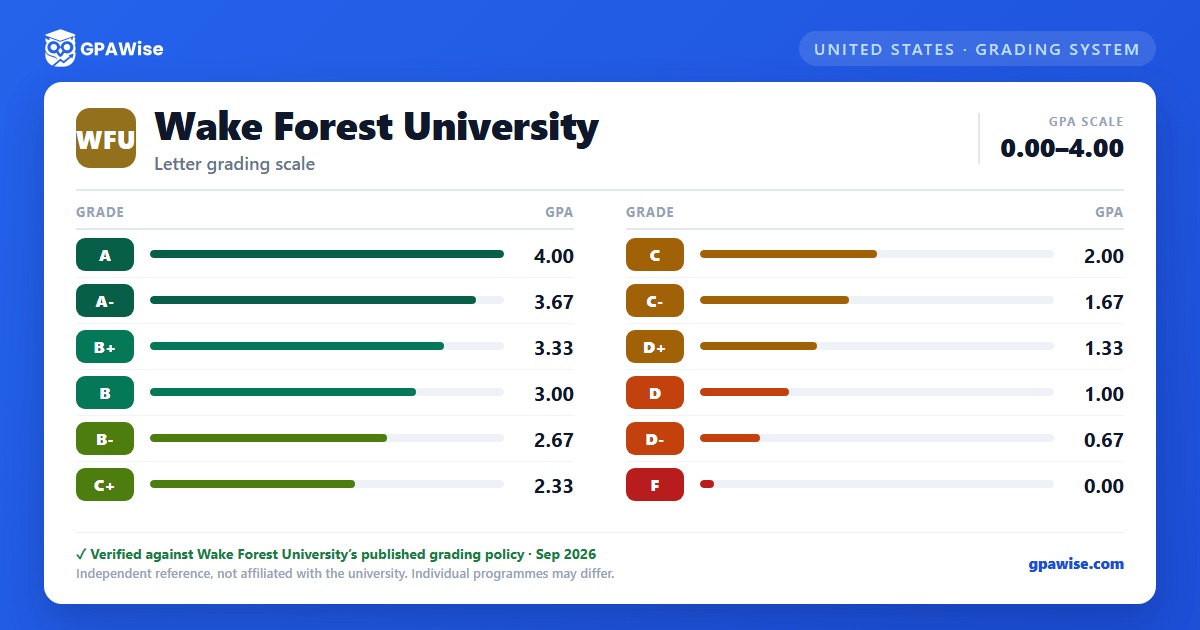

How the GPA Is Calculated
Grades of I (Incomplete) and NR (Not Reported) carry no GPA impact. An I not resolved within thirty days of the start of the student's next semester automatically converts to F; an NR not resolved within forty-five days automatically converts to F.
Courses taken under the student-elected Pass/Fail option yield full credit when passed but are never computed in the GPA, whether passed or failed. Students may count at most 18 pass/fail hours toward the degree; first-year students may not elect pass/fail; second-, third-, and fourth-year students may take at most 4 elective pass/fail hours per semester; and no School of Business course may be taken pass/fail unless it is offered only on that basis.
A Wake Forest course can be repeated if the original grade earned was C- or lower. The course counts only once toward the cumulative GPA, using the highest grade received; hours from an earlier passed attempt are not forfeited. The one exception is an irreplaceable F assigned for an honor-code violation: if a later repeat earns credit, both the repeat grade and the irreplaceable F remain in the cumulative GPA.
Source: Wake Forest University, Academic Bulletin, Examinations and Grading (Undergraduate, 2026-2027), accessed 2026-09-12. — verified Sep 2026
Minimum GPA and Dean's List
Students in Wake Forest College and the (undergraduate) School of Business must maintain a minimum cumulative GPA of 2.0.
The Dean's List is issued after the fall and spring semesters to full-time, degree-seeking students in the College and School of Business who earn a semester GPA of 3.4 or better with no grade below C; part-time students are not eligible.
Source: Wake Forest University, Academic Bulletin, Examinations and Grading (Undergraduate, 2026-2027), accessed 2026-09-12. — verified Sep 2026
Graduation Distinctions (Latin Honors)
Effective for the Class of 2024 forward, Latin Honors are awarded by class-rank percentile rather than a fixed GPA cutoff: the top 5% of the graduating class earn summa cum laude, the next 10% magna cum laude, and the next 15% cum laude (the top 30% overall). Cut-offs are set from May degree candidates and carried forward to that year's August and December candidates. For this purpose only, cumulative GPAs are calculated to three decimal places and truncated without rounding.
Source: Wake Forest University, Academic Bulletin, Examinations and Grading (Undergraduate, 2026-2027), accessed 2026-09-12. — verified Sep 2026
Frequently asked questions
What grading scheme does Wake Forest University (WFU) use?
Where does this WFU grade scale come from?
Does this calculator apply to Wake Forest's law, medical, divinity, or MBA programs?
No. This calculator uses the undergraduate grading scale published in the Wake Forest University Academic Bulletin, which governs Wake Forest College and the undergraduate School of Business. The Graduate School of Arts and Sciences and the School of Divinity publish their own grade-point scales with different passing floors than the undergraduate table, the School of Law publishes a separate JD/LLM/SJD/MLS scale (which includes an A+ grade not used at the undergraduate level), and the School of Business's graduate/MBA programs are governed by their own Graduate Student Handbook. None of those professional or graduate scales are reflected here.
Source: Cross-checked 2026-09-12 against each school's own current page: bulletin.wfu.edu/graduate + /divinity, law.wfu.edu/academics/registrar/policies, business.wfu.edu/students/academic-services. — verified Sep 2026
