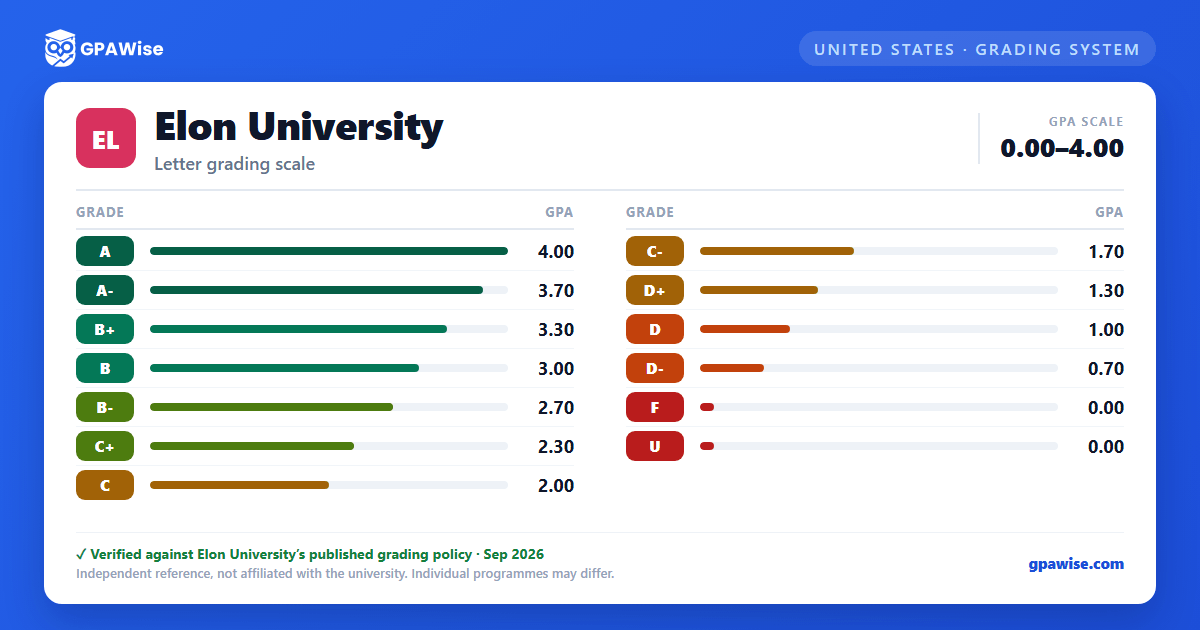

How Your GPA Is Calculated
Your GPA is calculated by dividing your total quality points by the number of hours attempted at Elon only.
Source: Office of the Registrar, GPA Calculation Formula page — verified Aug 2026
Repeated Courses and Pass/Fail Options
Courses repeated within four semesters of attendance (excluding winter and summer sessions) following the first enrollment in the course count only once in computing the cumulative grade point average, with the most recent grade counted rather than any previous grade received. A course repeated more than once counts in the cumulative grade point average each time it is repeated.
A student may take up to two courses outside their major, minor, and Elon Core curriculum requirements on a pass/fail basis. Study abroad and Study USA courses may not be taken pass/fail, and the decision to take a course pass/fail must be made on or before the last day of drop/add.
Source: Faculty Handbook, Grading System and Quality Points — verified Aug 2026
Transfer Credit and Your GPA
Transfer credit hours from other institutions do not affect your GPA and should not be calculated into it.
Source: Office of the Registrar, GPA Calculation Formula page — verified Aug 2026
Frequently asked questions
What grading scheme does Elon University use?
Where does this Elon University grade scale come from?
What are Elon University's GPA rules?
Source: Office of the Registrar, GPA Calculation Formula page — verified Aug 2026
What are Elon University's academic standing rules?
Source: Faculty Handbook, Grading System and Quality Points — verified Aug 2026
How does Elon University treat transfer credit?
Source: Office of the Registrar, GPA Calculation Formula page — verified Aug 2026
