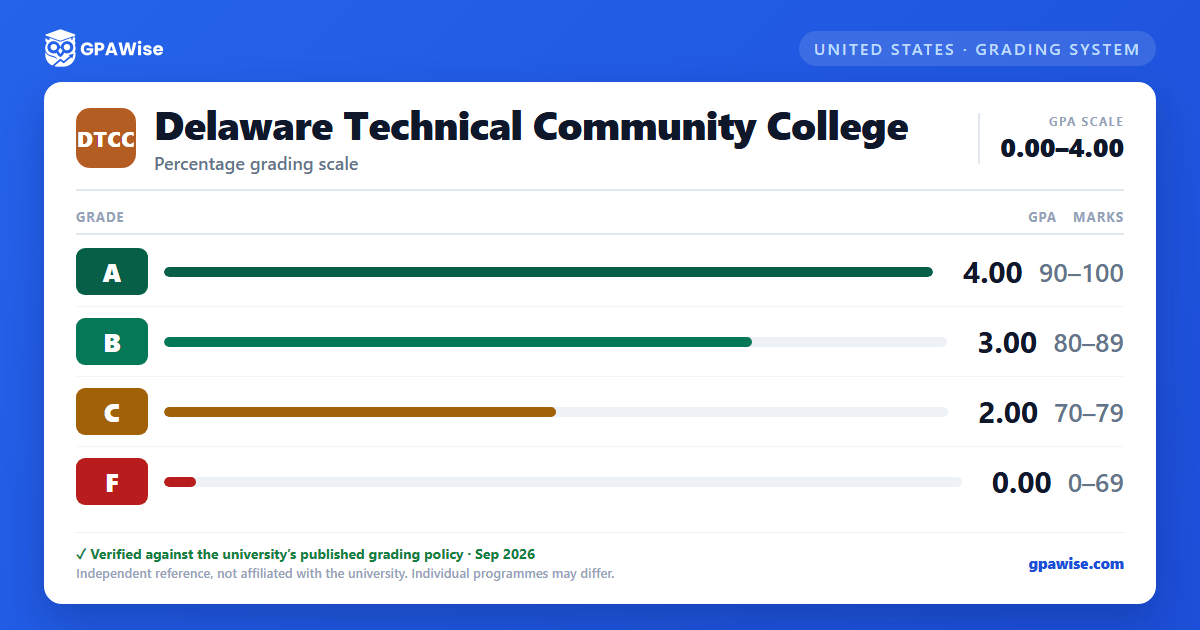

Grade Notations Beyond the A-B-C-F Scale
Several notations appear on a Delaware Tech transcript besides the four percentage-graded letters. A grade of U (Withdrawal without approval from the College) carries a 0.0 grade point value and is counted in the GPA, even though it isn't part of the percentage-graded scale. I (Incomplete), L (Listener/Auditor), W (Withdrawal with approval), and Y (Complete) are all excluded from the GPA entirely.
Developmental courses (numbered under 100) use a separate set of qualitative grades — AE, BE, CE, FE, and S/SE — which are always excluded from the GPA. From fall 1991 until fall 2012, an "R" grade was used in place of "F"; it no longer appears on current transcripts.
Source: Grading Policy (Grade Point System), effective 2022-06-03 — Grading Interpretation, GPA-inclusion/exclusion lists, developmental-grade list — verified Aug 2026
How Term and Cumulative GPA Are Calculated
Term GPA is the total quality points earned during the term divided by the total quality hours attempted; developmental courses are never included. Cumulative GPA works the same way across a student's full history at Delaware Tech and is not recalculated when a student changes majors.
Either GPA figure is recalculated only when an Incomplete is later resolved or an authorized grade change is made — otherwise the GPA at the end of a term stands as recorded.
Source: Grading Policy — Definition of Terms: Quality Point, Quality Hours, Term GPA, Cumulative GPA — verified Aug 2026
Transfer Coursework and the GPA
Work completed at other institutions is not included in the calculation of a student's cumulative GPA at Delaware Tech — only grades earned at the College count toward it.
Source: Grading Policy — Definition of Terms: Cumulative GPA — verified Aug 2026
Frequently asked questions
What grading scheme does Delaware Technical Community College (DTCC) use?
Where does this DTCC grade scale come from?
What are DTCC's GPA rules?
Source: Grading Policy — Definition of Terms: Quality Point, Quality Hours, Term GPA, Cumulative GPA — verified Aug 2026
How does DTCC treat transfer credit?
Source: Grading Policy — Definition of Terms: Cumulative GPA — verified Aug 2026
