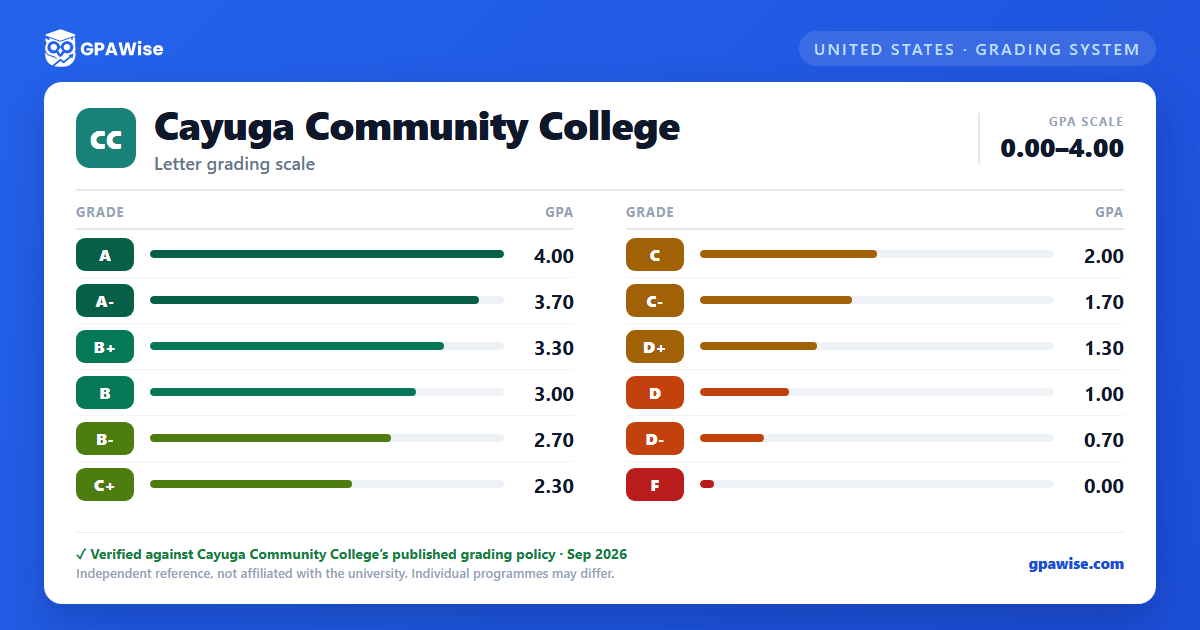

Grading System
Cayuga Community College uses a plus/minus letter grading system running from A (4.0 quality points per credit hour) down to F (0.0); there is no A+ grade. Courses with an asterisked grade (e.g. A*, B+*) are remedial-course sections graded at the same quality-point value as the non-asterisked letter; they count toward attempted, passed credits and GPA but not toward earned credits.
The following grades are not calculated in the grade point index: INC (Incomplete), W (Withdrawal without a grade), R (Repeated D or F grade), IR (Illegal repeated grade), AU (Audit), and S (Satisfactory, completed through Prior Learning Assessment).
Source: Cayuga Community College, 2026-2027 Course Catalog, Academic Progress — Grading System, accessed 2026-08-24. — verified Aug 2026
Incompletes, Non-Credit Courses, and Repeated Courses
An Incomplete (INC) is a temporary grade for coursework a student could not finish due to illness or other justifiable circumstances; it must be resolved by the 20% mark of the following semester or it reverts to F (or another instructor-specified default grade), with one extension possible for specific courses such as internships.
Five non-credit courses are computed in a student's GPA despite carrying no credit: ENGL 049, ENGL 097, ENGL 098, MATH 070, and MATH 099.
A repeated course always counts as credits attempted. Only the most recent grade computes into the GPA, unless the student has already been awarded the degree or certificate the course was part of, in which case the original attempt and grade remain in the GPA. Repeating a previously passed course can also affect financial-aid enrollment status under separate state and federal rules.
Source: Cayuga Community College, 2026-2027 Course Catalog, Academic Progress, accessed 2026-08-24. — verified Aug 2026
Academic Probation and Dismissal
A cumulative average of 2.0 (C) is required for the associate degree or certificate; progress is first reviewed once a matriculated student has attempted 6 or more credits, then at the end of each succeeding grading period. Students are placed on academic probation, and limited to a 12-15 credit load, when their cumulative GPA falls within set bands by GPA-credits attempted (for example, 1.00-1.49 at 12-15 credits, rising to 1.90-1.99 at 46 or more credits). Students whose GPA falls below those probation bands are dismissed from the College, except that a first-semester matriculated student who meets the dismissal criteria is placed on academic warning instead, and must meet with an Academic Coach to build an academic plan. A student who has been academically dismissed may file a written appeal for reinstatement.
Source: Cayuga Community College, 2026-2027 Course Catalog, Academic Progress — Academic Dismissal / Academic Probation / Academic Reinstatement, accessed 2026-08-24. — verified Aug 2026
Minimum GPA for Degree or Certificate
A cumulative grade point average of 2.0 (C) is one of the requirements for the associate degree or certificate.
Source: Cayuga Community College, 2026-2027 Course Catalog, Academic Progress — Academic Dismissal, accessed 2026-08-24. — verified Aug 2026
Frequently asked questions
What grading scheme does Cayuga Community College use?
Where does this Cayuga Community College grade scale come from?
What are Cayuga Community College's GPA rules?
Source: Cayuga Community College, 2026-2027 Course Catalog, Academic Progress, accessed 2026-08-24. — verified Aug 2026
What are Cayuga Community College's academic standing rules?
Source: Cayuga Community College, 2026-2027 Course Catalog, Academic Progress — Academic Dismissal / Academic Probation / Academic Reinstatement, accessed 2026-08-24. — verified Aug 2026
What does Cayuga Community College require to graduate?
Source: Cayuga Community College, 2026-2027 Course Catalog, Academic Progress — Academic Dismissal, accessed 2026-08-24. — verified Aug 2026
