
Grades Not Counted Toward the GPA
Some grade symbols at Bloomsburg University carry no quality points and are excluded from the QPA: I (Incomplete, converts to F if the completion plan lapses), P (Passed, for pass/fail-option courses or proficiency exams), F in a pass/fail course (a failing outcome under the pass/fail option, distinct from a graded F), V (Audit), W (Withdrawal), R (Research in progress, converts to F if not completed), and X (No grade reported, converts to F if not resolved).
Source: PRP 3522, Commonwealth University (Bloomsburg campus), effective Fall 2017 — verified Aug 2026
How the QPA Is Calculated
The Quality Point Average (QPA) is computed by multiplying the number of semester hours for each course by the number of quality points earned, adding the products, then dividing by the total semester hours attempted. A Semester QPA covers a single term; the Cumulative QPA includes all coursework taken at Bloomsburg University to date, including Developmental Studies (Academic Enrichment) courses numbered 001–099.
If a course is successfully repeated at Bloomsburg University, its credits are counted only once, using the most recent grade regardless of whether it is higher or lower than the original. If the repeat is taken at another accredited institution instead, the original Bloomsburg University credits are removed from the QPA computation entirely.
Source: PRP 3522, Commonwealth University (Bloomsburg campus), effective Fall 2017 — verified Aug 2026
Frequently asked questions
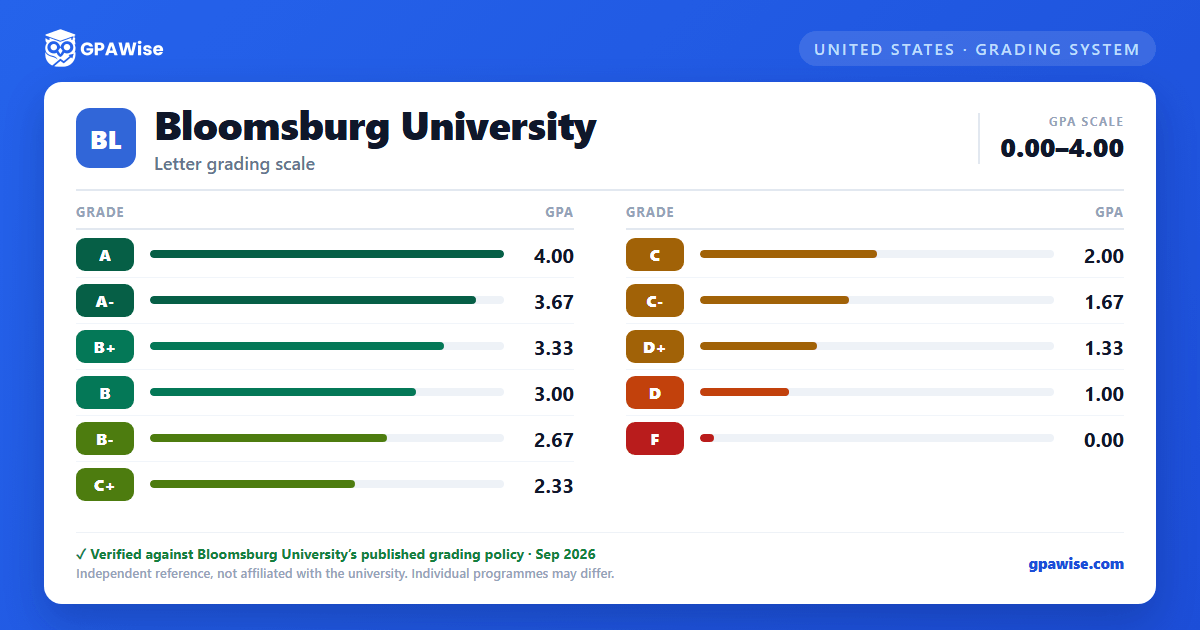
What grading scheme does Bloomsburg University use?
Where does this Bloomsburg University grade scale come from?
What are Bloomsburg University's GPA rules?
Source: PRP 3522, Commonwealth University (Bloomsburg campus), effective Fall 2017 — verified Aug 2026
