
How grading works at CSUB
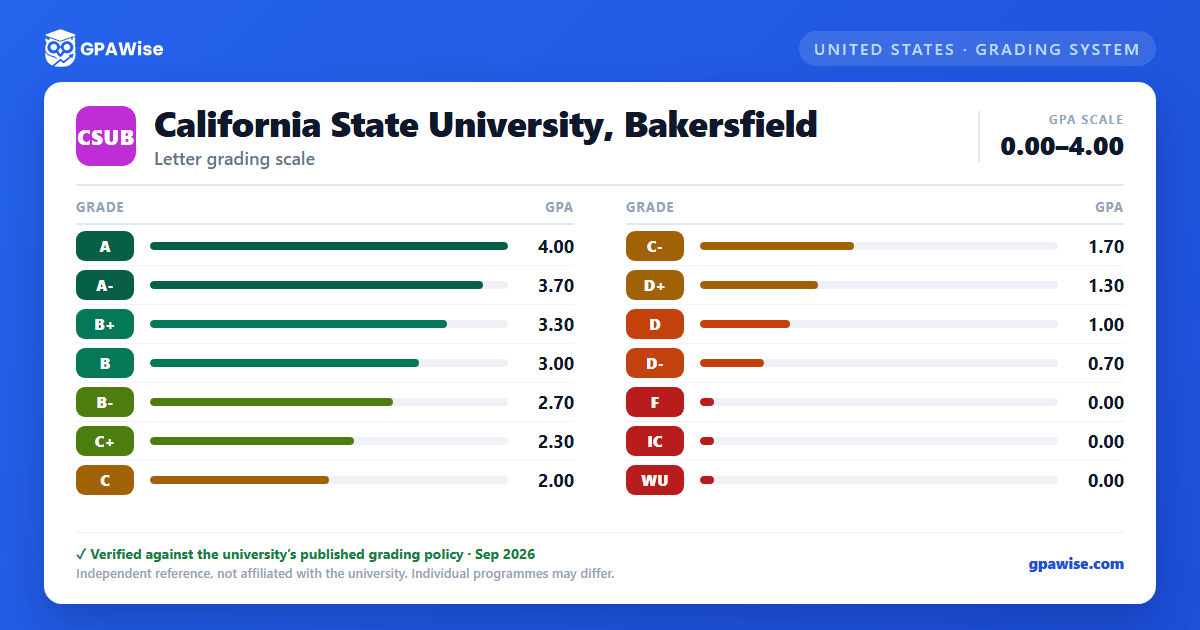
CSUB's Course Grading System is a standard letter scale running from A (4.0 grade points) down to F (0.0), with plus/minus grades used throughout (A-, B+, B, B-, and so on). CSUB does not award an A+ — A is the highest available grade and the highest point value on the scale.
Source: Course Grading System table, catalog.csub.edu Registrar's Office page — verified Aug 2026
How CSUB calculates your GPA
Grade point averages are computed by dividing the total grade points earned by the total units attempted. Only units and grade points earned while enrolled at CSUB count toward the CSUB GPA; a separate overall GPA also factors into academic standing.
- IC (Incomplete-Charged) and WU (Unauthorized Withdrawal) both carry 0.0 grade points and count as a failing grade, exactly like an F.
- AU (Audit), CR (Credit), I (Incomplete), NC (No Credit), RD (Report Delayed), RP (Report In Progress), and W (Withdrawal) have no effect on GPA.
Source: Course Grading System table + GPA computation rule, catalog.csub.edu Registrar's Office page — verified Aug 2026
Academic Notice, Jeopardy, and Disqualification at CSUB
Under Executive Order 1038, an undergraduate whose CSUB GPA or overall GPA falls below 2.00 is placed on Academic Notice and must complete an Academic Intervention Program. A student on notice is Academically Disqualified if their GPA falls below these class-level floors (measured in all units attempted):
- Freshman (fewer than 30 units): 1.50
- Sophomore (30–59 units): 1.700
- Junior (60–89 units): 1.85
- Senior (90+ units): 1.95
A student may qualify once during their academic career for Academic Jeopardy instead of immediate disqualification; falling below the same limits while on Jeopardy leads to disqualification.
Source: Academic Notice / Jeopardy / Disqualification policy, catalog.csub.edu Registrar's Office page — verified Aug 2026
Minimum GPA to graduate from CSUB
Baccalaureate degree: a minimum of 120 semester units (at least 40 upper-division, at least 30 at CSUB including 24 upper-division and 12 major units), a minimum 2.00 GPA in major, minor, CSUB, and overall, and the Graduation Writing Assessment Requirement passed with a C- or better.
Graduate degree: a minimum of 30 semester units (at least 21 at CSUB), and a minimum 3.00 program GPA; some programs also require a comprehensive exam and/or thesis or project.
Source: Graduation Requirements for Baccalaureate/Graduate Degree, catalog.csub.edu Registrar's Office page — verified Aug 2026
Graduating with honors at CSUB
An undergraduate must complete at least 40 letter-graded resident units at CSUB to graduate with honors. Both the cumulative GPA and the CSUB GPA must reach the same threshold:
- 3.3–3.59 — Cum Laude
- 3.6–3.89 — Magna Cum Laude
- 3.9–4.0 — Summa Cum Laude
Source: Graduation with Honors policy, catalog.csub.edu Registrar's Office page — verified Aug 2026
How transfer credit works at CSUB
The Registrar's Office evaluates transfer credit and certifies General Education breadth requirements. Coursework from a California community college designated as transferable/baccalaureate-appropriate is accepted in full; baccalaureate-oriented coursework from a four-year accredited institution is also accepted in full. Credit from non-accredited institutions is evaluated case by case. Currently-enrolled students need prior approval from their department chair, School Dean, and the AVP for Academic Programs before taking a course elsewhere for transfer credit.
Source: Evaluation and Acceptance of Transfer Credit policy, catalog.csub.edu Registrar's Office page — verified Aug 2026
Frequently asked questions
What grading scheme does California State University, Bakersfield (CSUB) use?
Where does this CSUB grade scale come from?
What are CSUB's GPA rules?
Source: Course Grading System table + GPA computation rule, catalog.csub.edu Registrar's Office page — verified Aug 2026
What are CSUB's academic standing rules?
Source: Academic Notice / Jeopardy / Disqualification policy, catalog.csub.edu Registrar's Office page — verified Aug 2026
What does CSUB require to graduate?
Source: Graduation Requirements for Baccalaureate/Graduate Degree, catalog.csub.edu Registrar's Office page — verified Aug 2026
How are honors and awards decided at CSUB?
Source: Graduation with Honors policy, catalog.csub.edu Registrar's Office page — verified Aug 2026
How does CSUB treat transfer credit?
Source: Evaluation and Acceptance of Transfer Credit policy, catalog.csub.edu Registrar's Office page — verified Aug 2026
