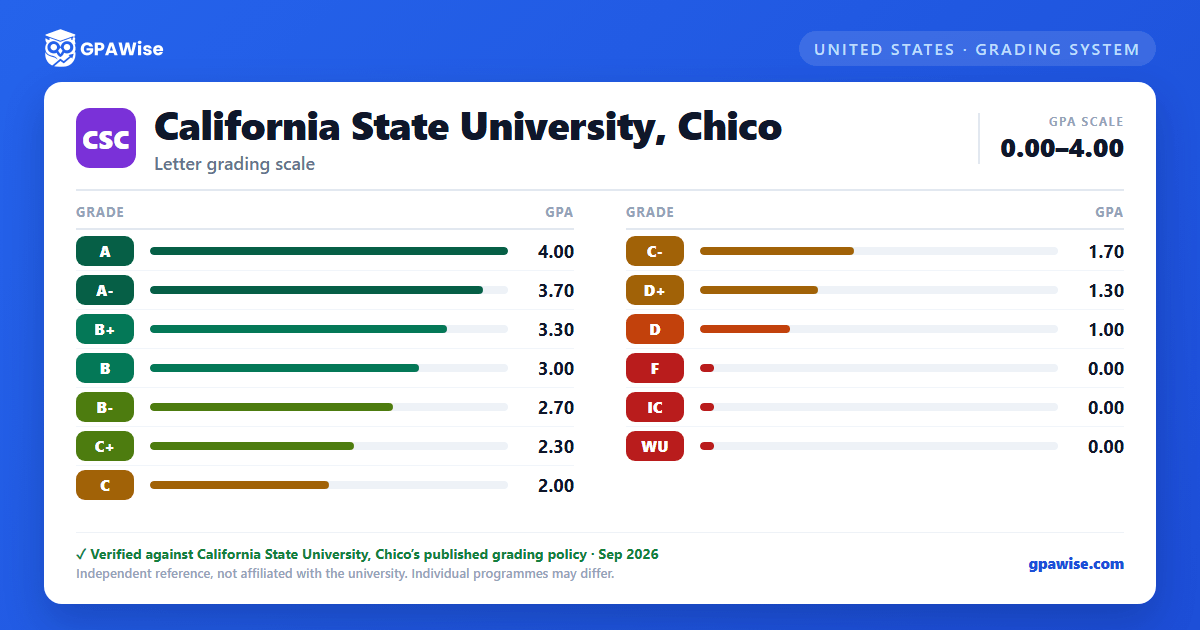

Grading System
Most courses are graded on the standard A–F letter scale with plus/minus modifiers. Some courses are graded Credit (CR)/No Credit (NC) only, mandated where standard grading procedures are not practical or possible, such as independent studies, credit for prior experience, or challenge examinations.
In elective courses not required for a student's major, minor, or general education requirements, undergraduate students may elect to take a course CR/NC instead of a letter grade; up to 30 units of elected CR/NC coursework may be applied to a bachelor's degree. Courses that are only ever offered CR/NC do not count toward that 30-unit limit.
An Audit (AU) registration earns no credit; a student who wishes to change from credit to audit status must do so no later than the census date for the term.
Source: EM 25-004 SS III, V (Office of the President, csuchico.edu) — verified Aug 2026
GPA Computation and Course Repetition
Grade Point Average is determined by dividing the number of grade points earned by the number of letter-graded units attempted. CR/NC grades are not computed in the GPA, though Credit (CR) grades count toward total units passed and progress toward graduation.
Undergraduate students may repeat a course originally taken for a letter grade if the earlier attempt resulted in a grade of C- or lower, up to a maximum of 28 repeated units; graduate students may repeat courses in which they earned B- or lower. The repeated grade is averaged with all other grades in determining the GPA. Separately, undergraduates may repeat up to 16 units "with forgiveness" — the earlier grade excluded from the cumulative GPA — under conditions set by the Office of the Registrar, including a limit of two forgiveness repeats per course and no forgiveness for courses originally taken Credit/No Credit.
Chico State may also grant academic forgiveness disregarding up to two semesters of prior undergraduate coursework, provided the student has since earned, in residence, at least 15 units at a 3.0 GPA, 30 units at a 2.5 GPA, or 45 units at a 2.0 GPA, among other conditions.
Source: EM 25-004 SS III, IV, X, XI (Office of the President, csuchico.edu) — verified Aug 2026
Academic Notice and Disqualification
Undergraduate students are placed on academic notice if their cumulative GPA — in all college work attempted, or at Chico State specifically — falls below 2.00, and are removed once both reach 2.00 or higher. While on academic notice, a student must meet with their faculty advisor by the end of the second week of classes each semester and is advised to limit course loads to no more than 14 units.
An undergraduate already on academic notice is subject to disqualification if their cumulative GPA falls below a class-standing threshold: 1.50 as a freshman (fewer than 30 semester hours completed), 1.70 as a sophomore (30–59 hours), 1.85 as a junior (60–89 hours), or 1.95 as a senior (90 or more hours).
An undergraduate or graduate student not on academic notice may still be disqualified if, at the end of any term, their cumulative GPA is below 1.0 and their overall educational record makes it unlikely the deficiency will be removed within a reasonable period.
Source: University Catalog, 'Academic Notice' section — verified Aug 2026
Frequently asked questions
What grading scheme does California State University, Chico (Chico State) use?
Where does this Chico State grade scale come from?
What are Chico State's GPA rules?
Source: EM 25-004 SS III, IV, X, XI (Office of the President, csuchico.edu) — verified Aug 2026
What are Chico State's academic standing rules?
Source: University Catalog, 'Academic Notice' section — verified Aug 2026
