
GPA Rules
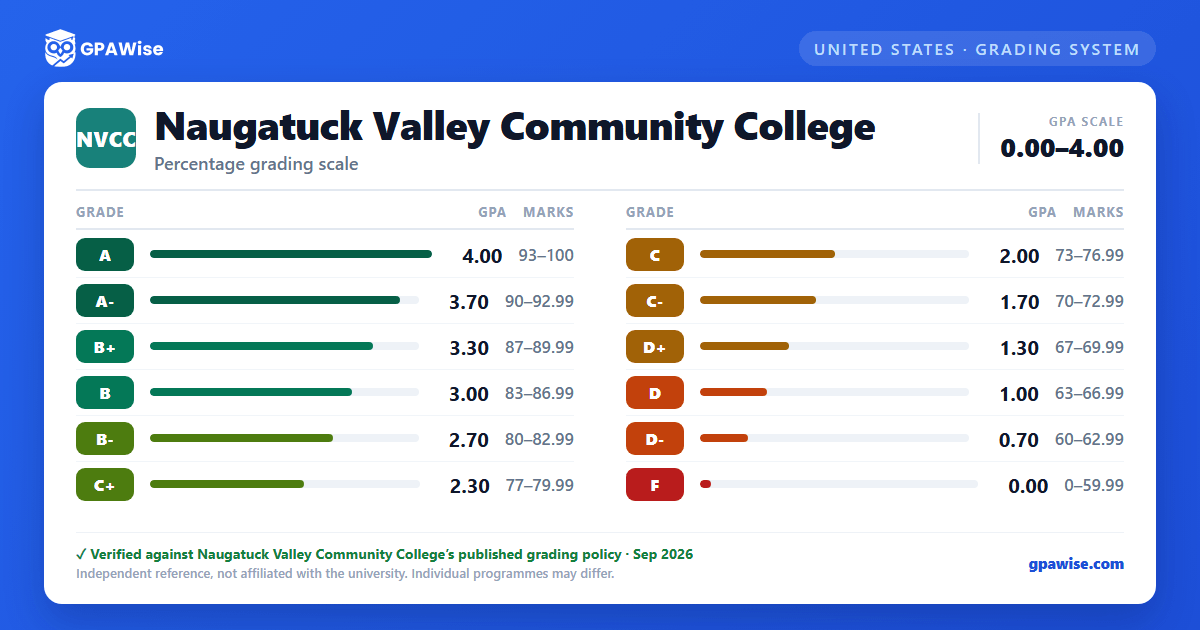
GPA is calculated by multiplying each course's grade points by its credit hours, summing across all courses, and dividing by the total semester hours attempted.
A course may be repeated for credit up to twice without special approval; the highest grade earned is the one used in the cumulative GPA.
An Incomplete ("I") is a temporary placeholder grade, not a GPA value in itself; if the coursework isn't finished (typically by the tenth week of the next standard semester), it converts to the letter grade specified when the Incomplete was granted. Audited ("AU") courses do not earn a grade and are not part of the GPA. Withdrawal ("W"), Pass ("P"), and grades from developmental courses (numbered below 1000) are likewise excluded from the College GPA calculation, though developmental grades still count toward Financial Aid eligibility.
Source: CT State Community College Academic Catalog, 2026-2027 ed. — Grading page — verified Sep 2026
Academic Standing
A student is in good academic standing with a cumulative GPA of 2.0 or higher and may register for up to 19 credits in a regular fall or spring term. Falling below a 2.0 cumulative GPA places a student on a progressive Academic Warning (three levels), each with a lower per-term credit cap, before Academic Suspension.
Students who have attempted more than 31 credits toward an associate degree (or 13 or more toward a certificate) while on the first three Academic Warning levels are placed on Academic Suspension and barred from enrolling for the next fall or spring semester. Suspension may be appealed; a granted appeal places the student on Third Level Academic Warning for one semester.
The Academic Fresh Start program lets a returning student (after a two-or-more-year absence, with a cumulative GPA below 2.00) retain credit only for courses graded C- or above; all other prior grades stay on the transcript but are excluded from the recalculated cumulative GPA. It can be used only once in a student's history, including at a legacy Connecticut community college.
Source: CT State Community College Academic Catalog, 2026-2027 ed. — Academic Standing page — verified Sep 2026
Graduation Requirements
An Associate Degree requires a minimum of 60 credits, at least 25% of credits completed at CT State, an overall GPA of 2.0, completion of the 21-credit General Education Core, and the program's specific requirements. A Credit Certificate requires at least 25% of credits completed at CT State, an overall GPA of 2.0, and the program's specific requirements. These are college-wide minimums; individual programs may set additional requirements.
Source: CT State Community College Academic Catalog, 2026-2027 ed. — Earning a Degree page — verified Sep 2026
Honors & Awards
Full-time students who complete 12 or more credits in a semester with a 3.4 GPA or higher are named to the Dean's List; part-time students qualify the same way at each successive 12-credit interval. An Incomplete makes a student ineligible for that semester's Dean's List (retroactive recognition is possible once the Incomplete is resolved), and students on academic probation or with an academic-integrity hold are not eligible regardless of GPA.
Latin honors are awarded at graduation based on cumulative GPA: Summa Cum Laude (3.9-4.0), Magna Cum Laude (3.7-3.89), and Cum Laude (3.4-3.69).
The Board of Regents Medallion for Academic Excellence recognizes associate-degree graduates with a cumulative GPA of 4.000 who completed at least 50% of their degree in residence at CT State; a "W" or similar withdrawal notation does not disqualify a graduate from this award.
Source: Dean's List: Academic Standing page; Latin Honors & Medallion: Earning a Degree page (same 2026-2027 catalog) — verified Sep 2026
Frequently asked questions
What grading scheme does Naugatuck Valley Community College (NVCC) use?
Where does this NVCC grade scale come from?
What are NVCC's GPA rules?
Source: CT State Community College Academic Catalog, 2026-2027 ed. — Grading page — verified Sep 2026
What are NVCC's academic standing rules?
Source: CT State Community College Academic Catalog, 2026-2027 ed. — Academic Standing page — verified Sep 2026
What does NVCC require to graduate?
Source: CT State Community College Academic Catalog, 2026-2027 ed. — Earning a Degree page — verified Sep 2026
How are honors and awards decided at NVCC?
Source: Dean's List: Academic Standing page; Latin Honors & Medallion: Earning a Degree page (same 2026-2027 catalog) — verified Sep 2026
