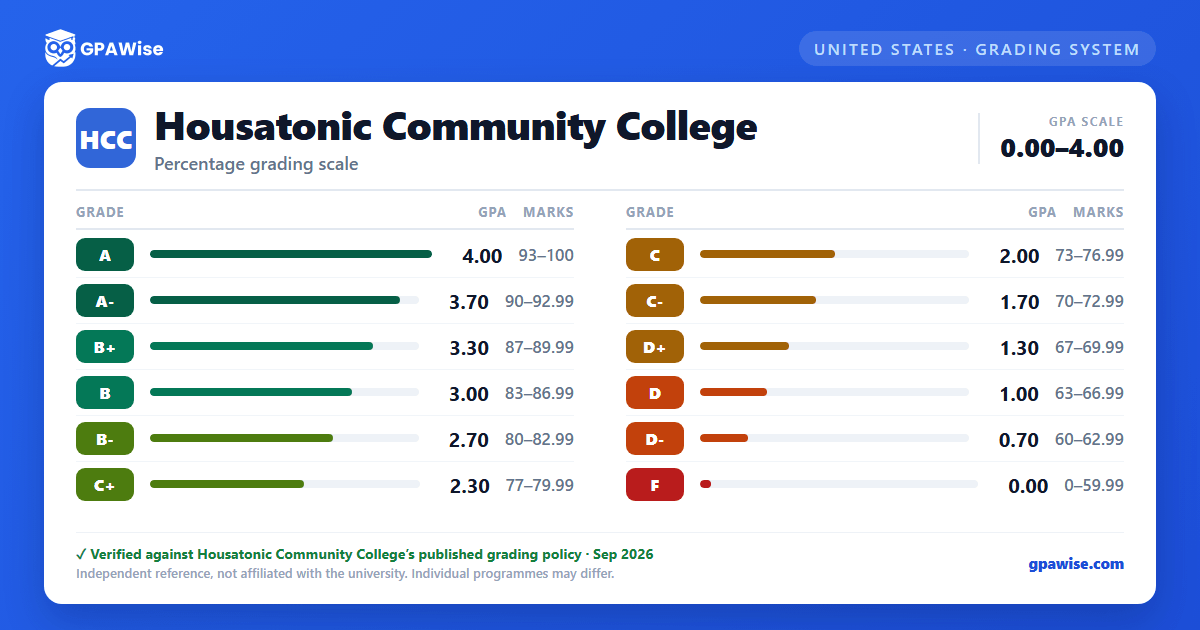

Grading System
Letter grades are assigned at the end of each semester to indicate how well a student has met the goals established for a course. Each letter grade corresponds to a grade point, used to calculate a student's grade point average (GPA).
Grades earned in courses numbered below 1000 (developmental courses) appear with a "#" suffix. These grades are not included in the College GPA calculation, but are included in calculations that determine eligibility for financial aid.
Source: Connecticut State Community College Academic Catalog, 2026-2027 edition (system-wide; Housatonic is a member campus). — verified Aug 2026
GPA Calculation and Repeat Policy
Grade points are calculated by multiplying the numerical weight allocated to each grade by the semester hours of credit assigned to the course. The GPA is determined by dividing the total number of grade points by the total number of semester hours attempted.
A course may be repeated for credit up to two times without approval; the highest grade received is used in calculating the cumulative GPA.
An Incomplete ("I") is a temporary grade; if the required work is not completed by the tenth week of the next standard semester, it converts to the letter grade specified when the Incomplete was assigned. Audited courses ("AU") do not earn a grade and are not included in GPA calculation.
Source: Connecticut State Community College Academic Catalog, 2026-2027 edition (system-wide; Housatonic is a member campus). — verified Aug 2026
Frequently asked questions
What grading scheme does Housatonic Community College (HCC) use?
Where does this HCC grade scale come from?
What are HCC's GPA rules?
Source: Connecticut State Community College Academic Catalog, 2026-2027 edition (system-wide; Housatonic is a member campus). — verified Aug 2026
