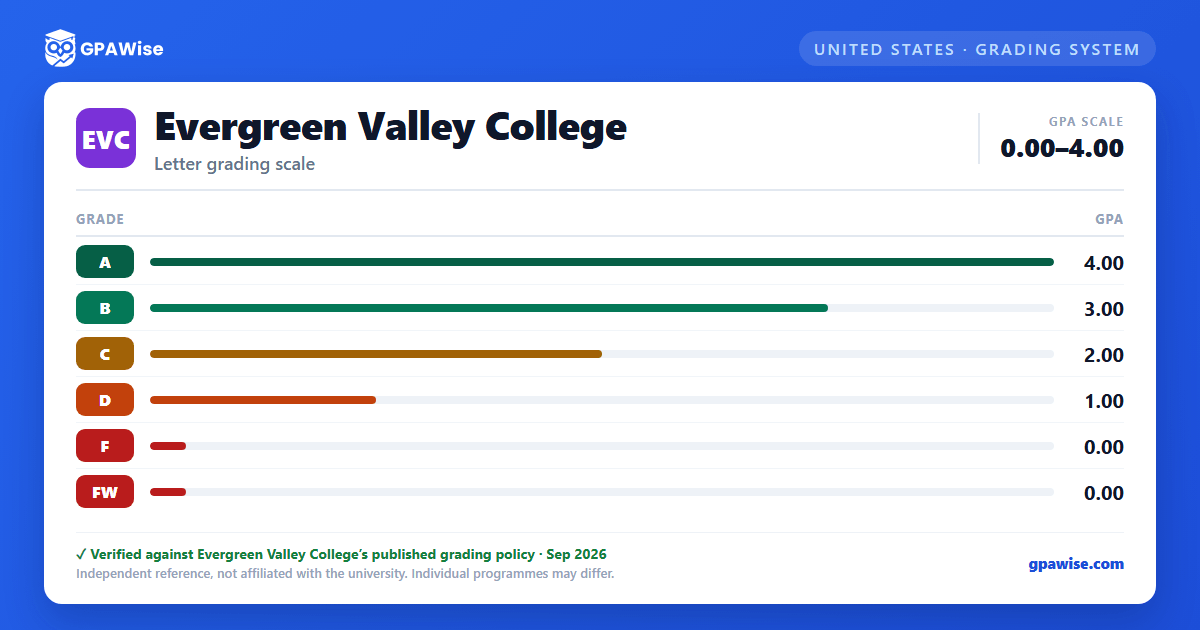

How the GPA is calculated
Grade point average (GPA) is calculated as total grade points earned divided by total semester units attempted. The letter grades A through F, and the FW (Unofficial Withdrawal) symbol, all carry a numeric grade point value and count toward the GPA — FW is calculated into the GPA the same way as an F.
The following notations do not count toward the GPA: P (Pass), NP (No Pass), W (Withdrawal), EW (Excused Withdrawal), I (Incomplete), and IP (In Progress).
Source: P/NP GPA exclusion confirmed on the catalog's separate Pass/No Pass Grading page — verified Aug 2026
What counts toward probation and dismissal
Academic probation and dismissal review uses different criteria than the GPA calculation itself. The F and NP grades, the I (Incomplete) symbol, and excessive W (Withdrawal) notations count toward probation and dismissal calculations. The P grade and the MW (Military Withdrawal) and RD (Report Delayed) symbols are excluded from probation and dismissal calculations.
Source: official document — verified Aug 2026
Frequently asked questions
What grading scheme does Evergreen Valley College (EVC) use?
Where does this EVC grade scale come from?
What are EVC's GPA rules?
Source: P/NP GPA exclusion confirmed on the catalog's separate Pass/No Pass Grading page — verified Aug 2026
What are EVC's academic standing rules?
Source: official document — verified Aug 2026
