
Repeated Courses and Academic Renewal
If a student repeats a course, only the most recent grade earned is used in GPA calculations; the previous grade and credit hours remain on the transcript but are excluded from the GPA and from total hours completed.
Academic renewal lets a currently enrolled student remove previous grades of D+, D, D-, or F from GPA calculations, but only once, only for coursework completed at least five years earlier, and only after earning a minimum 2.5 GPA in at least 15 credit hours completed afterward at Utah Tech (within three years of the petition). Renewed courses no longer count toward GPA or credit totals but remain on the transcript with a notation.
Source: Utah Tech University Catalog, 2026-2027 Edition, Academic Policies and Procedures — verified Aug 2026
Academic Standing
Undergraduate students are in good academic standing with a cumulative and semester GPA of 2.0 or above. Falling below 2.0, or failing to raise it back to 2.0 or higher in a subsequent semester, places a student on low academic status, which affects the ability to register for classes. Graduate students must maintain a cumulative GPA of 3.0.
Source: Utah Tech University Catalog, 2026-2027 Edition, Academic Policies and Procedures — verified Aug 2026
Transfer Credit and GPA
Official transcripts from transferring students are evaluated by the Registrar's Office after matriculation into a degree program, and transfer credits are calculated into the student's cumulative GPA.
Source: Utah Tech University Catalog, 2026-2027 Edition, Academic Policies and Procedures — verified Aug 2026
Frequently asked questions
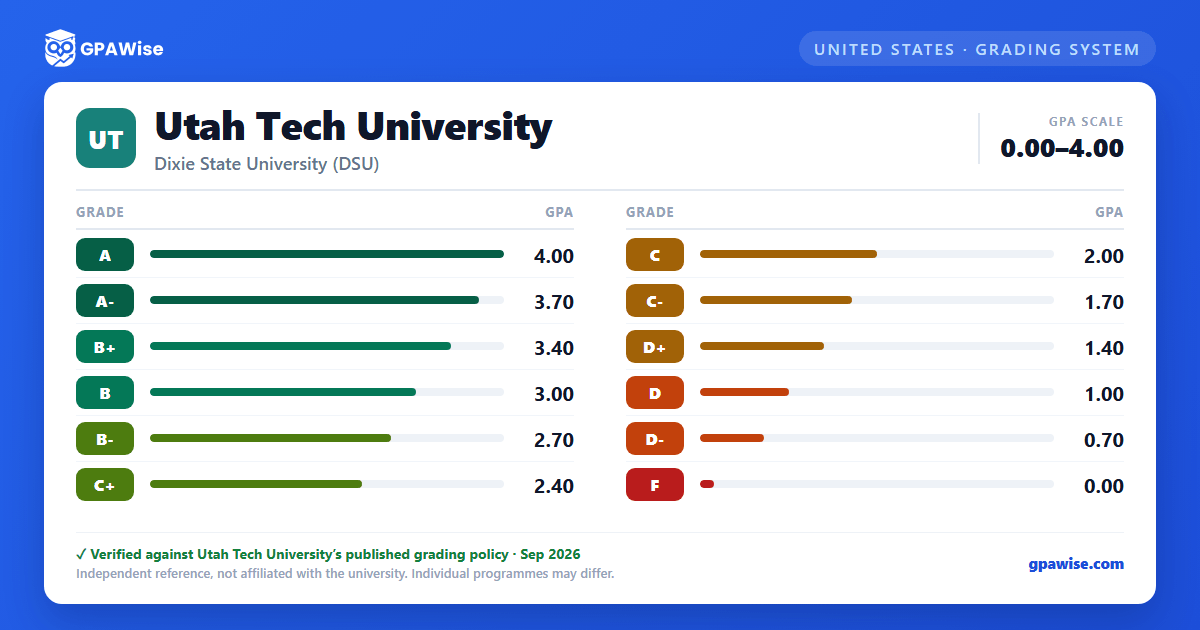
What grading scheme does Utah Tech University use?
Where does this Utah Tech University grade scale come from?
What are Utah Tech University's GPA rules?
Source: Utah Tech University Catalog, 2026-2027 Edition, Academic Policies and Procedures — verified Aug 2026
What are Utah Tech University's academic standing rules?
Source: Utah Tech University Catalog, 2026-2027 Edition, Academic Policies and Procedures — verified Aug 2026
How does Utah Tech University treat transfer credit?
Source: Utah Tech University Catalog, 2026-2027 Edition, Academic Policies and Procedures — verified Aug 2026
