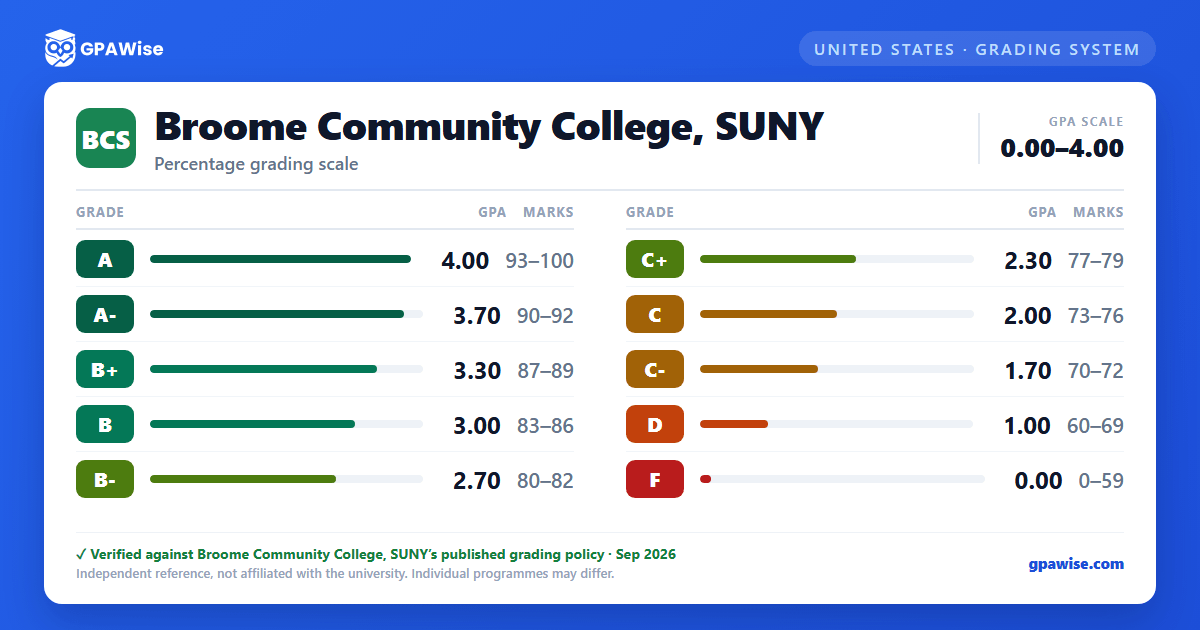

GPA Calculation
The grade point average is determined by (1) multiplying the honor points earned for each letter grade by the number of credits for the course to get the quality points earned for that course, then (2) summing the quality points for all courses attempted and dividing by the total number of quality hours. Both semester and cumulative GPA are calculated and shown on the academic transcript.
Non-letter grades (P, S, U, W, WA, I, AU) carry no quality-point value and do not affect the GPA, nor do credit-equivalent courses (numbered below the 100 level) or accepted transfer credit.
Repeated courses are marked in the transcript's "R" column as E (Excluded Repeat Grade) or I (Included Repeat Grade).
Source: Registrar: Key to Understanding Transcript Data — verified Aug 2026
Standards for Academic Progress
Students are in good academic standing if they meet SUNY Broome's Standards for Academic Progress (SAP): a minimum cumulative GPA based on total credits attempted — 1.50 for 12–20 credits, 1.75 for over 20–40, and 2.00 for over 40 — plus successful accumulation of credits.
A student who falls below SAP is placed on Academic and Financial Aid Warning for one term; failing to meet SAP again after a warning term results in Academic Dismissal. A dismissed student may apply for reinstatement, which places them on Academic Probation under a required academic plan.
Source: AA4007 Standards for Academic Progress Policy — verified Aug 2026
Honors
Full-time students earn the President's List with a semester GPA of 3.80 or better, or the Dean's List with a semester GPA between 3.50 and 3.79, each requiring at least 12 credit hours with no incomplete grades. Part-time students qualify for the same honors after accumulating 12 credit hours across their most recent semesters.
Graduates with a cumulative GPA of 3.80 or better earn High Honors; those between 3.50 and 3.79 earn Honors.
Source: Registrar: Key to Understanding Transcript Data — verified Aug 2026
Transfer Credit
Transfer credit may be earned through College Proficiency, Advanced Placement (AP), Credit Level Examinations (CLEP), and Portfolio Assessment or special assessment of group-sponsored learning (with department approval). Only credit hours actually applied and accepted toward the degree appear on the transcript, and transfer credits are not calculated in the GPA.
Source: Registrar: Key to Understanding Transcript Data — verified Aug 2026
Frequently asked questions
What grading scheme does Broome Community College, SUNY use?
Where does this Broome Community College, SUNY grade scale come from?
What are Broome Community College, SUNY's GPA rules?
Source: Registrar: Key to Understanding Transcript Data — verified Aug 2026
What are Broome Community College, SUNY's academic standing rules?
Source: AA4007 Standards for Academic Progress Policy — verified Aug 2026
How are honors and awards decided at Broome Community College, SUNY?
Source: Registrar: Key to Understanding Transcript Data — verified Aug 2026
How does Broome Community College, SUNY treat transfer credit?
Source: Registrar: Key to Understanding Transcript Data — verified Aug 2026
