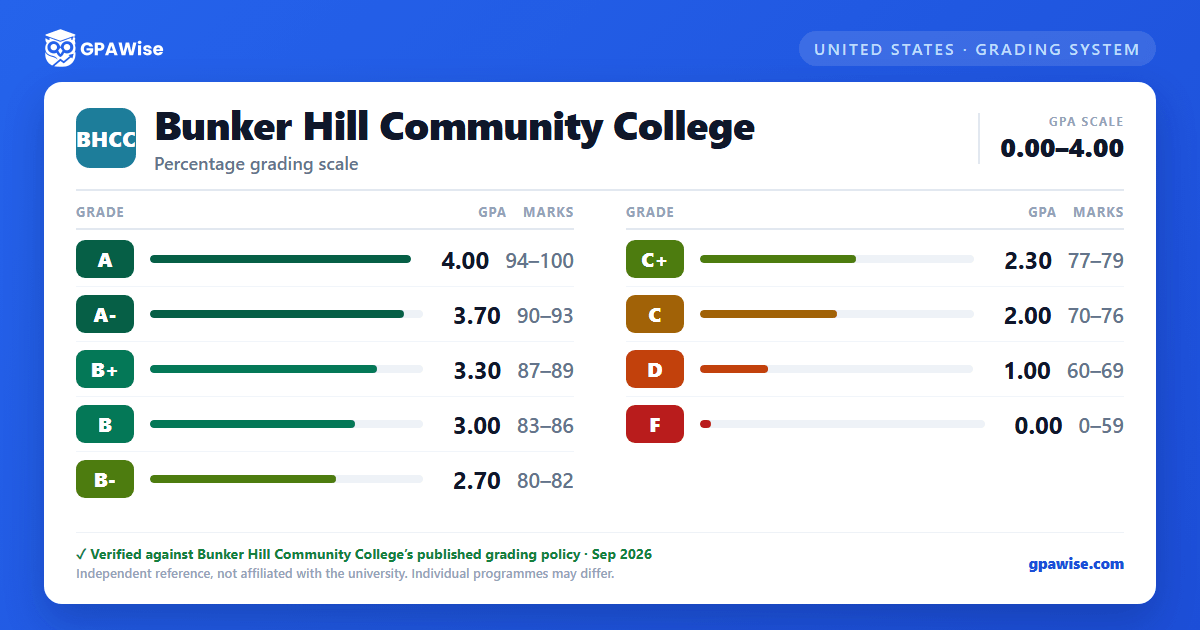

How to Calculate GPA
The Cumulative Grade Point Average (CGPA) is computed by dividing the total number of quality points by the total number of credit hours attempted at Bunker Hill Community College.
Grades of AU, IP, P, NA, W and WA are not calculated in the semester, cumulative or graduation grade point average. All grades are used in determining satisfactory academic progress, suspension and probation.
A Graduation Grade Point Average (GCPA) is calculated in the same manner but excludes developmental course work (courses numbered below 100).
Source: BHCC "Grades" page, How to Calculate GPA section — verified Aug 2026
Probation and Suspension
To continue at Bunker Hill Community College and/or receive financial aid, students must make satisfactory academic progress toward a degree or certificate.
Academic Probation: the College places students on academic probation who fail to meet the criterion of satisfactory academic progress.
Academic Suspension: the College will suspend students who have failed to meet specified GPA and progress standards, or who remain on academic probation for three consecutive semesters.
Appeals: students placed on academic probation or suspension have the right to appeal.
Fresh Start: students who have not attempted or completed courses at BHCC for at least five years may qualify for a second chance on building a satisfactory GPA, enrolling without having to carry a very poor prior GPA record.
Source: BHCC "Grades" page, Probation and Suspension / Fresh Start sections — verified Aug 2026
Frequently asked questions
What grading scheme does Bunker Hill Community College (BHCC) use?
Where does this BHCC grade scale come from?
What are BHCC's GPA rules?
Source: BHCC "Grades" page, How to Calculate GPA section — verified Aug 2026
What are BHCC's academic standing rules?
Source: BHCC "Grades" page, Probation and Suspension / Fresh Start sections — verified Aug 2026
