
How grading works at Baylor
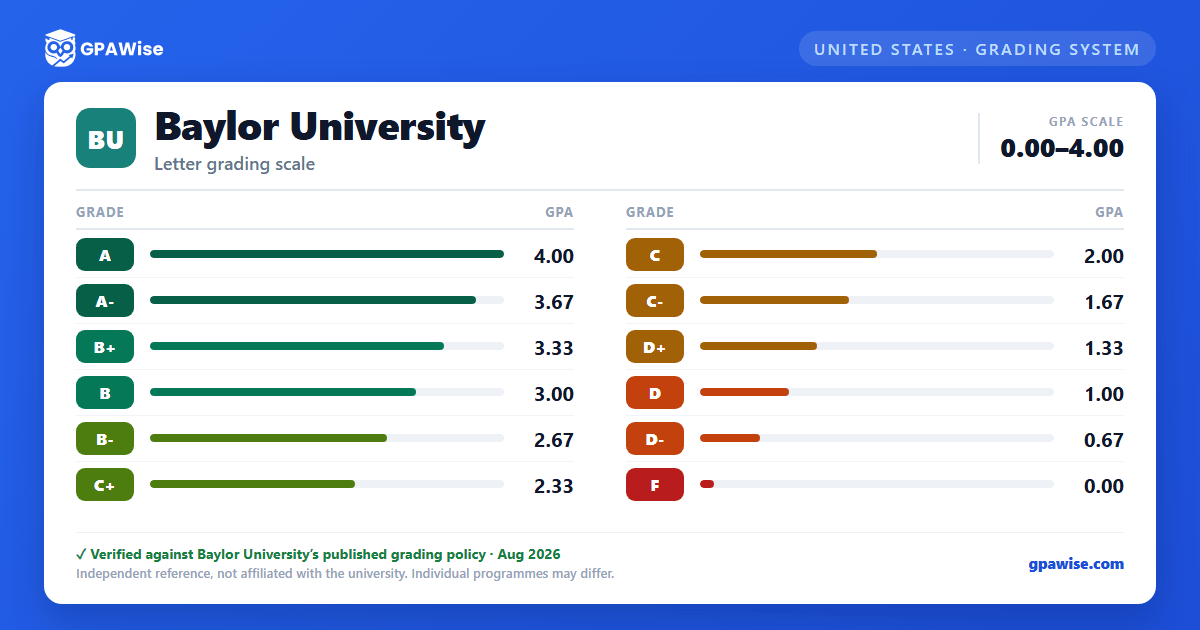
Baylor grades undergraduates on a 0.00–4.00 scale using a full plus/minus letter system from A through D-, in .33-point increments (A = 4.00 down to D- = 0.67), plus F = 0.00. Baylor does not award A+ — a plain A is the top grade, at 4.00.
GPA is calculated by dividing total grade points earned by total credits applied toward the GPA, and the result is truncated, not rounded, after the second decimal (for example, 1.99672 becomes 1.99).
Repeating courses and Academic Grade Forgiveness at Baylor
A course may be repeated if the highest grade earned was C- or below (or, with dean approval, to satisfy a prerequisite), up to a maximum of three attempts — a grade or a W notation each count as an attempt. Every grade earned at Baylor factors into the GPA unless forgiveness is applied.
Under Academic Grade Forgiveness, an undergraduate may exclude the first grade (C- or below) from up to three repeated courses from their GPA calculation. Excluded grades stay on the transcript, marked with an "E," but no longer count toward the GPA. Once applied, forgiveness cannot be cancelled or appealed.
Source: Baylor University 2026-2027 Undergraduate Catalog, Course Repetition and Academic Grade Forgiveness
Academic Notice, suspension, and dismissal at Baylor
A student is placed on Academic Notice when their term and/or cumulative GPA falls below 2.0 (4.0 scale), and is removed once both the term and cumulative GPA reach 2.0 or higher.
A student already on Academic Notice who earns another term GPA below 2.0 is subject to Academic Suspension — two enrollment terms for a first suspension, three for a second. A student who fails to reach a 2.0 term GPA after reinstatement from a second suspension may face permanent Academic Dismissal.
GPA and credit-hour requirements to graduate from Baylor
A Baylor undergraduate degree requires a minimum of 124 semester hours, including at least 36 hours of 3000-/4000-level coursework. A grade average of "C" or better must be maintained overall and in all major and minor fields, computed on hours attempted, not just completed.
At least 60 semester hours must be earned in residence at Baylor.
Latin honors and the Dean's List at Baylor
Graduating in residence, students qualify for Latin honors by GPA: Cum Laude (3.75), Magna Cum Laude (3.85), and Summa Cum Laude (3.95). Only Baylor residence credit counts toward these averages — credit by examination does not.
The Dean's List recognizes undergraduates with a semester GPA of 3.70 or higher, no grade below a "C," while enrolled in at least 12 graded semester hours. It is announced three times a year (Fall, Spring, Summer).
How transfer credit affects your Baylor GPA
Transfer coursework must earn a grade of "C" or better to transfer to Baylor (a "C-" doesn't qualify), and transferred coursework does not affect the Baylor GPA in any respect.
Up to 70 semester hours may transfer from a community/junior college, and at least 60 semester hours must be earned in residence at Baylor. After matriculating, a student may transfer at most 15 semester hours toward their degree, capped at 2 courses from any single course prefix.
Source: Baylor University 2026-2027 Undergraduate Catalog, Transfer Credit
Frequently asked questions
What grading scheme does Baylor University (BU) use?
Where does this BU grade scale come from?
Does Baylor award an A+ grade?
No. Baylor's Grading table tops out at a plain "A" worth 4.00 — there is no A+ at any point value.
Source: Baylor University 2026-2027 Undergraduate Catalog, Grading Policies (Grading table)
Is Baylor's GPA rounded?
No. Baylor truncates the GPA after the second decimal rather than rounding it — for example, 1.99672 becomes 1.99, not 2.00.
Does a D- grade count toward my Baylor GPA?
Yes. D- carries a grade point value of 0.67, is included in the GPA, and earns credit toward graduation — unlike a plain F, which counts in the GPA but earns no credit.
Source: Baylor University 2026-2027 Undergraduate Catalog, Grading Policies (Grading table)
