
Pass/No Pass Grading Option
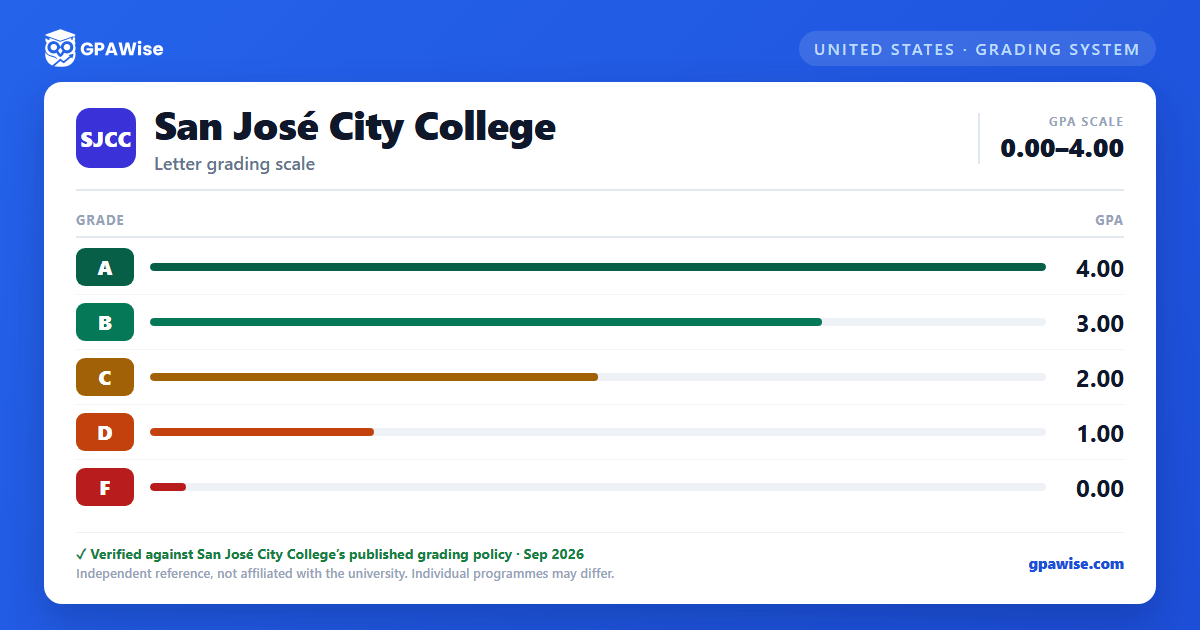
SJCC's grading policy adds "P" (Pass) and "NP" (No Pass) to the standard letter grades. Some courses are offered solely for a letter grade, some solely for P/NP, and some let a student choose between the two.
- Courses with an optional P/NP grade are marked with a plus sign (+) in the class schedule's credit column.
- A student must submit a Pass/No Pass Option form to Admissions and Records by the last day of the term; the choice may not be reversed afterward by either the student or the instructor.
- "P" is given for course work of "C" grade or better.
- "P" applies toward the 60 units required for graduation but does not affect GPA; "NP" does not apply toward graduation and does not affect GPA, though an excessive number of "NP" grades affects a student's academic progress ratio.
Source: Grades — SJCC 2026-2027 Catalog, Pass/No Pass Grades section — verified Sep 2026
GPA Calculation
GPA is calculated by dividing total grade points earned by total units attempted. Grades earned in non-degree-applicable courses are not used when calculating a student's degree-applicable GPA. All developmental courses are graded only "P" (Pass) or "NP" (No Pass); neither counts toward GPA.
Administrative symbols also excluded from GPA calculation: "W" (Withdrawal), "I" (Incomplete), "IP" (In Progress), and "RD" (Report Delayed) are never used in calculating grade point average, though an excessive number of "W" grades is used in progress-probation calculations.
Source: Grades — SJCC 2026-2027 Catalog, Academic Grade Point Average section — verified Sep 2026
Academic and Progress Probation
A student who has attempted at least 12 semester units and has a cumulative GPA below 2.0 is placed on Academic Probation I; failing to reach 2.0 the following semester moves the student to Academic Probation II, and failing again after that results in dismissal. A dismissed student may petition for readmission, which is evaluated by a counselor.
Progress Probation follows the same two-stage structure, but is based on the percentage of cumulative units graded "W", "NP", or "I": a student who has attempted 12 cumulative units is placed on Progress Probation I once 50% or more of those units carry such grades, moves to Progress Probation II if the percentage stays at or above 50% the next semester, and is dismissed if it remains there a further semester.
A student on either kind of probation returns to good standing once their cumulative GPA (or poor-progress percentage) recovers past the relevant threshold.
Source: Grades — SJCC 2026-2027 Catalog, Probation/Dismissal sections — verified Sep 2026
Credit by Examination
Students with equivalent knowledge and experience may petition for Credit by Examination in place of coursework, subject to Division Dean approval and a grade of "C" or better on the examination. Credit earned this way is capped at 12 semester units toward graduation, cannot be applied until the student has completed 12 other units of study at SJCC, and cannot duplicate a high school diploma requirement or a college course for which the student already received admission credit.
Source: Grades — SJCC 2026-2027 Catalog, Credit by Examination section — verified Sep 2026
Scholastic Honors
Students completing at least 6 units in a semester with a semester GPA of 3.50 or better are recognized on the semester grade report and transcript; optional "P"/"NP" grades exclude a student from this honor, but mandatory "P" grades do not, provided the student still earns at least 6 units of "A", "B", "C", or "D" grades that semester.
- Dean's List: cumulative GPA between 3.5 and 3.99.
- President's List: cumulative GPA of 4.0.
- Graduation with Honors: overall GPA between 3.5 and 4.0 across all units attempted at all accredited post-secondary institutions; students must have converted all optional "P"/"NP" grades to letter grades to qualify.
Source: Grades — SJCC 2026-2027 Catalog, Honors (Scholastic) / Dean's List / President's List / Honors at Graduation sections — verified Sep 2026
Transfer and Examination Credit Considerations
Unit limitations for Pass/No Pass grades may exist at transfer institutions. Credit awarded for Advanced Placement (AP) or International Baccalaureate (IB) exams based on minimum passing scores may be applied differently for the AA/AS degree than for transfer, so students are advised to consult a counselor; duplicate credit is not given for an AP/IB exam and the equivalent course taken at the college.
Source: Grades — SJCC 2026-2027 Catalog, Pass/No Pass Grades and Advanced Placement Examinations sections — verified Sep 2026
Frequently asked questions
What grading scheme does San José City College (SJCC) use?
Where does this SJCC grade scale come from?
What are SJCC's GPA rules?
Source: Grades — SJCC 2026-2027 Catalog, Academic Grade Point Average section — verified Sep 2026
What are SJCC's academic standing rules?
Source: Grades — SJCC 2026-2027 Catalog, Probation/Dismissal sections — verified Sep 2026
What does SJCC require to graduate?
Source: Grades — SJCC 2026-2027 Catalog, Credit by Examination section — verified Sep 2026
How are honors and awards decided at SJCC?
Source: Grades — SJCC 2026-2027 Catalog, Honors (Scholastic) / Dean's List / President's List / Honors at Graduation sections — verified Sep 2026
How does SJCC treat transfer credit?
Source: Grades — SJCC 2026-2027 Catalog, Pass/No Pass Grades and Advanced Placement Examinations sections — verified Sep 2026
