
Other Grade Designations
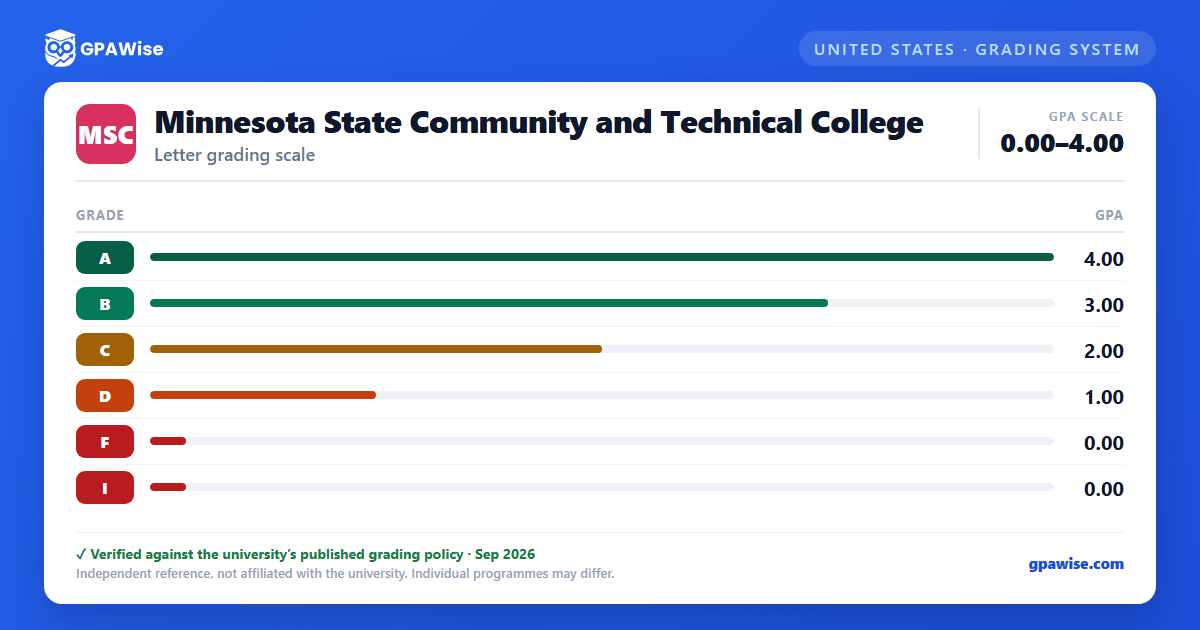
Beyond the standard A–F letter grades, M State uses several other grade designations. An unresolved Incomplete (I) carries a grade point value of 0 per credit hour, the same as a failing grade (F), until it is resolved.
- NC (No Credit), P (Pass), and CR (Credit by Examination) carry no grade point value and are not factored into GPA.
- AU (Audit), FN (Failure for Non-Attendance), FW (Failure to Withdraw), and W (Withdrawal) do not impact GPA.
- Z indicates a grade has not yet been submitted by the instructor.
Source: M State Grading Policy, effective Oct 1 2011, rev. Oct 26 2016 — verified Sep 2026
Frequently asked questions
What grading scheme does Minnesota State Community and Technical College use?
The university uses a letter-grade grading system on a 0.0–4.0 scale with 6 grade levels: A = 4.00, B = 3.00, C = 2.00, D = 1.00, F = 0.00, I = 0.00.
Where does this Minnesota State Community and Technical College grade scale come from?
From the university's official grading policy, published at minnesota.edu. The grade table on this page is the one the policy sets out, verified Sep 2026.
How do I convert semester GPA to cumulative GPA at Minnesota State Community and Technical College?
Your cumulative GPA is the credit-weighted average of your semester GPAs across every semester: (semester GPA₁ × credits₁ + … + semester GPAₙ × creditsₙ) ÷ (credits₁ + … + creditsₙ). Save each semester to the tracker on this page, by course or as a quick semester GPA + credits entry, and it works out your cumulative GPA on every save, edit and delete.
Is this Minnesota State Community and Technical College GPA calculator free, and is my data private?
Yes. GPAWise is free, with no signup, and your courses and saved semesters stay in your browser: nothing is sent to our servers. "Clear all tracker data" on the tracker wipes them at any time.
