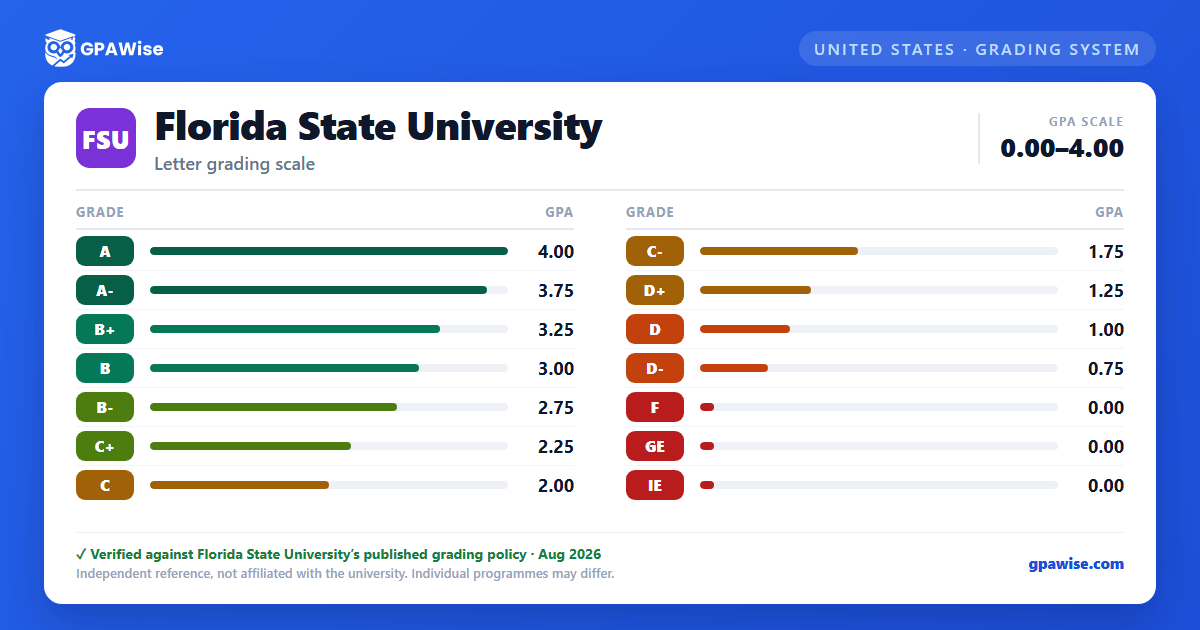

How grading works at FSU
FSU grades on a 4.00 scale with quarter-step plus/minus increments: A (4.00), A- (3.75), B+ (3.25), B (3.00), B- (2.75), C+ (2.25), C (2.00), C- (1.75), D+ (1.25), D (1.00), D- (0.75), and F (0.00). There is no A+ for the general undergraduate and graduate population — the only A+ FSU publishes is a College of Law-specific value (4.33), which does not apply outside Law.
Source: General Bulletin, Academic Regulations (Grading Practices: Grading System table) — verified Aug 2026
How your GPA is calculated at FSU
Quality points are assigned for each semester hour as listed in the grading table. Your GPA is the total number of quality points divided by the total number of credit hours for which letter grades were received.
If you repeat a course in which you earned a D or F, both the original and repeat grades are used in computing your GPA (only one attempt counts toward graduation credit).
Grades of S (Satisfactory) and U (Unsatisfactory) from the S/U elective option are not included in your GPA.
Source: General Bulletin, Academic Regulations (Grade Point Average; Satisfactory/Unsatisfactory Grading) — verified Aug 2026
Minimum GPA and academic probation at FSU
FSU requires a minimum 2.0 cumulative GPA for graduation, and students are expected to maintain at least a 2.0 at all times to remain in good standing. If your cumulative GPA falls below 2.0, you're placed on Academic Probation for your next term and must enroll in 12–15 letter-graded semester hours. Failing to return to good standing after a probationary term can lead to Academic Probation Continued (max two consecutive terms) and then dismissal.
Source: General Bulletin, Academic Regulations (Academic Standing and Retention Policies; Probation) — verified Aug 2026
Frequently asked questions
What grading scheme does Florida State University (FSU) use?
Where does this FSU grade scale come from?
Does FSU award an A+?
Not for undergraduate or graduate students. FSU's Grading System table lists an A+ at 4.33 quality points, but explicitly marks it "(Law only)" — it is a College of Law-specific value and does not appear anywhere in the general grading scale, which tops out at A = 4.00.
Source: General Bulletin, Academic Regulations (Grading Practices: Grading System table) — verified Aug 2026
Does FSU award a D-?
Yes. D- is worth 0.75 quality points in FSU's general grading scale, confirmed in both the University Registrar's Grading System table and the Transcript Legend.
Source: General Bulletin, Academic Regulations (Grading Practices: Grading System table) — verified Aug 2026
What happens to an Incomplete (I) or No Grade (NG) at FSU if it isn't resolved?
An unresolved Incomplete grade normally reverts to a default grade the instructor specifies in advance. If no default grade or expiration term was set, the incomplete expires to "IE" (Incomplete Expired) at the end of the next term of enrollment; an unresolved "No Grade Reported" similarly expires to "GE" (No Grade Expired). Both IE and GE "are considered final grades and will calculate as an F in the student's overall GPA" — they carry 0.00 quality points, the same as F.
Source: General Bulletin, Academic Regulations (Grading Practices; Incomplete Grade Policy) — verified Aug 2026
Does the Satisfactory/Unsatisfactory (S/U) option affect my GPA at FSU?
No. A course taken on the S/U basis and completed with an "S" counts toward your credit hours and graduation requirements but "will not be included in the grade point average." S and U carry no quality-point value.
Source: General Bulletin, Academic Regulations (Satisfactory/Unsatisfactory Grading) — verified Aug 2026
Does a Withdrawn (W or WD) grade affect my GPA at FSU?
No. Both "W" (Withdrawn while Passing) and "WD" (Withdrawn with Dean's Permission) carry no quality-point value and are not counted in your GPA. Note that students who simply stop attending without formally withdrawing "will be assigned grades of 'F' for each course" — which does count.
Source: General Bulletin, Academic Regulations (Grading Practices: Grading System table; Withdrawal Policies) — verified Aug 2026
Does FSU's College of Law or College of Medicine use a different grading scale?
Yes. The College of Law uses its own eighth-step scale (A+ 4.33, A- 3.67, B+ 3.33, B- 2.67, C+ 2.33, C- 1.67, D+ 1.33, D- 0.67) plus Law-specific administrative grades (AF, AD). The College of Medicine uses Honors Medicine (HM, 4.00) and Pass Medicine (PM, 3.00) in place of standard letter grades. Neither applies to undergraduate or standard graduate coursework.
Source: General Bulletin, Academic Regulations (Grading Practices: Grading System table) — verified Aug 2026
