
Other Grade Notations
Besides the letter grades that carry grade points, Santa Monica College records several notations that do not affect GPA:
- P (Pass) and NP (No Pass) — awarded on Pass/No Pass basis courses; units are awarded for P but not counted in the GPA, and no units or grade points are given for NP.
- W (Withdrawal), EW (Excused Withdrawal), and MW (Military Withdrawal) — excluded from units attempted and from the GPA calculation.
- I (Incomplete) — a temporary status for a student doing C (2.0) or better work who cannot finish the course for reasons beyond their control; no grade points are assigned until the Incomplete is made up (within one year), at which point the final grade's points apply.
- SP (Satisfactory Progress) — used only for noncredit courses and does not factor into the GPA.
Source: SMC Catalog 2026-2027, Academic Policies: Grades, Units, and Transcripts — verified Sep 2026
How Your GPA Is Calculated
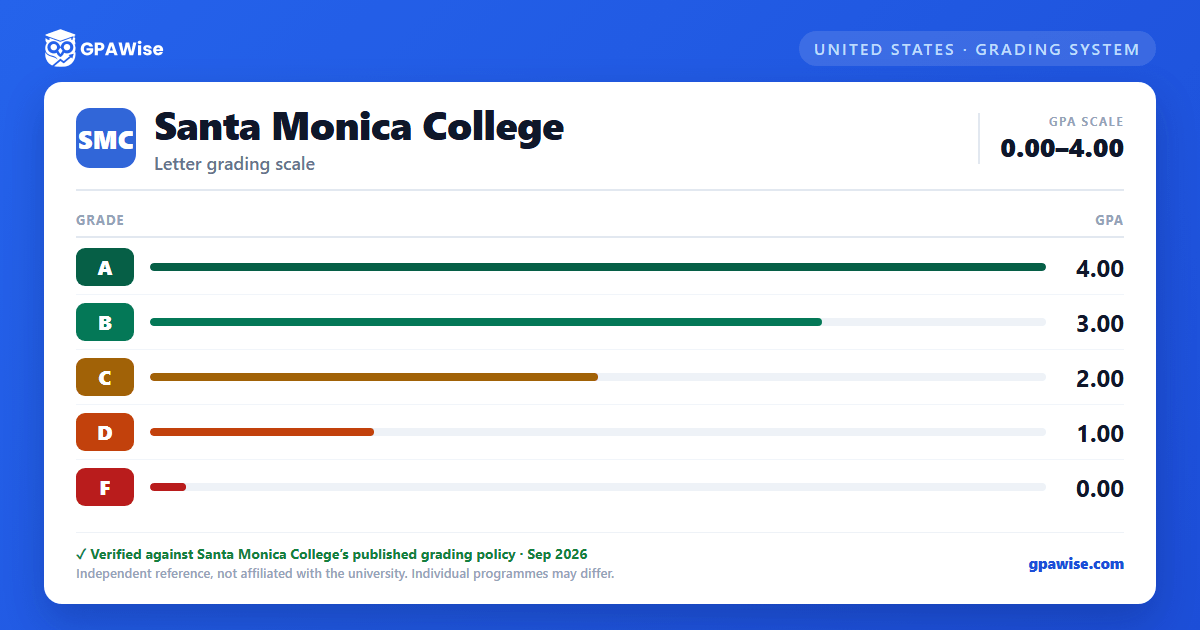
Your grade point average (GPA) is the sum of your grade points divided by your total "units attempted." Only units for classes graded A (4.0), B (3.0), C (2.0), D (1.0), or F (0.0) count toward units attempted and the GPA calculation.
Units are excluded from your GPA when a class is taken on a Pass/No Pass basis, or when the class is assigned a notation of W (Withdrawal), EW (Excused Withdrawal), MW (Military Withdrawal), or I (Incomplete). Course units taken under the Pass/No Pass option are capped at 14 cumulative transferable units, except for nontransferable and Pass/No Pass-only courses, which are not subject to that limit, and for students who already hold a Bachelor's degree, who may take an unlimited number of units on a Pass/No Pass basis.
Source: SMC Catalog 2026-2027, Academic Policies: Grades, Units, and Transcripts — verified Sep 2026
Frequently asked questions
What grading scheme does Santa Monica College (SMC) use?
Where does this SMC grade scale come from?
What are SMC's GPA rules?
Source: SMC Catalog 2026-2027, Academic Policies: Grades, Units, and Transcripts — verified Sep 2026
