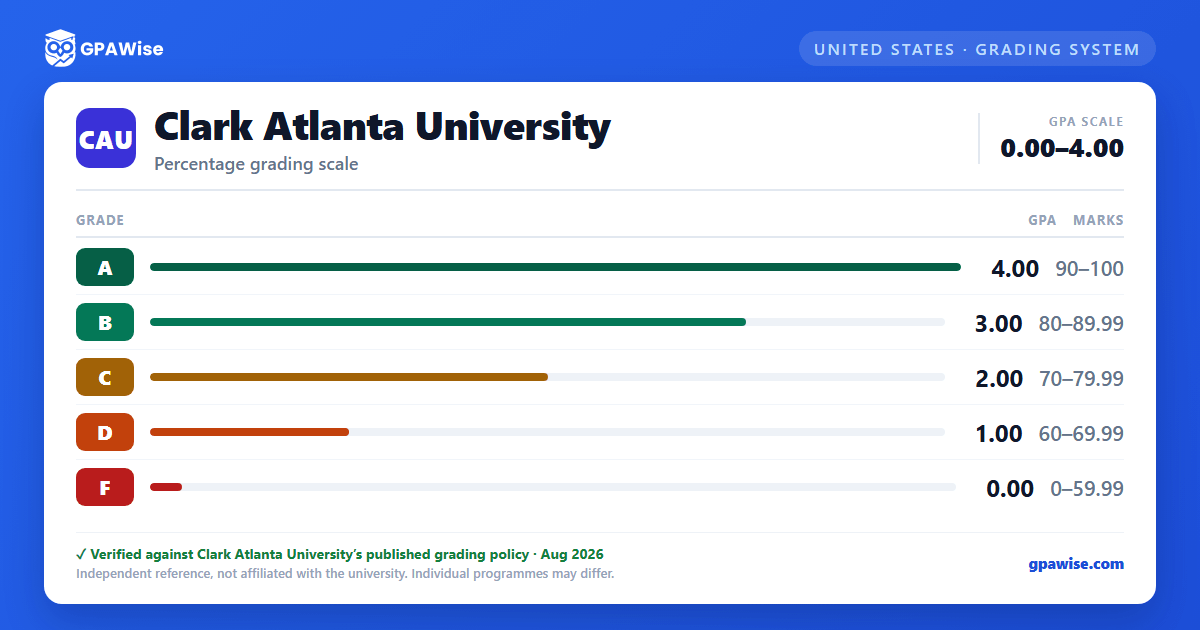

Grades and Quality Points
Coursework is evaluated with letter grades A through F, each carrying a quality point value used to compute the cumulative grade point average (GPA). Grades that carry no numerical value are not included in the GPA calculation.
Non-graded statuses include I (Incomplete), IP (In Progress), AU (Audit), HP (High Pass with course credit), P (Pass with course credit), W (Withdrew), WU (Withdrawal Unofficially), and XF (a non-transcript financial-aid status). HP and P apply specifically to the Honors Program Colloquium requirement, for which students earn credit hours but do not receive a letter grade.
Source: Course Grading System, Academic Support Services, 2024-2025 Undergraduate Catalog — verified Aug 2026
GPA Calculation and Repeated Courses
GPA is calculated by dividing the sum of quality points earned in courses graded A through F by the total number of graded course credits attempted.
When a course is repeated, the last final grade earned — whether higher or lower — becomes the grade of record used in the cumulative GPA. The original grade stays on the transcript, marked with the symbol "E" to show it was excluded and replaced by the later grade.
Final grades earned in summer sessions are included in the cumulative GPA of the preceding academic year.
Source: Grade Point Average (GPA), Academic Support Services, 2024-2025 Undergraduate Catalog — verified Aug 2026
Academic Standing
A minimum cumulative GPA of 2.0 is required for undergraduate students to maintain Good Academic Standing. Students earning below 2.0 for the first time are placed on Academic Warning (once only per matriculation).
A cumulative GPA below 2.0 in a later semester leads to Academic Probation, during which students must complete an Undergraduate Academic Seminar course. If the GPA is still below 2.0 the following term, the student is placed on Academic Suspension, eligible to reapply after one academic term; a third suspension results in expulsion with no eligibility for readmission.
Source: Academic Standing / Warning / Probation / Suspension, Academic Support Services, 2024-2025 Undergraduate Catalog — verified Aug 2026
GPA Requirements to Graduate
To graduate, undergraduate students must earn a minimum cumulative GPA of 2.0 across all courses, with minimum final grades of "C" in all major, cognate, and other required courses. Students pursuing a minor must also earn a minimum cumulative GPA of 2.0 in all courses required for that minor. A minimum of 122 credits is required for the degree.
Source: Grade Point Average (GPA), Graduation Requirements, Registration and Academic Records, 2024-2025 Undergraduate Catalog — verified Aug 2026
Dean's List, Honor Roll, and Latin Honors
Full-time students earn Dean's List recognition with a minimum 3.25 GPA in at least 12 credit hours in a term, no grade below "C," no incomplete grades, and no withdrawals. The Honor Roll recognizes students maintaining a minimum cumulative 3.25 GPA in 12 credits across two consecutive full-time terms under the same conditions.
Undergraduate Latin Honors, based on cumulative GPA after a minimum of 66 semester hours at the University: Cum Laude (3.25 up to 3.50), Magna Cum Laude (3.50 up to 3.80), Summa Cum Laude (3.80 and above).
Source: University Honors — Dean's List, Honor Roll, Graduation Honors, Registration and Academic Records, 2024-2025 Undergraduate Catalog — verified Aug 2026
Frequently asked questions
What grading scheme does Clark Atlanta University (CAU) use?
Where does this CAU grade scale come from?
What are CAU's GPA rules?
Source: Grade Point Average (GPA), Academic Support Services, 2024-2025 Undergraduate Catalog — verified Aug 2026
What are CAU's academic standing rules?
Source: Academic Standing / Warning / Probation / Suspension, Academic Support Services, 2024-2025 Undergraduate Catalog — verified Aug 2026
What does CAU require to graduate?
Source: Grade Point Average (GPA), Graduation Requirements, Registration and Academic Records, 2024-2025 Undergraduate Catalog — verified Aug 2026
How are honors and awards decided at CAU?
Source: University Honors — Dean's List, Honor Roll, Graduation Honors, Registration and Academic Records, 2024-2025 Undergraduate Catalog — verified Aug 2026
