
Non-Evaluative and Administrative Symbols
Beyond the letter grades used in GPA calculation, Chabot College records several administrative symbols that carry no grade-point value:
- I (Incomplete): assigned for unforeseeable emergencies, with the removal conditions and default letter grade documented in writing. It must be made up by the end of the following term (extensions require Chief Instructional Officer approval) and is never used in calculating units attempted or grade points.
- IP (In Progress): used only for coursework extending beyond the normal end of a term; replaced by an evaluative grade once the course is complete, and never used in GPA calculation.
- RD (Report Delayed): a temporary placeholder used only when grade reporting is delayed for reasons beyond the student's control; not used in GPA calculation.
- W (Withdrawal): authorized through the end of the 14th week of instruction (or 75% of the term, whichever is less); no notation appears for a withdrawal in the first 4 weeks (or 30% of the term, whichever is less). A student may not accumulate more than three W's in the same course across colleges within the district without petitioning the Chief Instructional Officer to re-enroll.
- MW (Military Withdrawal) and EW (Excused Withdrawal): used for military orders or documented circumstances beyond the student's control; neither counts toward the three-withdrawal limit, enrollment attempts, or progress-probation calculations.
Source: AP 4230, Chabot-Las Positas CCD (district administrative procedure). — verified Aug 2026
How GPA Is Calculated
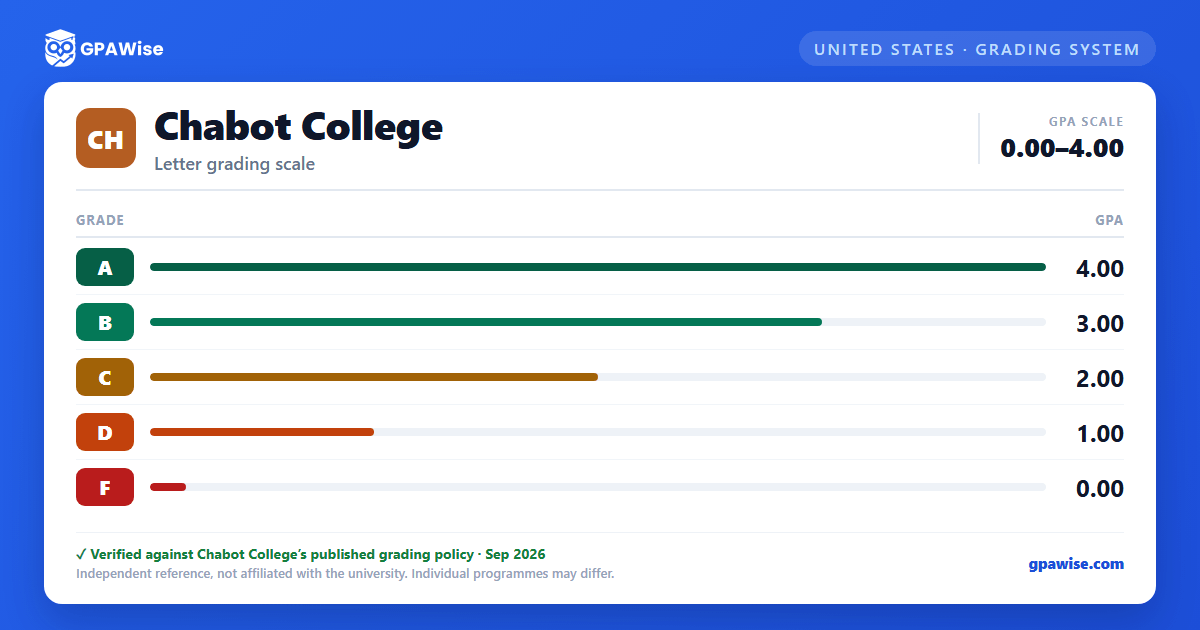
Grade point average is calculated as total grade points divided by total units attempted, and may range from 0.0 to 4.0.
Only the evaluative letter grades A, B, C, D, and F carry grade points and count toward the GPA. P (Pass), NP (No Pass), and W (Withdrawal) receive no grade-point value and are excluded from the calculation; SP (Satisfactory Progress) applies only to noncredit courses and is likewise excluded.
Source: Formula and exclusions: AP 4230 (district); 0.0-4.0 range stated explicitly on the Transfer Center corroborating page. — verified Aug 2026
Withdrawals and Probation
The "W" symbol, though excluded from GPA calculation, is used in determining academic probation and dismissal under Title 5 Section 55024. Military Withdrawal ("MW") and Excused Withdrawal ("EW") are explicitly excluded from progress-probation and dismissal calculations.
Source: AP 4230, Chabot-Las Positas CCD. — verified Aug 2026
Transfer GPA Recalculation and Prior-Learning Credit
The UC and CSU systems each recompute GPA from a Chabot transcript under their own rules when a course with a substandard grade (D or F) is repeated. UC counts only the most recent grade when the repeat is at the same institution, but counts both grades if the original substandard grade was earned at a UC campus and the repeat was taken at a non-UC campus. CSU counts only the most recent grade when the repeat is "at the same college," but counts both grades if repeated at another college, unless the transcript shows academic forgiveness.
Credit for prior learning -- International Baccalaureate, College Level Examination Program, Advanced Placement, or another assessed prior-learning experience -- may be granted where the college determines it satisfies standards comparable to its own baccalaureate or general-education coursework, per discipline-specific faculty-approved standards.
Source: Repeat-grade rules: Transfer Center page. Prior-learning credit sentence: AP 4230 (district). — verified Aug 2026
Frequently asked questions
What grading scheme does Chabot College use?
Where does this Chabot College grade scale come from?
What are Chabot College's GPA rules?
Source: Formula and exclusions: AP 4230 (district); 0.0-4.0 range stated explicitly on the Transfer Center corroborating page. — verified Aug 2026
What are Chabot College's academic standing rules?
Source: AP 4230, Chabot-Las Positas CCD. — verified Aug 2026
How does Chabot College treat transfer credit?
Source: Repeat-grade rules: Transfer Center page. Prior-learning credit sentence: AP 4230 (district). — verified Aug 2026
