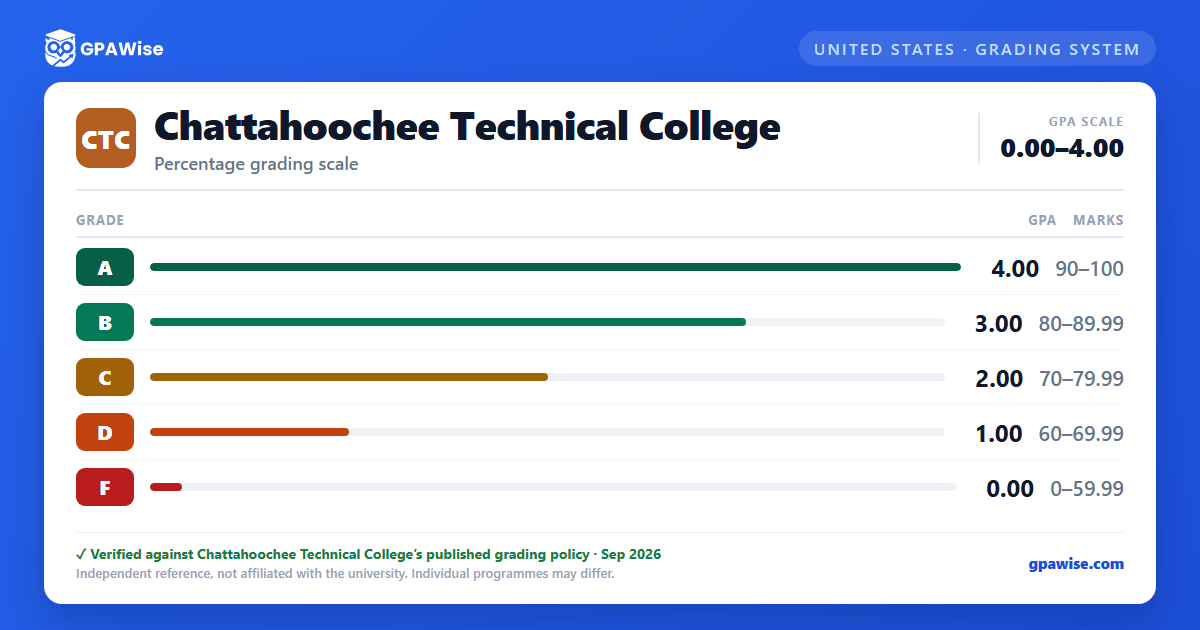
How GPA Is Calculated
Semester GPA is computed by dividing the number of credit hours attempted in courses graded A, B, C, D, or F into the number of quality points earned on those hours (quality points = credit hours × grade value, where A=4, B=3, C=2, D=1, F=0). Transfer credit, articulated credit, and exemption credit are not calculated in the GPA.
Source:
General Catalog 2026-2027, Grading System > Grade Point Average (GPA) — verified Aug 2026
Academic Standing
Students are considered to be in academic good standing if they maintain a cumulative grade point average of 2.0 or higher.
The first time a student earns a semester GPA below 2.0 and also has a cumulative GPA below 2.0, they are placed on academic warning. A student who does not earn a semester GPA of 2.0 or higher while on academic warning is placed on academic probation. A student on academic probation whose semester and cumulative GPAs are both below 2.0 is placed on academic suspension; to return, the student must complete the readmit form.
Source:
General Catalog 2026-2027, Grading System > Academic Standing — verified Aug 2026
GPA Requirement for Graduation
Graduation requires a program grade point average of 2.0.
Source:
General Catalog 2026-2027, Student Records and Registration > Graduation — verified Aug 2026
Transfer Credit
Transfer credit (grade symbol TR) is assigned when courses with a grade of C or better are accepted as college credit from another regionally accredited postsecondary institution or any Technical College System of Georgia college. Articulated credit (AC) is assigned for coursework accepted from an accredited Georgia high school. Neither is calculated in the GPA.
Source:
General Catalog 2026-2027, Grading System page (TR/AC symbol definitions) — verified Aug 2026
Frequently asked questions
Can I save my semesters and track my CGPA at CTC?
Yes. After you calculate a semester's GPA, click "Save as semester" to add it to the built-in CGPA tracker, which then computes your cumulative GPA across every saved semester using the standard weighted formula (Σ SGPA × credits ÷ Σ credits). You can save semesters by course (full breakdown) or quick-add a past semester with just the SGPA and credit hours. Locking, renaming, and deleting saved semesters are all supported, and the tracker shows a running CGPA plus a trend arrow versus your previous semester.
How do I convert SGPA to CGPA at CTC?
Your CGPA is the credit-weighted average of every semester's SGPA. The formula is: CGPA = (SGPA₁ × credits₁ + SGPA₂ × credits₂ + … + SGPAₙ × creditsₙ) ÷ (credits₁ + credits₂ + … + creditsₙ). On this page, add each semester to the CGPA tracker (either by course or as a quick SGPA + credit-hours entry) and the calculator runs the conversion for you on every save, edit, and delete — no manual arithmetic required.
Can I add past semester GPAs without entering every course?
Yes. On the My CGPA Tracker tab, click "Add semester" and choose the quick-add option. You enter just the SGPA and the credit hours for that semester — no course-by-course breakdown required. It works as a GPA calculator with previous semesters support, or as a GPA calculator without course details when you only remember the SGPA from your transcript. Quick-added and course-by-course semesters can be mixed freely; both contribute to your CGPA using the same credit-weighted formula.
Is my CGPA tracker data sent to your servers?
No. Your saved semesters are stored locally in your browser only — nothing is transmitted to GPAWise. A "Clear all tracker data" button is always available on the tracker tab to wipe the data on demand.
Is this Chattahoochee Technical College (CTC) GPA calculator free?
Yes — GPAWise is completely free to use. There's no signup, no paywall, and your inputs stay in your browser.