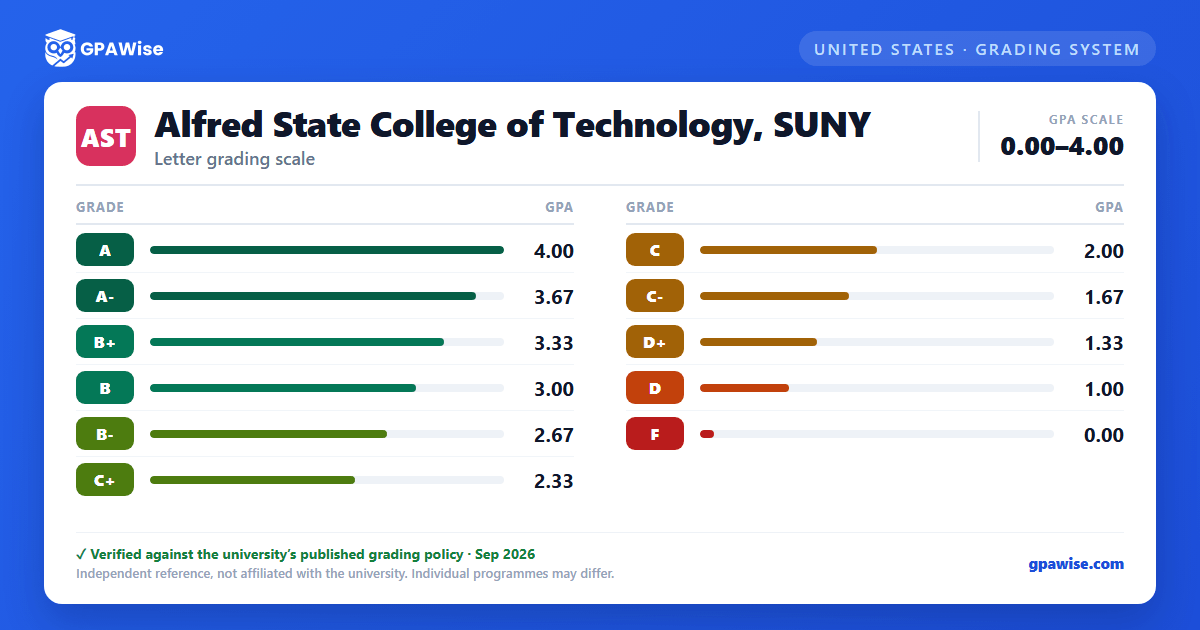

How the Index (GPA) Is Calculated
Only courses completed at Alfred State for which a grade of "A" through "F" is earned count toward a student's index. All other grade designations (audits, withdrawals, incompletes, pass/fail, transfer and challenge credit, etc.) appear on the transcript but are not used in the calculation.
- The semester index is the total honor points earned divided by the total credit hours completed that semester.
- The cumulative index is the total honor points earned divided by the total credit hours completed at the college.
- When a course is repeated, its credit hours are counted only once, and the honor points from the highest grade earned are the ones used in the cumulative index.
Source: Alfred State College Academic Regulations Sec. 304, 2025-2026 catalog
Transfer Credit and the GPA
Credits transferred in from another institution are not included in the calculation of a student's index. Courses taken at another college after leaving Alfred State may replace comparable courses already completed there (up to 12 credit hours, within seven years of leaving), which removes the original course from the index calculation.
On an internal transfer between degree programs, grades from the previous major (including "F" grades) generally carry into the new major's GPA; "F" and "D" grades that could not have satisfied a requirement in the new major may be excluded, unless the student has already completed a degree at the college.
Source: Alfred State College Academic Regulations Sec. 305.2-305.5, 2025-2026 catalog
Frequently asked questions
What grading scheme does Alfred State College of Technology, SUNY use?
Where does this Alfred State College of Technology, SUNY grade scale come from?
What are Alfred State College of Technology, SUNY's GPA rules?
Source: Alfred State College Academic Regulations Sec. 304, 2025-2026 catalog
How does Alfred State College of Technology, SUNY treat transfer credit?
Source: Alfred State College Academic Regulations Sec. 305.2-305.5, 2025-2026 catalog
