
How grading works at UOW
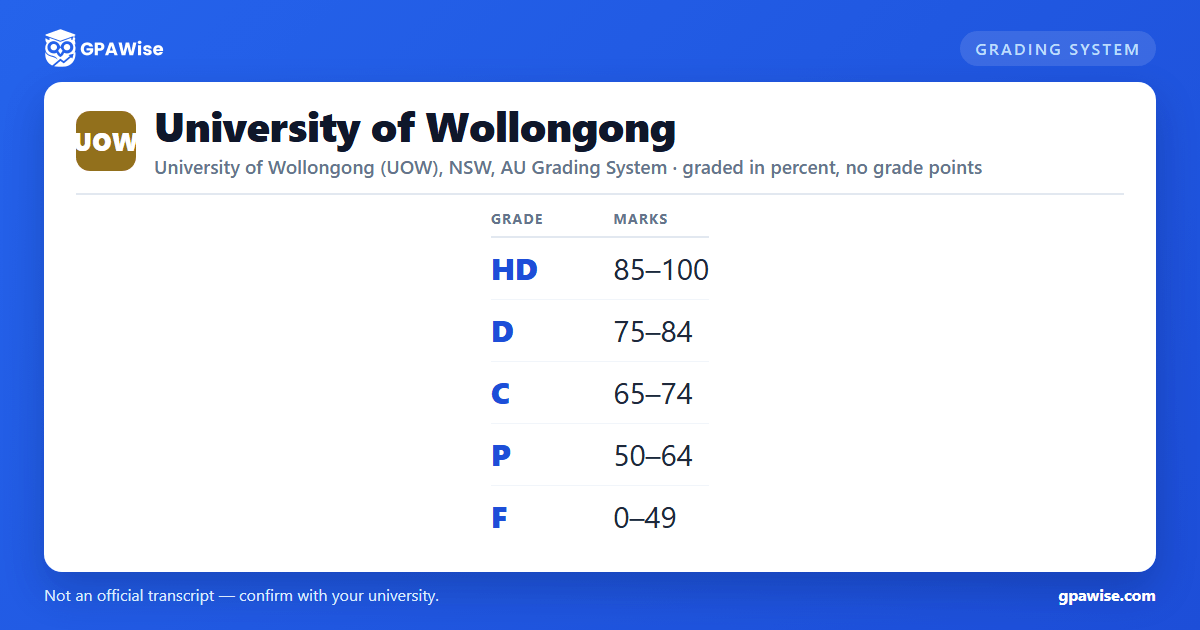
UOW grades subjects on a five-band scale of High Distinction (HD), Distinction (D), Credit (C), Pass (P) and Fail (F), expressed as percentage marks on a university-wide 0-100 scale: HD 85-100, D 75-84, C 65-74, P 50-64, F 0-49. UOW's Assessment and Feedback Policy states that results use criterion-referenced grading rather than grading on a normal distribution curve.
A handful of additional pass/fail outcomes sit outside this numeric scale: Technical Fail (TF) for a subject where a required minimum-performance ('hurdle') component wasn't met despite an otherwise satisfactory overall mark, and Satisfactory (S) / Unsatisfactory (U) for subjects assessed only as pass/fail (with an Excellent (E) grade available in place of S for some Graduate Medicine subjects).
Source: Assessment and Feedback Policy, Schedule 1 'UOW Grade Descriptors', clauses 90-92 and 124-125 — verified Aug 2026
UOW uses a WAM, not a GPA
UOW does not calculate or publish a Grade Point Average. Instead it uses a Weighted Average Mark (WAM): WAM = (sum of each subject's mark x its credit points) / (total credit points). Fail grades count toward the WAM at their actual mark, and a Technical Fail (TF) is entered as 49 for WAM purposes. All subjects attempted at UOW count toward the WAM, including credit transferred from other courses within UOW; results from subjects completed at other institutions do not.
Where a student passes a subject via supplementary assessment, their subject mark is fixed at exactly 50 (grade Pass Supplementary, PS) regardless of the mark achieved in the supplementary attempt; if the composite mark stays below 50, the original mark and a Fail grade stand.
Source: Weighted average mark calculations (WAM), uow.edu.au/student/admin/wam/; Assessment and Feedback Policy clauses 101-106 — verified Aug 2026
Maintaining satisfactory course progress at UOW
To satisfy course progress requirements, UOW students must pass more than 50% of the credit points they are enrolled in during each study period. Full detail on the consequences of not meeting this requirement sits in UOW's Course Progress Policy.
Source: Results page ('Maintaining satisfactory course progress'), uow.edu.au/student/exams/results/ — verified Aug 2026
Graduating with distinction at UOW
Pass Bachelor and Master's-by-coursework students are eligible to graduate 'with distinction' if their final WAM is 75 or above (WAMs are not rounded up, so a WAM of 74.6 does not qualify). Undergraduate students must have completed at least 50% of their course at UOW, and postgraduate students at least 66%, to be eligible; double degrees are assessed for distinction separately under each degree. A degree with more than 50% of its credit points graded Satisfactory/Unsatisfactory is not eligible for the award. The same WAM calculation is also used to assess eligibility to apply for a Law School Honours program.
Source: Weighted average mark calculations (WAM), uow.edu.au/student/admin/wam/ — verified Aug 2026
How transferred and external credit affects the WAM
Credit points transferred from another course within UOW count toward a student's WAM. Grades from subjects completed at other institutions do not count toward the UOW WAM and should not be included in a WAM calculation.
Source: Weighted average mark calculations (WAM), uow.edu.au/student/admin/wam/ — verified Aug 2026
Frequently asked questions
Can I save my semesters and track my average at UOW?
Can I add past semesters without entering every course?
Is my tracker data sent to your servers?
Is this University of Wollongong (UOW) GPA calculator free?
Does UOW use a GPA?
No. UOW does not calculate or publish a Grade Point Average. Instead it uses a Weighted Average Mark (WAM), calculated directly from your 0-100 subject marks weighted by credit points, not from grade points.
Source: Weighted average mark calculations (WAM), uow.edu.au/student/admin/wam/ — verified Aug 2026
What are UOW's grade bands?
High Distinction (HD) 85-100, Distinction (D) 75-84, Credit (C) 65-74, Pass (P) 50-64, and Fail (F) 0-49. These five bands cover the full 0-100 mark range with no gaps.
Source: Assessment and Feedback Policy, Schedule 1 'UOW Grade Descriptors' — verified Aug 2026
What WAM do I need to graduate with distinction at UOW?
A final WAM of 75 or more (not rounded up) makes you eligible to graduate with distinction, provided you've completed at least 50% of an undergraduate degree, or 66% of a postgraduate degree, at UOW.
Source: Weighted average mark calculations (WAM), uow.edu.au/student/admin/wam/ — verified Aug 2026
What happens to a Technical Fail (TF) in my WAM?
A Technical Fail carries no numeric mark on your record, so UOW enters a fixed mark of 49 for it when calculating your WAM.
Source: Results page ('Legend of grades'), uow.edu.au/student/exams/results/ — verified Aug 2026
