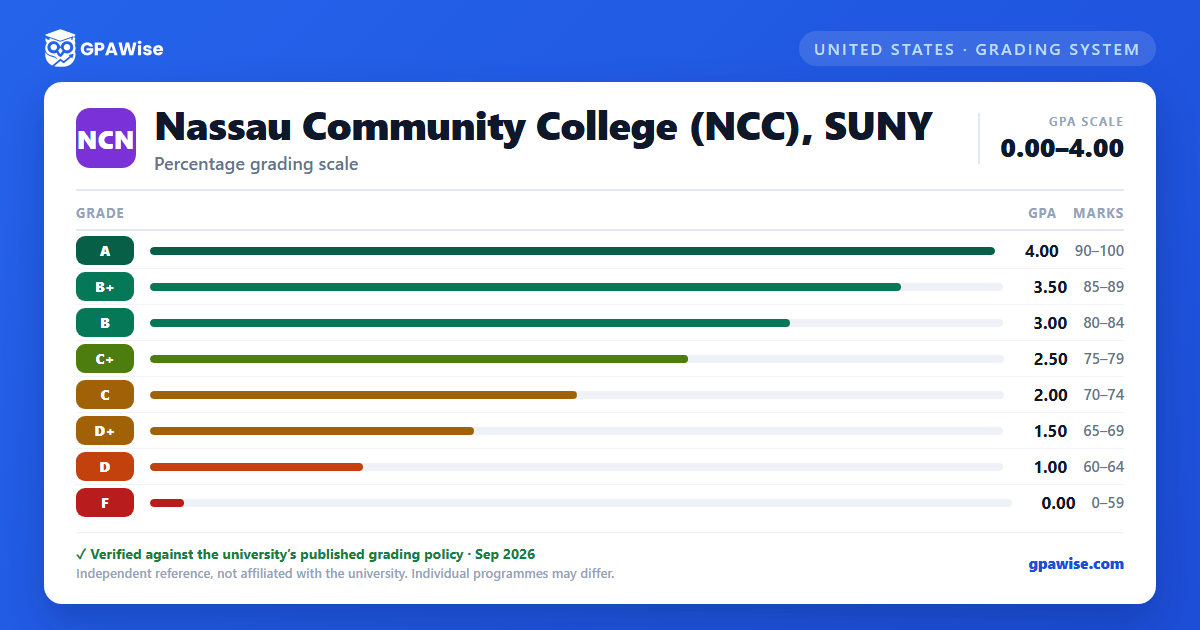
Each letter grade carries a numerical Quality Point value; your GPA is the total quality points earned divided by the total credits attempted.
- Transfer credit is awarded but the transfer grade is not computed into your grade point average.
- When you repeat a course, both the original and repeat grades stay on the transcript, but only the last completion mark counts toward your GPA.
- Grades of W, WU, INC, NA, NG, S, U and UU carry no quality points and do not affect your GPA.
To remain in good academic standing, your cumulative GPA must meet these minimums: 1.7 with 1-14 credits attempted, 1.8 with 15-29 credits attempted, 1.9 with 30-47 credits attempted, and 2.0 with 48 or more credits attempted.
Falling below the minimum for the first time keeps you in good standing but limits you to 14 credits the next semester. If your average is still below the minimum after that semester, you are placed on academic probation and restricted to part-time attendance (fewer than 12 credits). Cumulative GPA is reviewed at the end of the spring semester, and students still below the minimum are academically dismissed.
A previously dismissed student who is readmitted avoids dismissal again by maintaining a GPA of 2.00 or higher in courses taken since readmission.
Can I save my semesters and track my CGPA at Nassau Community College (NCC), SUNY?
Yes. After you calculate a semester's GPA, click "Save as semester" to add it to the built-in CGPA tracker, which then computes your cumulative GPA across every saved semester using the standard weighted formula (Σ SGPA × credits ÷ Σ credits). You can save semesters by course (full breakdown) or quick-add a past semester with just the SGPA and credit hours. Locking, renaming, and deleting saved semesters are all supported, and the tracker shows a running CGPA plus a trend arrow versus your previous semester.
How do I convert SGPA to CGPA at Nassau Community College (NCC), SUNY?
Your CGPA is the credit-weighted average of every semester's SGPA. The formula is: CGPA = (SGPA₁ × credits₁ + SGPA₂ × credits₂ + … + SGPAₙ × creditsₙ) ÷ (credits₁ + credits₂ + … + creditsₙ). On this page, add each semester to the CGPA tracker (either by course or as a quick SGPA + credit-hours entry) and the calculator runs the conversion for you on every save, edit, and delete — no manual arithmetic required.
Can I add past semester GPAs without entering every course?
Yes. On the My CGPA Tracker tab, click "Add semester" and choose the quick-add option. You enter just the SGPA and the credit hours for that semester — no course-by-course breakdown required. It works as a GPA calculator with previous semesters support, or as a GPA calculator without course details when you only remember the SGPA from your transcript. Quick-added and course-by-course semesters can be mixed freely; both contribute to your CGPA using the same credit-weighted formula.
Is my CGPA tracker data sent to your servers?
No. Your saved semesters are stored locally in your browser only — nothing is transmitted to GPAWise. A "Clear all tracker data" button is always available on the tracker tab to wipe the data on demand.
Is this Nassau Community College (NCC), SUNY GPA calculator free?
Yes — GPAWise is completely free to use. There's no signup, no paywall, and your inputs stay in your browser.