
Special Grades and GPA Treatment
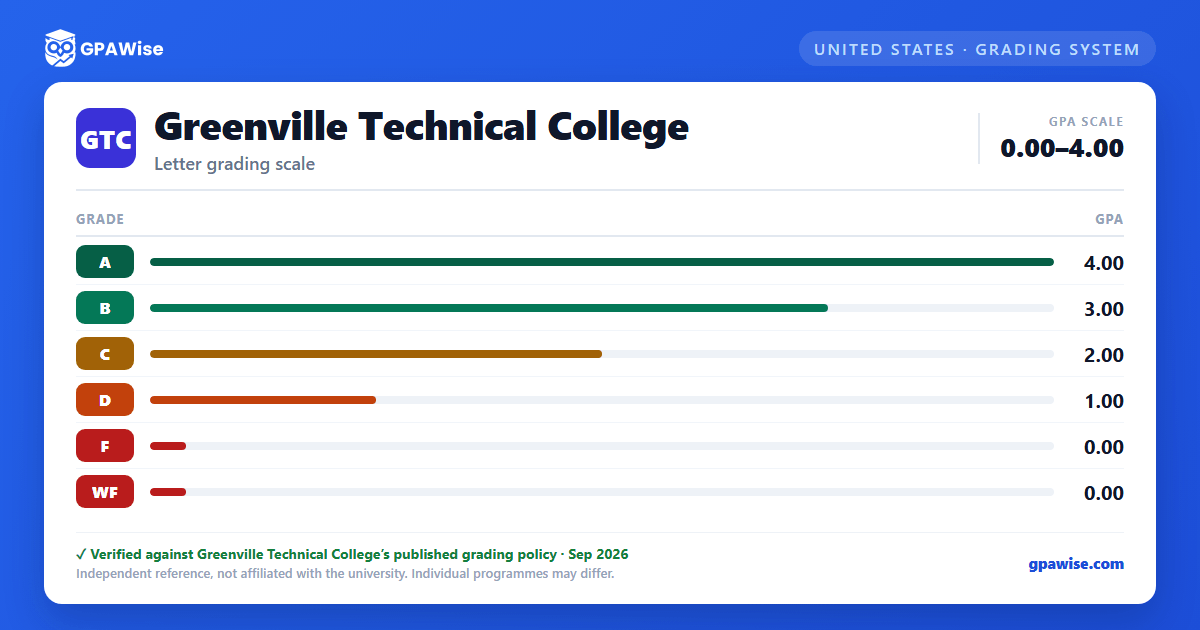
Several notations beyond the standard letter grades appear on Greenville Tech transcripts. Most carry no grade points and are not used in GPA calculations: AU (Audit), I (Incomplete), MI (Military Incomplete), NP (Pass/Nonpass option, in lieu of a D or F), NR (No Report), P (Pass/Nonpass option, in lieu of an A, B or C), S (Satisfactory, equivalent to C or higher), U (Unsatisfactory, equivalent to D or F), W (Withdrawn) and WA (Administrative System Withdrawal).
WF (Withdrawn Failing) is the exception: although it earns no credit, a grade point of zero per credit hour is used to calculate GPA — the same as an F. WF is assigned when a student is withdrawn for attendance or for a policy violation after the last day to withdraw.
The Office of Financial Aid may compute grade point averages differently from academics for Satisfactory Academic Progress purposes.
Source: Student Handbook and Catalog 2026-2027, Academic Policies, "Other Grades Used" — verified Aug 2026
Repeating a Course
Students may register for a course a maximum of two times. All grades, including D, F, W, WA and WF, count toward this two-attempt maximum. A third attempt requires approval from the appropriate department head or academic program director. Regardless of attempts, federal financial aid covers no more than 30 attempted hours of developmental coursework, including ENG/MAT co-requisite courses.
Source: Student Handbook and Catalog 2026-2027, Academic Policies, "Repeating a Course" — verified Aug 2026
Academic Standing Progression
A student ending a semester with a cumulative GPA of 2.0 or higher is in Good Standing. Falling below 2.0 places a student on Academic Notice, with a success coach recommended. Failing to reach a cumulative 2.0 the next enrolled semester moves the student to Academic Alert (advisor-required registration, 9-credit-hour recommended limit), then to Academic Recovery (Center for Student Advocacy support, 8-credit-hour recommended limit, or a voluntary semester off). A student on Academic Recovery who still fails to reach a cumulative 2.0 the next enrolled semester is placed on Academic Suspension and may not enroll the following semester.
Source: Student Handbook and Catalog 2026-2027, Academic Policies, Good Standing / Academic Notice / Academic Alert / Academic Recovery / Academic Suspension — verified Aug 2026
GPA Requirement for Graduation
A cumulative grade point average of at least 2.0 must be maintained in all college work presented to fulfill the requirements of a certificate, diploma or associate degree program. Specific credit and course requirements vary by program; refer to the individual program listing in the catalog.
Source: Student Handbook and Catalog 2026-2027, Academic Policies, graduation requirements — verified Aug 2026
Dean's List, President's List and Honor Graduates
Dean's List — full-time students earning at least 12 semester credit hours in 100-level courses and above, or part-time students earning 6-11 such hours, with a term GPA of at least 3.4 and no grade lower than "C".
President's List — students earning at least 12 semester credit hours in 100-level courses and above with a term GPA of 4.0.
Honor Graduates — any student graduating with a cumulative program GPA of 3.4 or higher.
Source: Student Handbook and Catalog 2026-2027, Academic Policies, Dean's List / President's List / Honor Graduates — verified Aug 2026
Transfer Credit
Greenville Tech may accept comparable course-to-course transfer credit based on demonstrated learning competencies consistent with its own courses, programs and credit requirements. All transfer credit must be supported by an official transcript — bearing the issuing institution's seal, current date and signatures, sent directly to Greenville Tech (or via a system-generated electronic transcript such as Parchment Exchange) — from a regionally accredited post-secondary institution or by special agreement. Transfer credit is recorded as a TR grade, awarded only for coursework completed with a grade of C or higher, and is not used in GPA calculations.
Source: Student Handbook and Catalog 2026-2027, Academic Policies, "Transfer Credit" and "Other Grades Used" (TR) — verified Aug 2026
