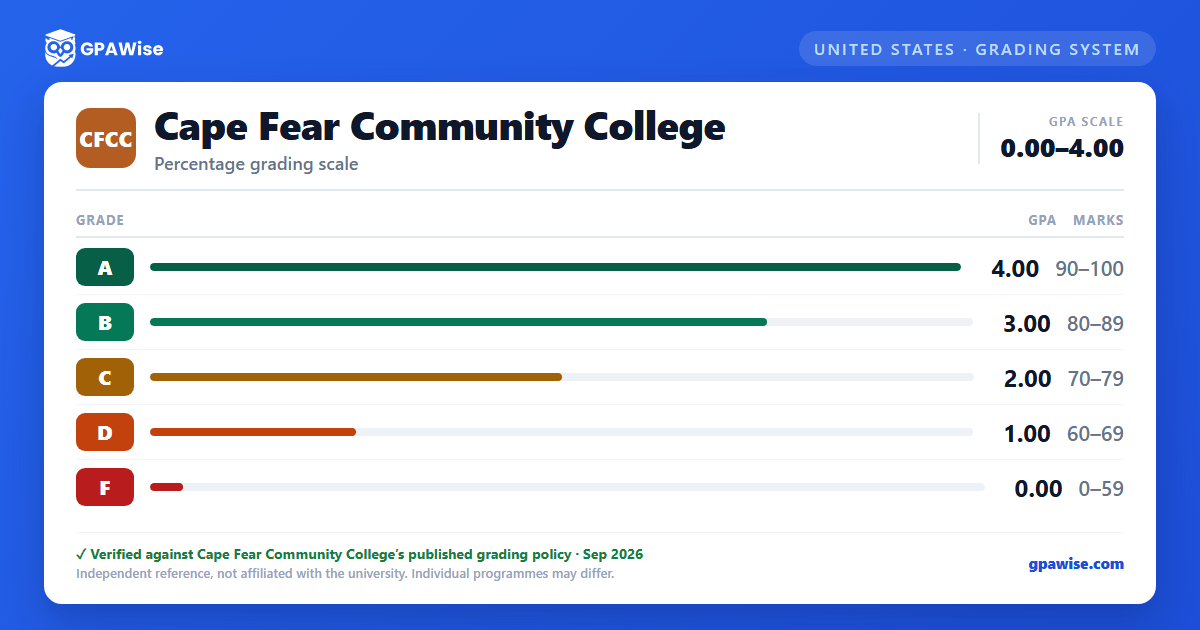
Grading System
CFCC grades using the traditional "A" through "F" method, with each letter assigned a numerical grade value used to compute GPA. Beyond the standard letter grades, the College also uses a set of non-GPA administrative codes — including I (Incomplete), W (Official Withdrawal), AU (Audit), SR (Senior Audit), CR (Credit by Proficiency Exam), CT (Credit by Transfer), and NS (No Show) — that carry no grade value and do not affect GPA, as well as two unofficial-withdrawal failure codes, XF and NC, which are counted as a failing grade in GPA calculations.
Some program-specific courses may use a different grading scale due to accreditation requirements; students should consult the course syllabus for those courses.
Source:
CFCC Catalog, Grades policy page — verified Aug 2026
GPA Calculation, Course Repeats, and Academic Forgiveness
Term and cumulative GPA are computed by multiplying each course's credit hours by its grade value to get quality points, then dividing total quality points by total credit hours attempted.
When a course is repeated, only the highest grade earned is used in the GPA calculation; lower grades are removed from the GPA but remain visible on the academic transcript. Courses graded C or better may be repeated up to two times; courses graded D, F, W, WP, XF, or WF may be repeated until successfully completed.
Returning students with at least three terms of non-enrollment may apply for Academic Forgiveness after earning a term GPA of 2.0 or higher in their first six semester hours back. If approved, the student's cumulative GPA is recalculated with F, XF, WF, and NC grades disregarded (D grades may also be forgiven if the course cannot be retaken). Academic Forgiveness can be used only once per academic career and is not reversible; forgiven grades remain visible on the transcript marked as forgiven, and courses already applied toward an awarded credential are not eligible.
Source:
CFCC Catalog, Grades policy page — verified Aug 2026
Frequently asked questions
Can I save my semesters and track my CGPA at CFCC?
Yes. After you calculate a semester's GPA, click "Save as semester" to add it to the built-in CGPA tracker, which then computes your cumulative GPA across every saved semester using the standard weighted formula (Σ SGPA × credits ÷ Σ credits). You can save semesters by course (full breakdown) or quick-add a past semester with just the SGPA and credit hours. Locking, renaming, and deleting saved semesters are all supported, and the tracker shows a running CGPA plus a trend arrow versus your previous semester.
How do I convert SGPA to CGPA at CFCC?
Your CGPA is the credit-weighted average of every semester's SGPA. The formula is: CGPA = (SGPA₁ × credits₁ + SGPA₂ × credits₂ + … + SGPAₙ × creditsₙ) ÷ (credits₁ + credits₂ + … + creditsₙ). On this page, add each semester to the CGPA tracker (either by course or as a quick SGPA + credit-hours entry) and the calculator runs the conversion for you on every save, edit, and delete — no manual arithmetic required.
Can I add past semester GPAs without entering every course?
Yes. On the My CGPA Tracker tab, click "Add semester" and choose the quick-add option. You enter just the SGPA and the credit hours for that semester — no course-by-course breakdown required. It works as a GPA calculator with previous semesters support, or as a GPA calculator without course details when you only remember the SGPA from your transcript. Quick-added and course-by-course semesters can be mixed freely; both contribute to your CGPA using the same credit-weighted formula.
Is my CGPA tracker data sent to your servers?
No. Your saved semesters are stored locally in your browser only — nothing is transmitted to GPAWise. A "Clear all tracker data" button is always available on the tracker tab to wipe the data on demand.
Is this Cape Fear Community College (CFCC) GPA calculator free?
Yes — GPAWise is completely free to use. There's no signup, no paywall, and your inputs stay in your browser.