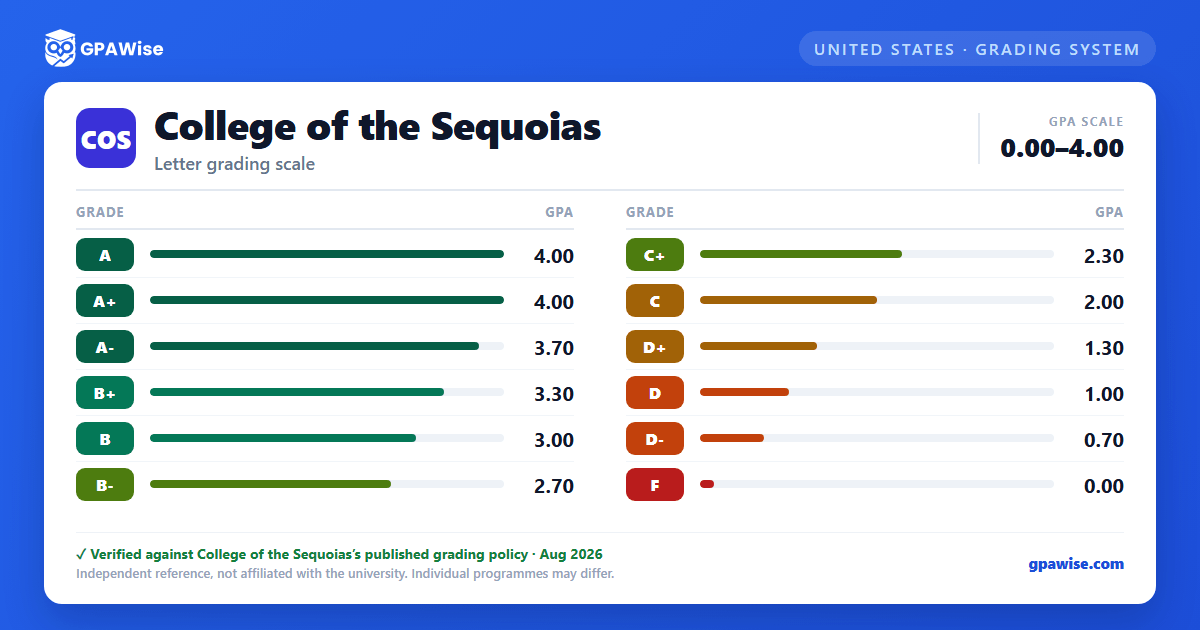

How COS Grading Works
College of the Sequoias measures course work in units (quantity) and grade points (quality). Individual faculty members may choose to use plus/minus grading and announce their choice at the start of each semester, so not every course uses the full A+ through D- range.
By California Education Code, no grade may be worth more than 4.0 in the GPA calculation, so an A+ is notated on the transcript but carries the same 4.0 grade-point value as a plain A. The Education Code also does not allow a C- to be reported, so that symbol does not exist at COS.
Source: Academic Regulations and Policies, College of the Sequoias 2026-2027 Catalog — verified Aug 2026
GPA Calculation and Grade Forgiveness
GPA is calculated as total grade points earned divided by total units attempted with a letter grade. Pass (P), No Pass (NP), Satisfactory Progress (SP), Incomplete (I), In Progress (IP), Report Delayed (RD), Withdrawal (W), Military Withdrawal (MW), and Excused Withdrawal (EW) are never counted toward GPA.
Students may repeat a course after a substandard grade (D, F, NC, NP) or a withdrawal (W); the first two such repeats are excluded from the GPA calculation. Students may also petition for Academic Renewal to have up to 15 units of substandard grades (D, F, NC, NP) disregarded from GPA, provided at least one year has passed and 15+ subsequent units were completed with a 2.5 GPA or better.
Source: Academic Regulations and Policies, College of the Sequoias 2026-2027 Catalog — verified Aug 2026
Academic and Progress Notice
A student who has attempted at least 12 cumulative semester units is placed on academic notice if their GPA falls below 2.0, and is removed once cumulative GPA reaches 2.0 or higher again. A student is placed on progress notice if 50% or more of their attempted units in a semester carry a W, I, NC, or NP.
A student on academic notice is subject to dismissal after three consecutive fall/spring semesters with a cumulative GPA below 2.0; a student on progress notice is subject to dismissal after three consecutive semesters with 50%+ of units in W/I/NP. Dismissal bars enrollment for at least one full semester, and readmission requires a petition.
Source: Academic Regulations and Policies, College of the Sequoias 2026-2027 Catalog — verified Aug 2026
Grading and Transfer
For grading and transfer to other collegiate institutions, a student must maintain a C average. College of the Sequoias accepts transfer coursework from institutions accredited by recognized national and regional accrediting agencies, applicable toward general education, program, and elective unit requirements for associate degrees and certificates.
Source: Academic Regulations and Policies, College of the Sequoias 2026-2027 Catalog — verified Aug 2026
Frequently asked questions
Can I save my semesters and track my CGPA at COS?
How do I convert SGPA to CGPA at COS?
Can I add past semester GPAs without entering every course?
Is my CGPA tracker data sent to your servers?
Is this College of the Sequoias (COS) GPA calculator free?
Why is an A+ worth the same as an A?
The California Education Code caps GPA-bearing grades at 4.0, so an A+ is notated on the transcript but does not exceed the 4.0 grade-point value of a regular A.
Source: Academic Regulations and Policies, College of the Sequoias 2026-2027 Catalog — verified Aug 2026
Why doesn't COS give a C- grade?
The California Education Code (Title 5, Section 55023) does not allow a C- grade to be reported, so College of the Sequoias' scale goes from C+ directly to D+.
Source: Academic Regulations and Policies, College of the Sequoias 2026-2027 Catalog — verified Aug 2026
Does every professor use plus/minus grading?
No. Plus/minus grading is optional; individual faculty members decide whether to use it and announce their choice at the start of each semester.
Source: Academic Regulations and Policies, College of the Sequoias 2026-2027 Catalog — verified Aug 2026
