
How grading works at Riverside City College
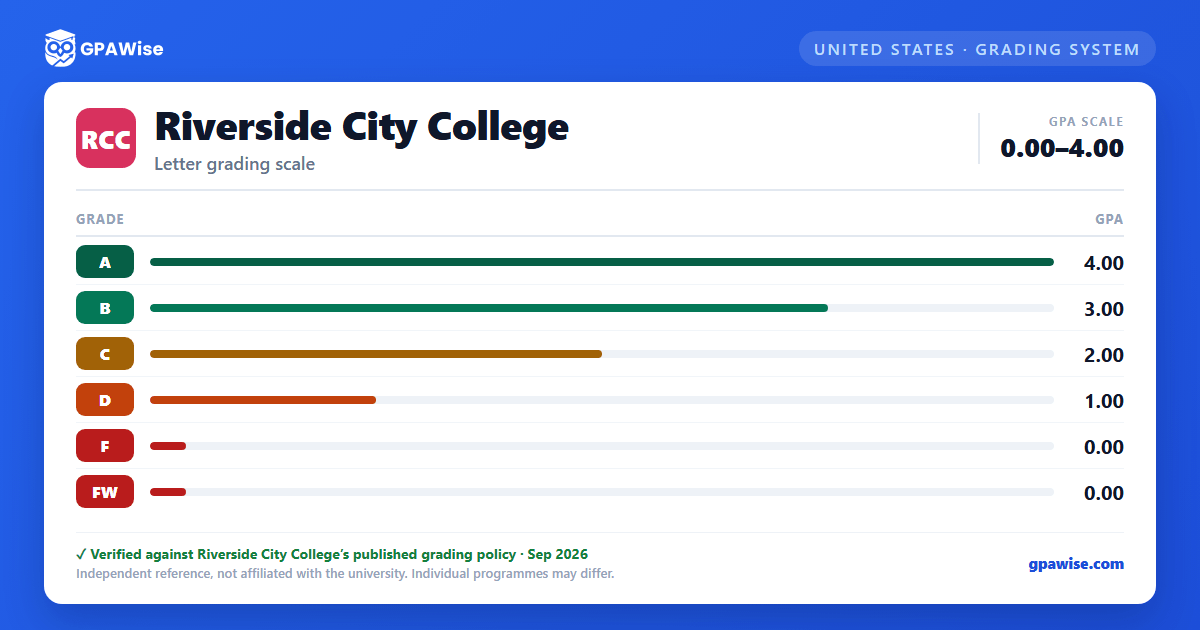
RCC grades on a straight letter scale: A, B, C, D and F, each worth a fixed number of grade points per unit — A is 4, B is 3, C is 2, D is 1, and F is 0. There is no A+ or any other plus/minus grade anywhere in RCC's own scale (the college's '+/-' language applies only to how an outside college's plus/minus transcript folds into an RCCD GPA after transfer, never to RCC's own grading).
RCC also assigns FW (Fail Did Not Withdraw), worth 0 points — the same as F — when a student stops participating in a course after the last day to officially withdraw without qualifying for an excused or military withdrawal.
Source: GRADING SYSTEM; Grade Points (catalog p.74-75); corroborated word-for-word by RCCD BP/AP 2230 — verified Sep 2026
How your GPA is calculated at RCC
Only RCC's evaluative grades count toward your GPA: A, B, C, D, F and FW.
Several other marks appear on your record but are never counted in your GPA. P (Pass) and NP (No Pass) explicitly carry no GPA weight, though units attempted for an NP are still considered in probation and dismissal decisions. The non-evaluative symbols I (Incomplete), IP (In Progress), RD (Report Delayed), W (Withdrawal), EW (Excused Withdrawal) and MW (Military Withdrawal) are likewise excluded from GPA calculation.
GPAs are not rounded up. If coursework from another accredited college is used toward degree requirements, your overall cumulative GPA combines grades from all transcripts used.
Source: GRADING SYSTEM; Grade Points; Scholastic Honors at Commencement (catalog p.74) — verified Sep 2026
Academic and progress probation at RCC
You'll be placed on Academic Probation once you've attempted at least 12 semester units and your cumulative GPA falls below 2.0 in units graded on the RCCD grading scale. You return to good standing once your cumulative GPA reaches 2.0 or higher.
You'll be placed on Progress Probation once you've attempted at least 12 semester units and the cumulative percentage of unsuccessful units you've attempted at RCCD reaches or exceeds 50%. You return to good standing once that percentage drops below 50%.
Dismissal follows academic probation if your cumulative GPA stays below 2.0 for two consecutive full-term (fall/spring) semesters. Dismissal follows progress probation if 50% or more of your attempted units are recorded as F, FW, W, I, NC or NP in two consecutive fall/spring semesters. Students on probation or dismissal status are limited to a maximum of 13 units per fall/spring semester (7 units on probation, 5 on dismissal, during intersessions). Returning to dismissal status requires a cumulative GPA of 2.0 or higher and completing over 50% of units attempted.
Source: STANDARDS OF SCHOLARSHIP: PROBATION AND DISMISSAL (catalog p.50-51) — verified Sep 2026
Associate degree requirements at RCC
To earn an Associate degree from Riverside Community College District, you must complete at least 12 units in residence at one of the district's three colleges, a minimum of 60 degree-applicable units (including 18 units in one of nine areas of emphasis), and one of three general education plans (Plan A: 27 units RCCD GE; Plan B: 39 units CSU GE; Plan C: 34-37 units IGETC).
You need a minimum cumulative GPA of 2.0 ('C' average) in degree-applicable coursework. If coursework from other accredited colleges counts toward your degree, your combined cumulative GPA across all transcripts must also be at least 2.0. If a course you're transferring in was graded on a plus/minus scale by the other institution, RCC uses that institution's own plus/minus grade points (not RCC's flat A/B/C/D/F values) when folding it into your cumulative GPA.
You must also demonstrate competency in mathematics, reading and writing (typically a 'C' grade or better in the relevant course, or a 2.0+ GPA across 60 degree-applicable units for the reading requirement).
Source: Residence Requirement; Grade Point Average Requirement; Competency Requirement (catalog p.61) — verified Sep 2026
Graduation honors and Dean's List at RCC
Commencement honors go to students with a cumulative GPA of 3.30 or higher: Associate Degree with Distinction at 3.30, or with Great Distinction at 3.70. Coursework from your final spring semester isn't counted toward commencement honors, and GPAs are never rounded up.
Each semester, RCC's Dean's List recognizes students who complete at least 12 units of credit-graded work (in one semester, or across fall/winter/spring of one academic year) with a GPA of 3.0 or better.
Source: Scholastic Honors at Commencement; Dean's List (catalog p.74) — verified Sep 2026
Transferring to a UC or CSU from RCC
To transfer as an upper-division student to a California State University (CSU) campus, you need at least 60 CSU-transferable semester units and a minimum 2.0 GPA (higher at impacted campuses or majors), plus 30 units of general-education-equivalent coursework at a 'C-' or better including the 'Golden Four' (Oral Communication, Written Communication, Critical Thinking, and Math/Quantitative Reasoning).
To transfer to a University of California (UC) campus, you need at least 60 UC-transferable semester units and a minimum 2.4 GPA (2.8 for California non-residents, higher at competitive campuses), plus a specific course pattern completed with a 'C' or better in each course.
Courses used for IGETC certification must each be completed with a 'C' or better ('C-' is not accepted); courses used for CSU GE certification accept 'C-' or better.
Source: CSU Minimum Admissions Requirements; UC Minimum Admission Requirements; IGETC Certification (catalog p.93-94) — verified Sep 2026
