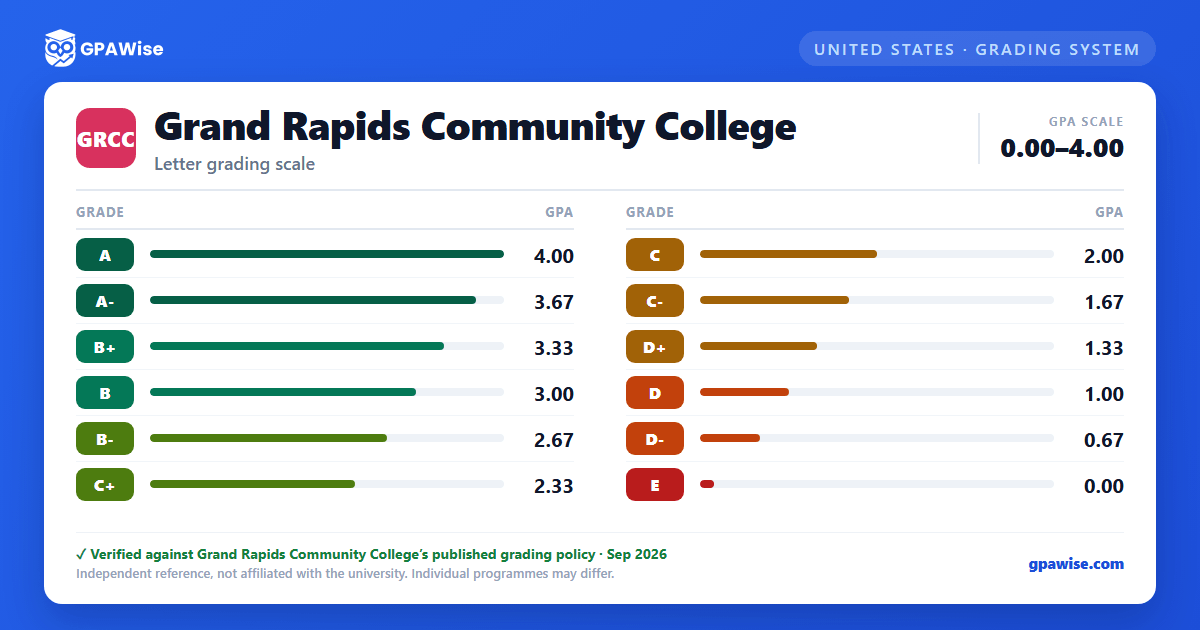

GRCC's Grading System
Grand Rapids Community College uses a letter-and-numerical grading system with honor points on a 4.00 scale, including plus and minus grades (GRCC does not award an A+). The lowest, failing grade is labeled E rather than F, and is worth 0.00 honor points.
Several notations carry no honor-point value and are not graded coursework: I (Incomplete), V (Audit), W (Student Initiated Drop), and DR (Administrative Withdrawal). Clock-hour programs use a separate satisfactory/unsatisfactory scale instead of honor points.
Source: Policy 7.10 Grading Procedures (effective Fall 2024), §III Policy Statement / §IX Definitions — verified Aug 2026
How GPA Is Calculated
GPA is calculated by multiplying each course's honor points by its credit hours, summing across all courses, then dividing by total credit hours earned. Grades of I, W, and DR are excluded from this calculation; E grades are included and are worth 0.00 honor points and no credit.
A course may be attempted up to three times (two additional attempts after the first); where a course may only be taken once for credit, the highest grade earned across attempts is used for GPA and earned-credit purposes.
Academic Forgiveness lets a student with a cumulative GPA below 2.0 request that up to 12 credits of GRCC coursework graded below a "C" be excluded from the GPA computation used for the 2.0 graduation minimum, provided the student has since completed 12 sequential credits at a C or higher with no grade below a C. Forgiven grades remain on the transcript, marked as excluded from the GPA computation; forgiveness may be granted only once and does not apply to financial-aid satisfactory-academic-progress calculations.
Source: Policy 7.10 §XI.A GPA Calculation / §XI.E Repeated Coursework; Policy 8.34 Academic Forgiveness (adopted Oct 2020, implemented Sep 2021) — verified Aug 2026
Academic Standing: Alert, Probation, and Suspension
A cumulative GPA of at least 2.0 keeps a student in good standing. Falling below 2.0 for the first time (or after returning to Good Standing) places a student on academic alert (not noted on the transcript). If the following semester's GPA is still below 2.0 while on alert, the student moves to academic probation (noted on the transcript; a required Academic Success Workshop must be completed the following semester or a registration hold is applied). If the next semester's GPA is again below 2.0 while on probation, the student is placed on academic suspension (noted on the transcript; the student is barred from registering for credit classes for one semester and any existing registration is dropped). A suspended student may appeal to the Academic Suspension Appeal Committee, whose decision is final, and must meet with an academic advisor before registering again after a suspension.
Source: Office of the Registrar, About Academic Standing page — verified Aug 2026
Graduation Requirements
To earn an associate's degree, students must complete at least 60 credit hours, meet the Minimum Institutional Credit Policy, complete the academic program's requirements including general education, earn a cumulative GPA of at least 2.0 at the time of the graduation audit, and fulfill the Michigan Transfer Agreement-aligned English Composition and Communications coursework. Courses below the 100-level do not count toward graduation requirements or the minimum credit total.
To earn a certificate, students must meet the Minimum Institutional Credit Policy, complete the program's requirements as defined in the College Catalog, and earn a cumulative GPA of at least 2.0 at the time of the graduation audit; courses below the 100-level again do not count.
Source: Policy 7.20 Graduation Requirements (effective Fall 2025) — verified Aug 2026
