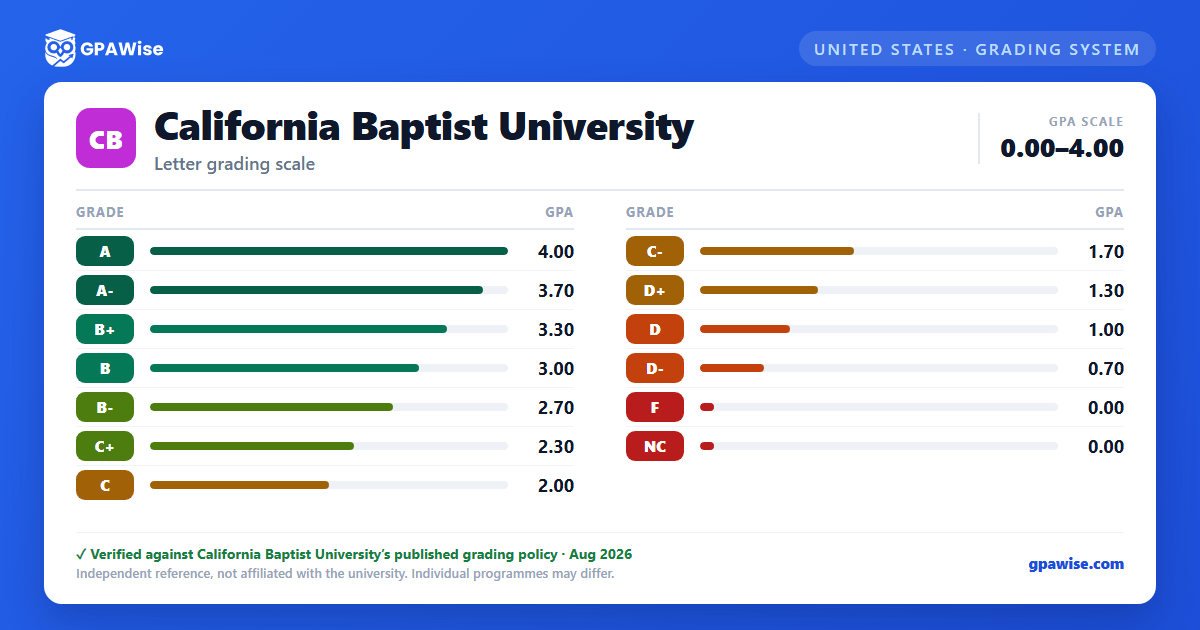

Grading System
California Baptist University grades coursework using letter grades A through F, plus special notations for Credit/No Credit (CR/NC), Pass/Fail (P), Incomplete (I), Satisfactory Progress (SP), Audit (AU), and Withdrawal (W). Up to 12 units of coursework may be taken on a Credit/No Credit basis in lieu of a letter grade, subject to restrictions: no more than one such course per semester, not permitted for major or minor coursework, and excluded for required English Composition courses and most general education courses.
Source: California Baptist University Catalog (2026-2027) — Grades and Standards — verified Aug 2026
GPA Calculation Rules
A grade of Credit (CR) or Pass (P) does not affect the GPA; a grade of No Credit (NC) has the same effect on the GPA as a failing grade. An Incomplete not resolved to a passing grade within six weeks of the end of the term automatically becomes an F.
Students may repeat a course originally taken at California Baptist University for grade replacement: only the repeated attempt's grade is calculated into the GPA, courses may be repeated only once for grade replacement, and the highest grade earned is used regardless of attempt order. If a C- or higher is not earned on the repeat, further attempts do not replace the first repetition, and all subsequent grades are used in GPA calculations.
Source: California Baptist University Catalog (2026-2027) — Grades and Standards — verified Aug 2026
Academic Standing
An undergraduate student is placed on Academic Warning for falling below a 2.0 cumulative GPA or a 1.7 semester GPA. A student who fails to reach a 2.0 cumulative GPA and a 1.7 semester GPA (or who fails to reach a 2.3 semester GPA while already on Warning) is placed on Academic Suspension; a student who fails all academic courses in a semester is placed on Suspension immediately. A student suspended for a second consecutive semester is academically disqualified and may not enroll for at least one semester.
Source: California Baptist University Catalog (2026-2027) — Scholastic Regulations — verified Aug 2026
Graduation GPA Requirement
To graduate, students must earn a cumulative grade point average of at least 2.0 overall, with no grade below C- in the major field of study. This applies to both bachelor's and associate's degrees.
Source: California Baptist University Catalog (2026-2027) — Graduation — verified Aug 2026
Academic Honors
Semester Honors: the President's Honor Roll requires a 4.0 session GPA and the Provost's Honor Roll requires at least a 3.6 session GPA, both on a minimum of 12 graded units; any failing grade (including Chapel Fail or No Credit) or an Incomplete disqualifies a student for that semester.
Graduation Honors, bachelor's degree: Cum Laude at 3.50, Magna Cum Laude at 3.70, Summa Cum Laude at 3.90 cumulative GPA. Graduation Honors, associate degree: Honors at 3.50, High Honors at 3.70, Highest Honors at 3.90 cumulative GPA, requiring at least 30 units completed at CBU with 18 or more as letter grades. Post-baccalaureate students are not eligible for semester or graduation honors.
Source: California Baptist University Catalog (2026-2027) — Academic Honors — verified Aug 2026
Transfer Credit Policy
Only coursework completed with a grade of C- or better is accepted in transfer. A maximum of 100 semester units may be accepted in transfer toward a bachelor's degree (no more than 30 upper-division and no more than 90 lower-division units), and a maximum of 45 semester units toward an associate degree. All coursework completed at other institutions is computed into the California Baptist University cumulative GPA, regardless of whether the course is accepted for transfer credit.
Source: California Baptist University Catalog (2026-2027) — Academic Policies and Standards — verified Aug 2026
