
Grade notations beyond A-F at Florida Tech
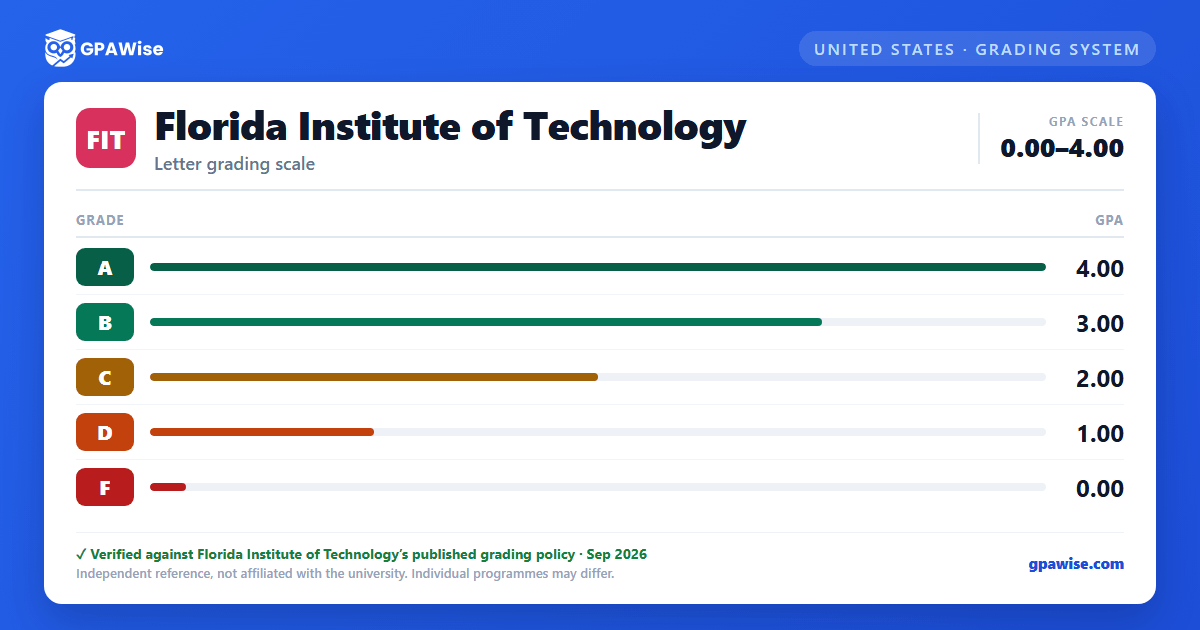
Florida Tech does not use plus/minus grades (e.g., B+) at all -- only the plain letters A, B, C, D, and F carry quality points.
Beyond the letter grades, the registrar also records: I (incomplete coursework), NR (no grade recorded) and NRF (no flight grade recorded, College of Aeronautics flight courses), AU (audit, no grade), and W (official withdrawal) -- none of these carry a quality-point value.
Withdrawal timing differs by program: Melbourne campus students can drop a course free through the first week of classes; from the end of week one through week six, a dropped course is recorded as W; after week six, students receive the grade earned in the class instead. Florida Tech Online follows the same week-one/week-six pattern within its 8-week terms.
Source: Undergraduate Grading System table (catoid=20 navoid=1256); Drop/Withdrawal Policy (navoid=1255) — verified Aug 2026
How Florida Tech calculates GPA, and the Forgiveness repeat policy
GPA is determined by dividing the total grade points earned (each course's credit hours multiplied by its quality-point value) by the total credit hours attempted, then truncating the result to three digits. I, NR, NRF, AU, W, and P do not count toward GPA. Undergraduate and graduate GPAs are never combined; a student earning multiple degrees gets both an overall GPA and a separate GPA for each program.
Under the Forgiveness Policy, an undergraduate who earned a D or F in a course may repeat it and have only the most recent grade count toward the cumulative GPA -- the original grade stays on the transcript but its credit hours are removed from both the term and overall GPA. Forgiveness can be used at most five times in a Florida Tech career, does not apply to graduate courses (or undergraduate courses taken by a graduate student), and cannot be applied after a degree has been awarded.
Source: General Academic Information - Grade Point Average (GPA); cross-ref. Undergraduate Academic Information - Forgiveness Policy — verified Aug 2026
Academic Warning, Probation, and Dismissal at Florida Tech
Academic Warning applies to an undergraduate with a term GPA between 1.50 and 1.99 who has attempted no more than 21 credit hours. Academic Probation applies to a student with a term GPA below 1.50 (regardless of hours attempted), or a cumulative GPA below 2.00 after 21 attempted hours. Students on warning or probation are capped at 15 credit hours (Melbourne campus) without dean's approval.
Probation continues as long as the cumulative GPA clears a floor tied to total credit hours completed (including transfer and exam credit): 1.50 at 0-59 hours, 1.70 at 60-89 hours, 1.90 at 90 or more hours. Falling short of that floor at the end of the probationary term results in Academic Dismissal (Melbourne campus offers a one-time summer grace period for a spring-term dismissal if the student registers for summer). A dismissed student may petition the college's Academic Standing Committee for reinstatement, possibly under special conditions.
Source: Undergraduate Academic Information - Probation and Dismissal (Academic Warning, Probation, Dismissal, Notification/Right of Appeal) — verified Aug 2026
Minimum GPA and residency to graduate from Florida Tech
An associate or bachelor's degree requires a cumulative Florida Tech GPA of 2.00 or higher. A student pursuing two or more degrees needs at least a 2.00 program GPA in each program awarded, on top of the overall 2.00 minimum.
At least 25 percent of a degree's coursework must be completed while enrolled and attending Florida Tech -- a residency requirement the university states cannot be waived.
Source: Undergraduate Academic Information - Graduation Requirements; Residency Requirements for Graduation — verified Aug 2026
Dean's List, Distinguished Student Scholars, and Graduation Honors
Dean's List (per semester): Melbourne campus students need 12 or more graded undergraduate credit hours, Florida Tech Online students need 6 or more, both with a semester GPA of at least 3.4. Distinguished Student Scholar recognition follows each fall semester for undergraduates with a cumulative GPA of 3.8 or higher and more than 52 credit hours completed at Florida Tech.
At graduation, bachelor's-degree honors are set by cumulative GPA (transfer credits excluded from the calculation): Cum Laude 3.40-3.69, Magna Cum Laude 3.70-3.89, Summa Cum Laude 3.90-4.00. Separately, the Honors College admits Melbourne campus students into three tiers -- Mercury, Gemini, and Apollo Scholars -- each requiring a minimum university GPA (3.2, 3.5, and 3.7 respectively) alongside honors coursework and activity-hour requirements.
Source: Undergraduate Academic Information - Grading and Honors (Dean's List, Distinguished Student Scholars); Graduation Honors; Honors College — verified Aug 2026
How transfer credit works at Florida Tech
Transfer applicants generally need a cumulative GPA of at least 2.50 (on a 4.00 scale) with 24 or more completed semester credit hours for admission consideration. To transfer a specific course, the sending institution's grade must be at least a C- (or equivalent), and the coursework must be judged equivalent in content and hours.
Grades and grade points never transfer -- only credit hours do, and transferred credit cannot be used to remove a Florida Tech grade from the GPA. The Forgiveness Policy does not apply to transfer credit, and credit is not given for coursework completed more than 10 years before Florida Tech enrollment.
Source: Undergraduate Academic Information - Transfer and Nonmatriculating Students (admission GPA); Transfer Credit — verified Aug 2026
Frequently asked questions
Can I save my semesters and track my CGPA at FIT?
How do I convert SGPA to CGPA at FIT?
Can I add past semester GPAs without entering every course?
Is my CGPA tracker data sent to your servers?
Is this Florida Institute of Technology (FIT) GPA calculator free?
Does Florida Tech give A+ or other plus/minus grades?
No. Florida Tech's catalog states plainly that plus and minus grades (e.g., B+) are not used at all -- only the plain letters A, B, C, D, and F carry quality points, at 4, 3, 2, 1, and 0 respectively.
Source: General Academic Information - Grade Point Average (GPA) — verified Aug 2026
Can you repeat a class to improve your GPA at Florida Tech?
Yes, under the Forgiveness Policy -- but only for a course where you originally earned a D or F, and only up to five times in your Florida Tech career. Only the most recent grade counts toward your cumulative GPA (the original grade still shows on your transcript), and forgiveness cannot be applied to graduate courses or after a degree has already been awarded.
Source: Undergraduate Academic Information - Forgiveness Policy — verified Aug 2026
What GPA do you need to graduate from Florida Tech?
A cumulative GPA of 2.00 or higher for an associate or bachelor's degree. If you're completing two or more degrees at once, each program also needs its own GPA of at least 2.00, on top of the overall 2.00 minimum.
Source: Undergraduate Academic Information - Graduation Requirements — verified Aug 2026
